D
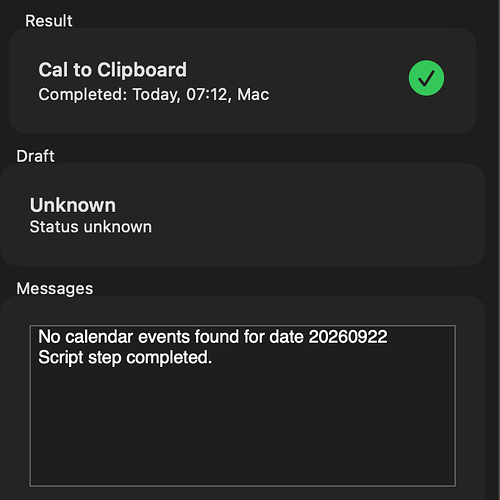
Nothing has changed in any recent updates to Drafts in this area. It could be an issue with the OS level APIs, I don’t know. I’d do more troubleshooting around what might be different about those calendars or events that are not appearing. e.g. could this be time zone related? Something related to all-day events vs. not?
D
I turned off Calendar access under privacy — Now, 3 of 4 calendar events ARE being pulled into Drafts. I do have fantastical accessing my calendars - and am having no issues with the 4th calendar. Seems isolated to Drafts… And still an issue on both Desktop and iPhone. Any suggestions?
D
Using the Magic Keyboard on iPad Pro, my cursor goes below the toolbar on the bottom of the input area when typing the body of a draft item.
D
Drafts is distributed through the Mac App Store. Check for and install updates there. Not aware of any general performance problems, if it persists after you update and restart your system to check on possible system temporary issues, open a support ticket with details (use “Send Feedback” in Help menu).
D
I have 400 notes. I’m getting interface lag on MacOS when scrolling up and down. Version is 53, but I can’t see anything in the changelog addressing this. I’ve gone through the maintenance options. By the way, where is the update option? Not in About or settings menu. My apologies for a silly question. Is there a way to tell if it’s actually drafts or something else on the system? No other winows are lagging. macOS is Tahoe Version 26.6.2
D
I don’t know, honestly. It’s working here…the only thing I changed in the script is the calendar names to match some of mine. I’d say a permissions problem is likely, but that would usually just be on one device - but try making sure Drafts has calendar access in System Settings > Privacy, and try toggling it off and back on if it does.
D
Great. Thank you (again).
D
Amazing (as ever). Thank you
D
Ahh. Thank you. Sorry for bothering, I’m not yet too deep into it. Will have a look.
D
Feel free to modify the script in the action, it’s totally customizable.
D
Ah I see. My bad. Would be more handy if it would not add the content if there is no <|> or [[Line|x]] etc. I find it useful to have a simple selection from a template list instead adding more and more actions for such a simple task.
D
You could change what that action does if you wanted…but if you read the description of the action, I don’t think it’s what you think it is… Prompt to select from a list of existing drafts with the tag “template” assigned, then apply that draft as a template to the current draft. This will assign tags and syntax from the template, and also insert the current content of the draft either at the end of the template or at the location of a <|> placeholder in the template. It’s mean more as a way to…
D
Thank you very much. Good to hear.
D
Underneath the Editor “Processing → Template” (Apply template)
D
What action are you using to evaluate your template?
D
Got it, thanks. Looks like a timing issue, will fix.
D
I did fix this for the last bug fix update, but it appears the fix did not get rolled into the final build. Apologies. It will be fixed in the next release.
D
I did report that too but unfortunately mixed with other topics. Until it is fixed a workaround could be to use a Dictate action. anyVariableForEditorContent = editor.dictate(yourLanguage); does recognise “yourLanguage” (formatted like “de-DE” for German, for example). Or the microphone button on the iOS/iPadOS keyboard instead of Dictate in Drafts’ "+" drop down menu.
D
I have an action with a prompt, and since iOS 27 (or the Drafts versions made for iOS 27) it does not have a focus in the text field although it is set to have. Script excerpt: var thePrompt = Prompt.create(); thePrompt.title = … thePrompt.addTextField("thePageField", "Page(s):", "", { "keyboard": "numbersAndPunctuation", "wantsFocus": true });
D
Thanks @agiletortoise … I ran the action and here is the result from the action log: Not sure where to go from here… This action is neither working on my MacBook Pro nor my iPhone. Thanks for your help…
D
Hi, Dictation language is always english no matter what’s selected in setting. Only after opening dictation setting language is set correctly. Have to do that every time. Regards Mick
D
Hi, Thank you so much for letting me be part of this community. My name is Mick. I created a simple template in Drafts and tagged it with “template”. When I create a new draft and select this template, everything works fine. However, since I’ve already edited the content of my template with [[line|1]] etc., it bothers me that the entire draft is appended again at the end. Is there a way to prevent this? Example: TEMPLATE: [[line|1]] [[line|2]] DRAFT: Hello World OUTPUT: Hello World Hello World…
D
Yeah I was stumped too. I also checked for a space at the end but it was just template. It’s almost like it wanted me to force configure it.
D
Weird. Maybe there was a space or invisible character in there accidentally? Not sure. I was not able to get it to fail in my testing.
D
I finally got it working. I guess I needed to press Save instead of Cancel in the Configure Action even though template was already listed as the Template Tag. Anyway, glad it’s working again for me!