D
Something like the below should work: var [st, len] = editor.getSelectedRange(); if (len == 0) { var isFull = true var text = editor.getText() } else { var isFull = false var text = editor.getSelectedText() } newText = text.replace(/(\r\n|\n|\r)/gm," "); newText = newText.replace(/\s+/gm," "); newText = newText.replace(/-\s+/gm,""); if (isFull) { editor.setText(newText) } else { editor.setSelectedText(newText); editor.setSelectedRange(st, newText.length); }
D
The basic bones of script below came from I know not where; I just fixed the regex. It is meant to remove line breaks from paragraphs copied from PDFs, which sometimes have an assortment of carriage returns, line feeds, extra spaces, and hyphens at the end of the lines. It works fine on selected text, but I was hoping to modify to use the entire draft if no text is selected. I can see that the script queries the range of the selected text and then sets a new range, but I have no idea how to fit…
D
setSelectedText will always replace the selected range. That range is a location and length, and that length can be zero - so likely what you are seeing is the last range selected in the document was just the cursor at the end. What are you trying to do, exactly? You might need to query the range and apply some logic to determine if it’s the range you were hoping for.
D
On either of these solutions: if text is selected, editor.setSelectedText(newText); will replace the selected text with newText, but if text is not selected, newText will be appended to the current draft. What would be needed to replace on either scenario?
D
By “every time I return to the app” I mean when multitasking. For example, I have Drafts in fullscreen mode on the iPad, and I have both the left-hand and right-hand “navigators” as visible: on the left, it’s the list of drafts, and on the right, it’s the list of actions. If I switch to Safari or other apps, then return to the Drafts instance that I left earlier, the left-hand list of drafts is still there, but the right-hand list of actions is hidden, and I have to bring it back using the icon…
D
I wouldn’t mind, though, being able to dictate into a “log” draft while driving, particularly if it could cope with me pausing dictation between the traffic lights. And if CarPlay gets me HomeView support I’d be happier still.
D
Since typing an em dash works and only pasting changes it, I’d focus on the paste path rather than Smart Dashes. Try a plain-text paste (Edit > Paste and Match Style, if Drafts offers it) or paste via TextEdit as plain text; if the em dash survives, the issue is likely Drafts’ rich-text/clipboard handling or a paste-related action or shortcut. Also check whether any Drafts action or keyboard shortcut assigned to paste runs a replacement. The character in your post is an en dash, not two…
D
The list selection plus read-back is handy, but I’d be cautious about building Drafts around that CarPlay category. It sounds intended for ongoing voice conversations, so using it for quick capture may be a fragile approval path. Selecting from a list while driving also involves more interaction than a Siri phrase. If Drafts pursues this, a minimal voice-first capture—dictate, confirm, done—with read-back seems more natural than a browsable list. The existing “Using Drafts…” Siri route still…
D
You actually can choose a capture from a list in their case and have Siri read it back.
D
In 26.4 they added a new category of CarPlay app for voice-conversations - e.g. for chatbots, basically. Looks like they shoehorned this into that category. Interesting. I’m a little surprised Apple approved it, but interesting to know. The docs indicate this is really for ongoing conversational apps. I think the only apps using the category prior to this are ChatGPT/Claude (and maybe other similar) Still pretty limited, and not sure how it’s better than just triggering Siri in CarPlay and…
D
It seems like support is opening up. Any way to get Drafts on CarPlay (and HomeView)… Sir Studio CarPlay, 11 new export destinations, and a command palette on Mac - Capture... Capture 3.5 is out. Capture now works in CarPlay, so you can save a thought while you drive. This release also adds 11 places to send your captures, and a command palette on the Mac. | Every release of Capture: new features, refinements, and fixes,...
D
I am seeing this same issue of a disappearing cursor (have been for some time). I was using the Modern editor so I did deactivate and activate it to see if that would work. The cursor was returned but only until I began typing. I deactivated the Modern editor and have since had no issues with it disappearing in Legacy mode. I am using Drafts 54.1.2 on an M1 Pro running 27.2.1 (26B131). Has there been any new insights on this @agiletortoise?
D
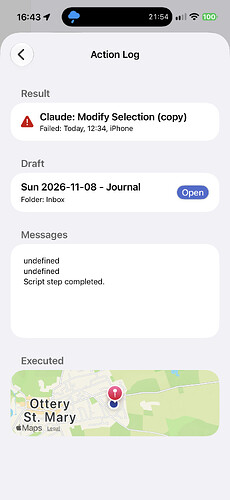
I did some digging on this and am finding that this may require a fix at my end, because Anthropic has changed the way some results are returned. I’ll get a fix in the next update. In the meantime, I’m only seeing this failure with some models. if you use this action with the Sonnet model, it should always work.
D
Got it. Thank you, Greg. I’m seeing a lot of ‘undefined’ alongside ‘script step completed’ as well the occasional ‘script step completed’ on its own — when it worked for me. What can I learn from this?
D
Thank you! One additional detail: when I manually view “versions” in Drafts for Mac, each snapshot is itself blank (unlike on the other devices, where I can see some text for each one). So, I’ll plan to run this action on one of the non-Mac devices.
D
I provided the link to docs above. See: docs.getdrafts.com Drafts User Guide: Action Log Documentation for Drafts app, a quick-capture note taking app for iPhone, iPad, Mac and Apple Watch.
D
Help me out here… how do I access the Actions log?
D
Again, start with the action log. There is likely more detail on why the action failed when it does. Also sharing more specifics about you Mr action and it prompts would be helpful to troubleshooting.
D
The key is fine and I can get the action to work – sometimes. It is hit and miss and seems to depend on the model. I can’t seem to find a model that gives consistent results (unless there’s something else going on with this action).
D
Yes! There is a fix for this. Install and run the action below to restore all the blanks. This was a migration gap that could occur if you had updated to Drafts 52 on some of you devices, then ran a version several versions older than that on another. directory.getdrafts.com Drafts Directory: Restore Blanks Example actions and other extensions for Drafts, the quick-capture notes app.
D
I have a mac that I don’t use very much. On a recent launch of Drafts on the Mac, I saw a notification that I needed to update Drafts and that sync had been paused to prevent data loss. In the background, I saw that the left sidebar had almost every draft showing as “–blank–”. I updated the mac app and also my ipad/iphone apps (which were closer to being up to date). All 3 devices are on 26 OSes. However, now that I am fully current on 54.1.2, there are still several recent drafts showing as…
D
The “Prefer Side by Side” option is the old pinning option, there were no behavioral changes. Could you be more specific about “every time I return to the app”, because I can’t reproduce that. There are things that could hide the action list, but it will typically remain in the last state (open/closed)…that’s the behavior I see here. The app will close it if a situation occurs that prevents it from display, like the window shrinks, or the draft list is opened with too narrow a display space…
D
It seems there is no Pin option for the Action List any more on iPad. Am I correct? Every time I return to the app the Action List is gone and I have to bring it back. I have the Action menu > List Display > Prefer Side by Side checked on but it seems like I would need another option right under that to pin it on or off.
D
Thanks. Glad to hear there’s hope at 27.3. Does Apple listen when developers report these things? I wonder why it doesn’t affect the Cancel button.
D
It’s an OS bug. I’ve just been watching it for now because there’s no obvious workaround and I figured Apple would have fixed it by now. I’ll keep an eye on it and consider taking more dramatic action to try to avoid it if Apple doesn’t resolve in an update soon. FWIW, I can’t reproduce your example on the 27.3 beta, so maybe they did something - or maybe just anecdotal.
D
To reproduce, install directory.getdrafts.com Drafts Directory: BlackButtonText Example actions and other extensions for Drafts, the quick-capture notes app. Run the action in Drafts at iPadOS 27.2. Enter 1 in the Target: box and click the Filter button. When the Prompt appears for the second time, the text on the Filter and 111 buttons is black instead of white. For me this seems to be happening reliably in this instance, though it is intermittent for my real use cases.
D
Buttons in Prompts used to have white text on a background of whatever tintColor was assigned to the button (default blue). I am now observing that the text colour is sometimes but not always black instead of white, apparently at random or possibly alternating successively between black and white, except for the Cancel button where the text is always still white. This is disconcerting and inelegant. I am running iPadOS 27.2 on a 2026 iPad Air M4, and I think but am not certain that this started…
D
I’m on an iPad Pro, 13 inch, M4. There is a “>” on the side of the menu bar that makes it disappear, but it comes right back as soon as I start typing. I don’t know how to collapse the bar and continue typing.
D
OK, so an overlap. That shouldn’t happen. You can hide or collapse the bar if it’s in the way, but I’ll review and make sure the offsets don’t need some adjustment. What iPad model and OS version are you running? Sometimes these issues are specific to certain device/OS combinations.
D
The menu bar floats over the page at the bottom. The menu bar does not interfere with typing, but covers it so I can’t see the line being typed.