Editor starts at top - default option
Was too fast to say something. I did find the cursor placement in editor settings > editing. Somewhat hard to find above the binary options list.
Posts from every feed QUEST has found across the web — blogs, news, podcasts, channels and more.
Was too fast to say something. I did find the cursor placement in editor settings > editing. Somewhat hard to find above the binary options list.
Navigation works. I did not find “bottom” option in Drafts > Settings > General or anywhere else. It is not clear where to find it now - 51.1.1 (943).
If you do generate conflicted versions, you can always restore them from the version history…but, yes, Drafts is a “last edit wins” sync, so if you are working in a situation where sync may be delayed (poor connection, low battery, etc.) you can overwrite the most recent version. You may find it handy to have an action around that compares versions.
Yes, but I’ve written it off as my connection. I work on the road a lot, and I use my phone as a hotspot. The sync happens slower on my hotspot than with WiFi. That’s the only thing I can see right now. And I’ve had similar issues with one device overwriting the other device. So I just play it careful when I’m writing.
I have seen the same behavior for years. I keep one draft as a daily log. I have gotten used to only using my phone to update it. I tried again yesterday to edit on my Mac. My Mac ended up overwriting the Draft with an older version than what was on my phone. @agiletortoise I’ll enable sync logs and open a ticket. @moodywaffle - are you still experiencing sync issues?
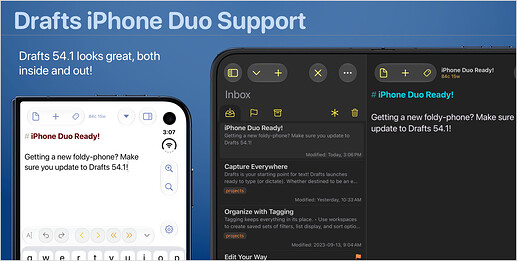
Drafts 54.1 is out with support for iPhone Duo (along with a few bug fixes) If you are planning to get a new Duo in the coming weeks (or happen to be one of those lucky reviewer types), make sure you update - and feel free to send feedback. Initial support was based only on use in a simulator, and I’m sure there will be a few tweaks needed once I hear from people using on actual hardware. In a few weeks, as people get Duos, I’ll post some tips on the forum on configuration options that work…
Figured it out: the calendar mysteriously disappeared from iOS. Added it back and now all is good again.
That is a bug. The navigation button should remain when tag entry is hidden. I’ll fix that in the next update.
Quick update: The drafts in question have NOT reappeared after the Watch app un- and re-install, so it seems to have worked

Well, as it happens both the offending notes this time around were dictated in the Watch app, so I’ve just removed and re-added Drafts on the Watch, and hopefully that will help! Thanks, Mr. Tortoise

I do use Drafts on the Apple Watch but I can’t remember if the returning notes were created on it. The last returning note is from one week ago, the second to last from June. So it’s definitely a rare thing. Which would fit to the Watch theory because very often when I dictate on the go it is noisy and then I use Just Press Records instead because with it I get the audio file and I can transcribe it later. I have now Drafts set to automatically add a “generated on the Apple Watch” tag and will…
The only case I know of this happening is with drafts that were created on the Apple Watch, and it can be resolved by removing and re-adding Drafts to the Watch using the Watch app on you phone. I’ve never been able to reproduce this problem, but have seen it from time to time over the years where something get corrupted in the OS-level conduit between the Watch and phone and it resurfaces a previously processed item. If that could explain you situation, try that first.
Yes, this has been happening to me every few weeks for quite a while. Only on the iPhone, never synched to either my Mac or my iPad. In my case the returning notes were in the Archive. When this occurred for the first time I assumed a user error but the vast majority of my actions not only move the notes to the archive but tags them too. And they were never tagged after they had returned to my Inbox, although they were tagged. My solution? Deletion. Minor inconvenience.
I have a couple of notes that keep returning to the inbox on my iPhone even after I delete them (and delete them from trash). They don’t seem to be synced to my other devices, strangely. This has happened once before, recently, and I think I “fixed” it by deleting Drafts and reinstalling it, but that seems a bit extreme, and certainly not something I want to have to do regularly Has anyone else experienced this, and perhaps found a solution?
I am having the problem on an Intel based iMac (10, i9 CPUs) running Tahoe 26.6.2. Your question prompted me to check my M2 MacBook Pro, also running Tahoe 26.6.2. Whatta ya know? The shortcut keys are working fine on that machine. It looks like it might be a problem on Intel based Macs.
yes, ok, there it is. I was expecting it in the same place as the iOS app, but I remember now that it hasn’t been the same for some time.
Try showing tag entry, does it appear then?
quitting and relaunching doesn’t bring it back. But the menu command does work. Here’s two screenshots that might give more detail.

What macOS version? I’m away from a Mac for a bit, so can’t test hear but was not aware of any issues.
That’s puzzling. It should still be there. Try a quit and relaunch? Maybe the system layout engine is having a moment. If that doesn’t help, what happens if you open it from the menu command? (Editor > Navigate)
On the Mac app, I’m missing the button that let me navigate the different headings in the document. Not sure exactly when this went away. Any way to re-enable it?
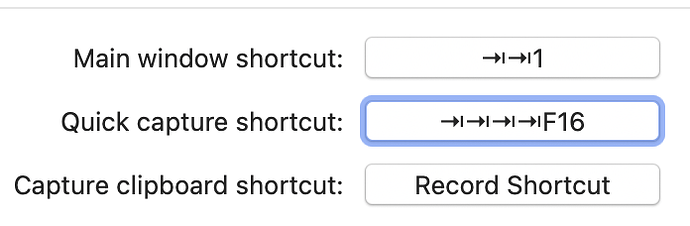
My quick capture shortcut has stopped working a couple of days ago. The shortcut used to be ⌘⌃⌥⇧F16. Now it is show up as ⇥⇥⇥⇥F16. I tried to record it again but the command keys keep getting replaced by ⇥. Hmmm. Anyone else?
Thank you, suavito. It’s a good thing to double-check, but there’s nothing in Text Replacement for an em-dash. And, as I said, it’s only when I paste into Drafts. Nowhere else does this happen. And I can even type an em-dash in Drafts just fine. But when I paste text that has an em-dash in Drafts, it gets converted into a double-dash.
You might want to check out text replacement in the keyboard settings of macOS. (If you are using Typinator or TextExpander or something similar you would have to check them too.) Although the replacement is a bit strange. The common replacement is double dash to em-dash (or en-dash in other languages), not the other way round.
Hello - For a long time, when I’ve pasted an em-dash (—) into Drafts on the desktop version, Drafts converts it to a double-dash (–). I’m sure there is a simple solution to get it to not to do this conversion, but I’m stumped. I’ve tried turning smart dashes on and off but it doesn’t seem to make a difference. Can someone please help me? Thanks!
thank you – I haven’t tried but appreciate knowing that I could.
Many thanks. The update seems to have fixed it. Funny how I missed the Mac store. I barely use it
Loving the new updates to the dictation feature features fantastic. One question has there been any consideration to adding a keyboard shortcut for pausing and resuming. This would make a massive difference for using this window between dictation and keyboard editing.
Would it be possible to get support in Draft’s AppleScript for syntax? Both setting and retrieving the syntax for a particular draft (including a new draft), and being able to get a list of available (i.e. valid) syntaxes. While languageGrammar is a property when running AppleScript inside Drafts, it does not look as though there is anything outside Drafts.