Menu bars block typing
You can hide them in Editor Settings. I’m not sure I understand if you just want to hide them, or if they are interfering somehow?
Posts from every feed QUEST has found across the web — blogs, news, podcasts, channels and more.
You can hide them in Editor Settings. I’m not sure I understand if you just want to hide them, or if they are interfering somehow?
I type my process writing in Drafts on my iPad. After several paragraphs, there are menu bars across the bottom of the page. I have found no way to reposition or remove these floating menu bars. They cover so I can’t see the current line I am typing. I do not have this problem on my iMac which has a much bigger screen. Is this an issue or have I just not found a simple work around or system setting?
Did you do what I suggested and update macOS? What macOS build number are you on?
hi, i just removed drafts and re-install it from Mac app-store. but it still didn’t work in my macbook M5. same problems still
Update to the final release of macOS 27.2, released last week. The current version of Drafts is built on the final release SDK, and Apple introduced a breaking change from the previous beta versions of 27.2. That is likely what you are seeing.
can’t reopen/open no matter how many times i tried clicking reopen and reboot my mac. but it works well on my mac mini and iphone.
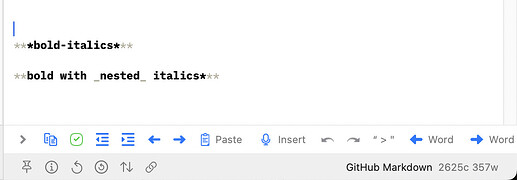
Drafts built-in syntax highlighting for Markdown does not do this…mostly for simplicity and performance. Drafts supports custom syntaxes if you wish to modify or enhance implementations. I believe there are several examples in the Directory that have added support for nested bold+italics (like this one and I believe, also Draftsdown).
I discovered today that Drafts does not render bold-italic text in Markdown. Turns out that’s not a feature of OG Markdown, though, so that makes sense. However, I switched the syntax to GitHub Markdown[1], which has explicitly defined syntax for that formatting. However, neither ***bold-italics*** nor **bold with _nested_ italics*** is properly rendered in Drafts (on macOS or iOS): If that’s not a bug, then adding support for that formatting would be much appreciated! [1] I think MultiMarkdown…
I used qq as well. But when I added Raycast, the suggestion was made to use ;; a pair of semi-colons. I like it.
You might look at this for ideas. You can use Chat Console tools through Shortcuts, too, so a shortcut that prompts the Drafts model could do a lot of that. TIP: Update a Widget Daily with AI & Shortcuts Automation Tips & Tricks TIP: Upcoming Widget NOTE: This example requires OS 27 and Drafts v54 or greater, and Drafts Pro. This tip covers how to set up a Home Screen widget that updates daily with new content generated by an AI prompt. In the example, we’ll generate a summary of your daily…

Got it. I was hoping it’d be able to index and show me info the way it does with Apple notes. I’ve tried asking it to show me the list of entries for the day in my work log. It finds the work log but goes not further.
What sort of things are you trying to do? Siri AI only has very narrow integration with third-party apps through pre-defined “app schemas” – of which there are a limited set for working with “Notes” — and Drafts implements these. Drafts also donates your drafts to the index to be searchable in Spotlight/Siri AI. The only schema that are really applicable for a notes app are “search”, “open”, and “create note” So, Siri AI should be able to search for content in your drafts. Open those drafts.…
I’ve tried with each iOS update to see if Siri AI can access the contents in Drafts, but it seems like it can only perform a search to find specific documents or read the contents on the screen in Drafts. It can’t read all of the drafts in the app. Has anyone has been able to get Siri AI to access drafts in a useful way?
I already do that all the time. It works, but the Prompt popup is not light weight. I still think extra configurable actions from icon long press would be a quick and useful alternative.
You could use an action that prompts you to select from a list of actions. Like: directory.getdrafts.com Drafts Directory: Run Action Example actions and other extensions for Drafts, the quick-capture notes app.

My problem with the Action bar is that the group of actions I use very frequently is too large to fit without sliding from side to side, which slows things down. It would be more efficient to long press on an icon and choose another action from there. Either is more efficient than long-pressing the keyboard dismissal button then having to hunt through the action groups.
Yes that’s great. Having the ability to launch a specific action upon long press on a button of the tool bar would be faster. But I know how busy you are to develop and maintain Drafts and other great apps. This idea is not a priority !
Do you know you can long press the keyboard dismissal button on the Action Bar and get to any of your actions in groups that are configured for use on bar?
I support the great idea of FireLarch
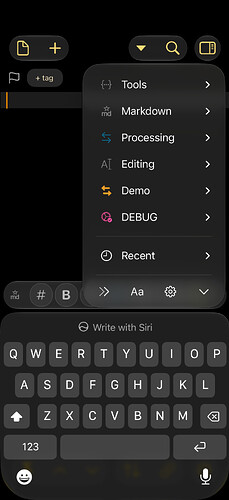
Another way of achieving something similar would be to allow user-configurable extra actions to be added to the three currently fixed functions (Run, Edit Action, Group) which appear when you long-press on an icon in the action bar. This approach would have the advantage of not permanently taking away space from the text being edited.
I’d be interested in more detail, because I don’t see that at all. Are you saying you use your autocomplete trigger, select something to input, and the next word is not giving you suggestions? Because I don’t see that behavior at all. Maybe open a ticket with a screen capture video demonstrating what you are seeing, with details on OS version, etc.
Normally, when you start typing you get word suggestions (that are more or less good). After Autocomplete the word suggestion feature treats the Autocomplete trigger as the beginning of a new word. Which it does not know, because no word begins with the trigger. Hence no word suggestion.
What, exactly, do you mean by it “breaks” word suggestions?
Is it possible to have another action bar? Especially on the small iPhone screen this would come very handy. For example, one bar for the most used actions/extra characters, the second with various actions to move the cursor and to select text etc., which is still cumbersome in the traditional iOS way. Of course only as an option. While it would make sense on an iPhone Pro Max, it would leave approximately only a single line of text on the outer screen of the iPhone Duo. I am aware that I could…
After using Autocomplete my trigger “qq” breaks the iOS keyboard word suggestion, because “qq” isn’t part of any word in the languages I write in—that’s why I picked it in the first place. Is it possible to “reset” the keyboard word prediction after Autocomplete, say, by signaling a word boundary to the keyboard? Bonus question: If so, could you make that “reset” an action step? Because then an action could use it after Markdown markups like *, [, and [^ which break the work prediction also. I…
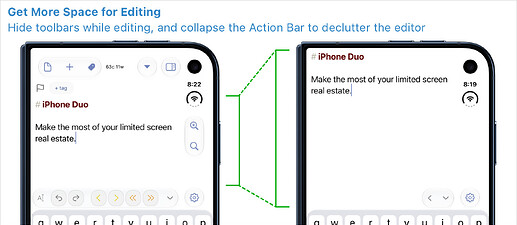
Some phones [gives iPhone Duo side-eye ] have limited vertical space for your content, especially when the on-screen keyboard is visible. If you have one of these phones, or just prefer a less cluttered editing experience, Drafts has a few handy display options that can help! On the iPhone Duo, hiding top toolbars while editing and collapsing the action bar can give you as much as 75% more vertical space for your text. Hide Toolbars Drafts can hide either the top or bottom toolbars…
macOS 27.0.1, Drafts 54.1.1. All Message actions fail with “Message services not available.” Messages.app itself works. AppleScript can activate Messages: tell application “Messages” activate end tell AppleScript can enumerate accounts: tell application “Messages” get every account end tell but these fail: tell application “Messages” get name of every account end tell (-1728) tell application “Messages” get properties of every account end tell
CarPlay hasn’t really changed. It only support a few specific application types (navigation, audio, messaging) and does not work for things like Drafts. Siri integration works fine through CarPlay, however. I use the trigger button on my steering wheel all the time and say “Using Drafts, create a note…” and that will create it in Drafts.
Also, revisiting this. Does carplay allow drafts to be added? Is there a way to use drafts on carplay?