H
I have an automation that notifies us, under different circumstances, for how long a door or window has been open, but the string returned from time_since is always in english. 1 post - 1 participant Read full topic
H
Hi everyone, I’d like to share a project I originally built for our own home because fixed heating schedules simply didn’t fit our shift work. The idea behind CastnCasa is simple: Home Assistant usually knows whether someone is home right now — but it does not necessarily know that everybody will leave in 45 minutes, or that someone is expected back at 15:30. CastnCasa adds that missing look ahead. It is an Android shift-calendar app with a Home Assistant integration. Each resident can maintain…
H
Very often, what I want to show on a card is spread across more than one entity. A tile card for my thermostat should show the room’s humidity sensor as secondary info. A light’s icon should turn red when a window sensor is open. A media player card should show the battery attribute of the remote that controls it. Right now a card can only show the state and attributes of its own entity. To combine data from two entities, I have to: create a template sensor just to copy the other entity’s state…
H
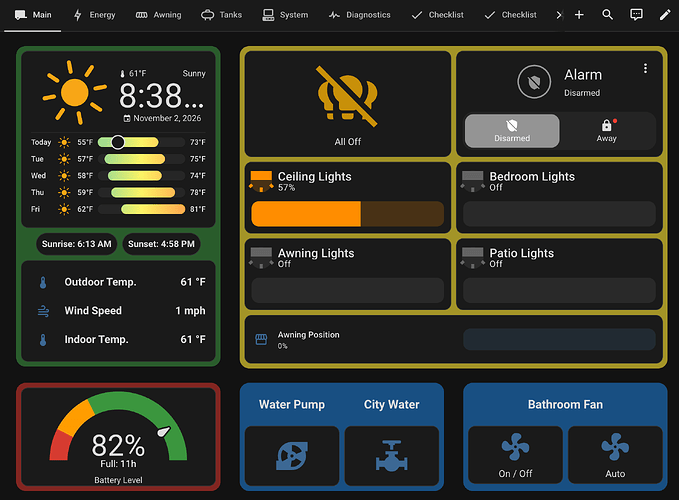
I wanted a remote tongue jack switch, so I cut a small hole in the side of the trailer. Cut right through the solar wire. Energized the -12V trailer frame with +46 volts. All 12V devices that did not have a physical off switch were immediately fried. Inverter, radio, lighting system, refrigerator, bathroom fan—all fried. I rebuilt everything and made it better using a Raspberry Pi running Home Assistant, a bunch of ESP32 microcontrollers, and various discrete electronic components. The main…
H
Può essere utilizzato come pannello di controllo per Home Assistant? 2 posts - 2 participants Read full topic
H
It’s a small thing, but ever since I started using apps, it’s felt tedious to open up an app’s page like AdGuard, or File Editor, or Matter Server, etc. It’s not so much that it’s one less tap to get into the overview page for that app and then tap “Open Web UI” but it’s more so that when DO get to the overview page, you see a dozen different buttons, pill icons, toggle switches, etc and you need to visually identify the right one instead of being able to just “open the app” so to speak. I’d…
H
I have a few counter helpers I use for tracking some random quantities around the house, and when I buy a new case of something (like a 48-pack of some item), I go to my dashboard and tap the counter tile and then have to tap “increment” 48 times in a row to update the value. 4 posts - 3 participants Read full topic
H
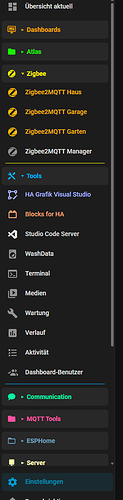
Hi everyone, I’d like to introduce Sidebar Manager. It lets you organize and color Home Assistant’s sidebar directly through “Edit sidebar”. Entries can be placed in collapsible folders, each with its own name, MDI icon and color. Optional separators appear only while the folder is expanded. Set colors and opacity for individual entries, and reorder folders alongside main-menu entries using the familiar drag handles. Folder assignments are visible directly in the editing dialog. Folder settings…
H
Oops!. (Yes its Claude)… And me During the last days I managed to pull together an Integration I call Blueprints Store! Please have a look, and I will of course accept PR.s Its not availble through HACS at the moment, so you need to add it manually in HACS. rickardfransson/Blueprints-store: Stop digging through forum threads. Search, preview and install Home Assistant blueprints from a store page in your sidebar. 1 post - 1 participant Read full topic
H
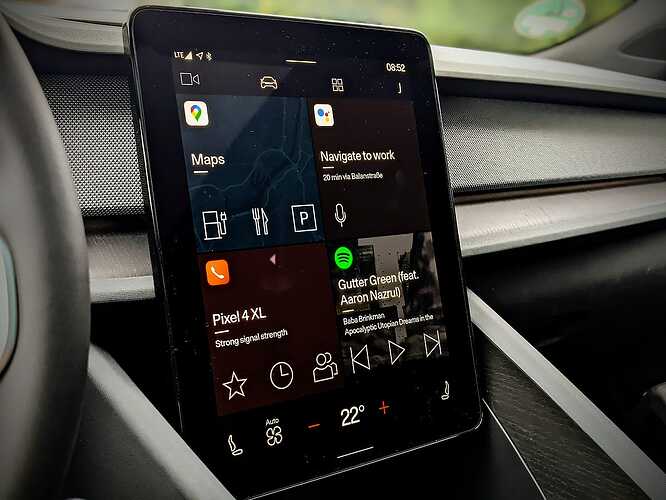
My car has Google AAOS built in (not android auto). I was surprised but very pleased to see there is a HA app. Most of the apps have nice big buttons on the app screen. For example here You can see maps has icons to search for fuel, Spotify has icons for play, pause etc. I think it would be really useful if the HA app could show these icons, perhaps icons for the first 3 favourite devices. This way I could have instant access to my garage door opener and external home lights with just the tap…
H
I have an Elsner Arexa 230V wintergarden window control: a battery RC handset and a weather station that drives the window motor. Elsner does not offer any integration for its radio products, so I decoded the radio protocol and wrote an ESPHome component for it. What you get in Home Assistant Buttons: open, stop, down, automatic mode, manual mode. They work like the RC’s own buttons, and the RC keeps working. Sensors: inside temperature (from the RC), outside temperature, wind, brightness, rain…
H
We want to create multiple areas with the same display name in our home, specifically for rooms that exist on multiple floors (e.g., “Toilette” on the Ground Floor and “Toilette” on the 1st Floor). Right now, Home Assistant does not allow two identical Area names because every Area name must be globally unique. We can write “Toilette Ground Floor” and “Toilette 1st Floor”, but why do we have floors in addition to areas? It is weired. 5 posts - 4 participants Read full topic
H
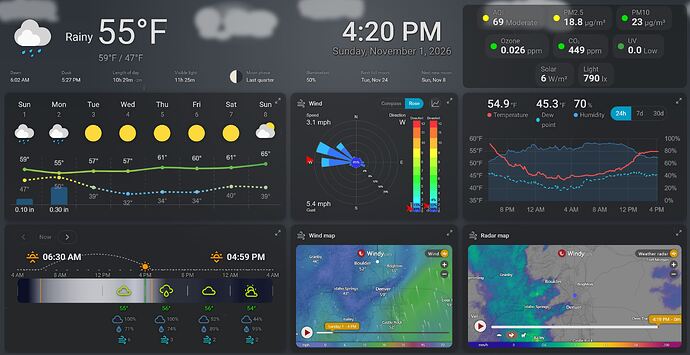
Weather Station Flex Card The most flexible and comprehensive Weather card. Combine multiple sources and weather stations and configure it any way you want — for large screens, small screens and everything in between. Use your station’s live readings, forecasts, radar, wind, sky, air quality, pollen and garden data in a flexible panel grid over any background, including multiple custom animated weather backgrounds. The card automatically detects multiple weather sources and supporting cards.…
H
The default dashboard navigation using tabs across the top works reasonably well on a desktop, but becomes increasingly impractical on mobile devices, particularly when a dashboard contains many views. This is my current main dashboard. The buttons on the top left mirror the views on the toolbar so it is easy to navigate to different views using either on a desktop. However on mobile, it is far from practical unless you have up to 5 views. I have about 50 views but spread out across multiple…
H
Climate and weather tracking are core pillars of smart homes. My family constantly asks things like, “Is it raining more this month than usual?” or “How did the summer heat waves compare to last year?” We want to see a something similar to a “Climate Diagram” similar to how the Energy Dashboard works. 1 post - 1 participant Read full topic
H
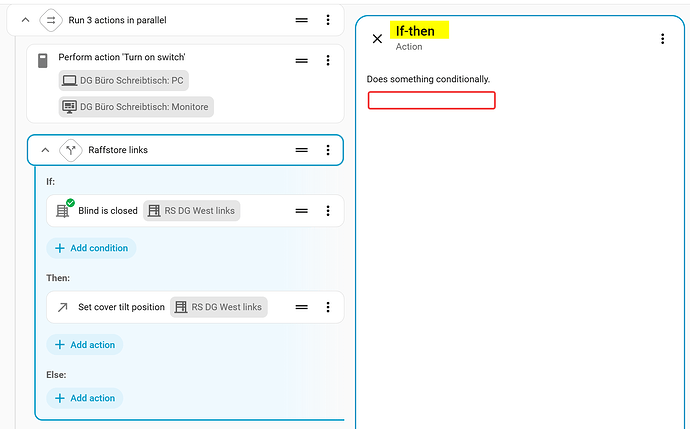
I want to rename blocks directly in the block details on the right, either by double clicking the block’s title or having a text input. 1 post - 1 participant Read full topic
H
The current color temperature range settings provided by the light results in a large range of very cold, blueish light. Since we prefer warmer tones to create a more comfortable environment, we want to adjust the configurable range (min/max values) on the color temperature slider. Probably for other sliders as well. 1 post - 1 participant Read full topic
H
Hi I was hoping the upgrade option in lovelace would work, , but looks like not implmentsed in the June 26 edition so From Docker CLI and upgrade. # finally, start a new one docker run -d \ --name homeassistant \ --restart=unless-stopped \ --privileged \ -e TZ=MY_TIME_ZONE \ -v /PATH_TO_YOUR_CONFIG:/config \ -v /run/dbus:/run/dbus:ro \ --network=host \ ghcr.io/home-assistant/home-assistant:stable Question : if left exactly as above, do I enter TZ, or will it pick up that its UTC, and likewise…
H
Not exactly a WTH for Home Assistant but these three projects are so intertwined so wondering why the Open Home do not also have “Month of What the heck” for ESPHome and Music Asistant? Suggest that OHF next year make it a shared month of WTH instead of only having only a dedicated WTH month for Home Assistant, and use that as an opertunity to cross-promote all three projects. https://www.openhomefoundation.org/projects/ https://esphome.io https://music-assistant.io/…
H
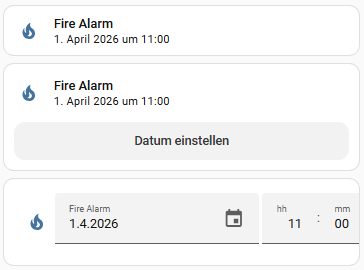
The modern Tile Card (1st and 2nd card) is a great replacement for the older Entities Card (3rd card), but it currently has a major inconsistency regarding input entities: For example: For Date entities, we can easily add a button to change the value directly from the card. For Time (or Date & Time) entities, there is no option to add an inline button. The only way to change the time is by clicking the label/icon to open the more-info dialog. This is highly confusing for users and breaks the…
H
What this gets you: real two-way talk on UniFi Protect cameras, right from your Home Assistant dashboard — press a mic button, talk, and it comes out the camera’s speaker. We just got this working and verified it on 2× UniFi Protect G4 Doorbell Pro and 2× UniFi Protect G4 Instant. This isn’t built into go2rtc yet — it’s an open PR (AlexxIT/go2rtc#2340) that adds a proper unifi-talkback: source, using UniFi Protect’s own talkback API instead of the old raw-RTP/ffmpeg workaround some people have…
H
I’m sharing Home Assistant Developer - an independent collection of agent skills for Home Assistant development, available for Codex and Claude Code. The skills were previously part of my personal agent configuration. I’ve extracted them into a separate repository so other developers can install them. The integration skill guides the agent through current Home Assistant documentation, existing repository conventions, implementation, and validation. It includes references for config entries and…
H
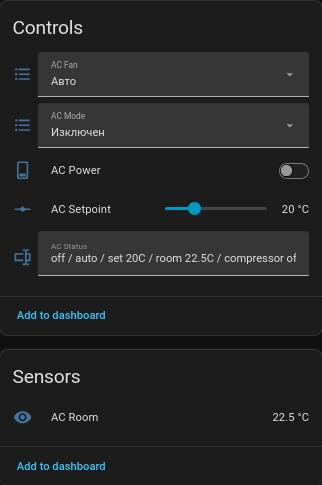
Got a Midea air conditioner working in Home Assistant and thought I’d share the setup in case it helps someone else. I followed a guide on Shelly’s website that uses The Pill with an RS485 add-on to communicate with the AC through its XYE interface. A script runs on the Shelly itself and handles both reading the AC’s state and sending commands. The controls appear in Home Assistant through the standard Shelly integration. I now have individual entities for on/off, operating mode, fan speed and…
H
I know, how to convert a date to the local language and I’m doing it so. {% set days = ["Montag", "Dienstag", "Mittwoch", "Donnerstag", "Freitag", "Samstag", "Sonntag"] %} {{ days[now().weekday()] }} And I also know the Easy Time Makro, which is a little bit oversized for just this language conversion. But wouldn’t it be easier to have this conversion being integrated in HA? so that I could just use something like: {{ now() | as_local | as_timestamp | timestamp_custom('%A %d.%B %Y') }} 1 post -…
H
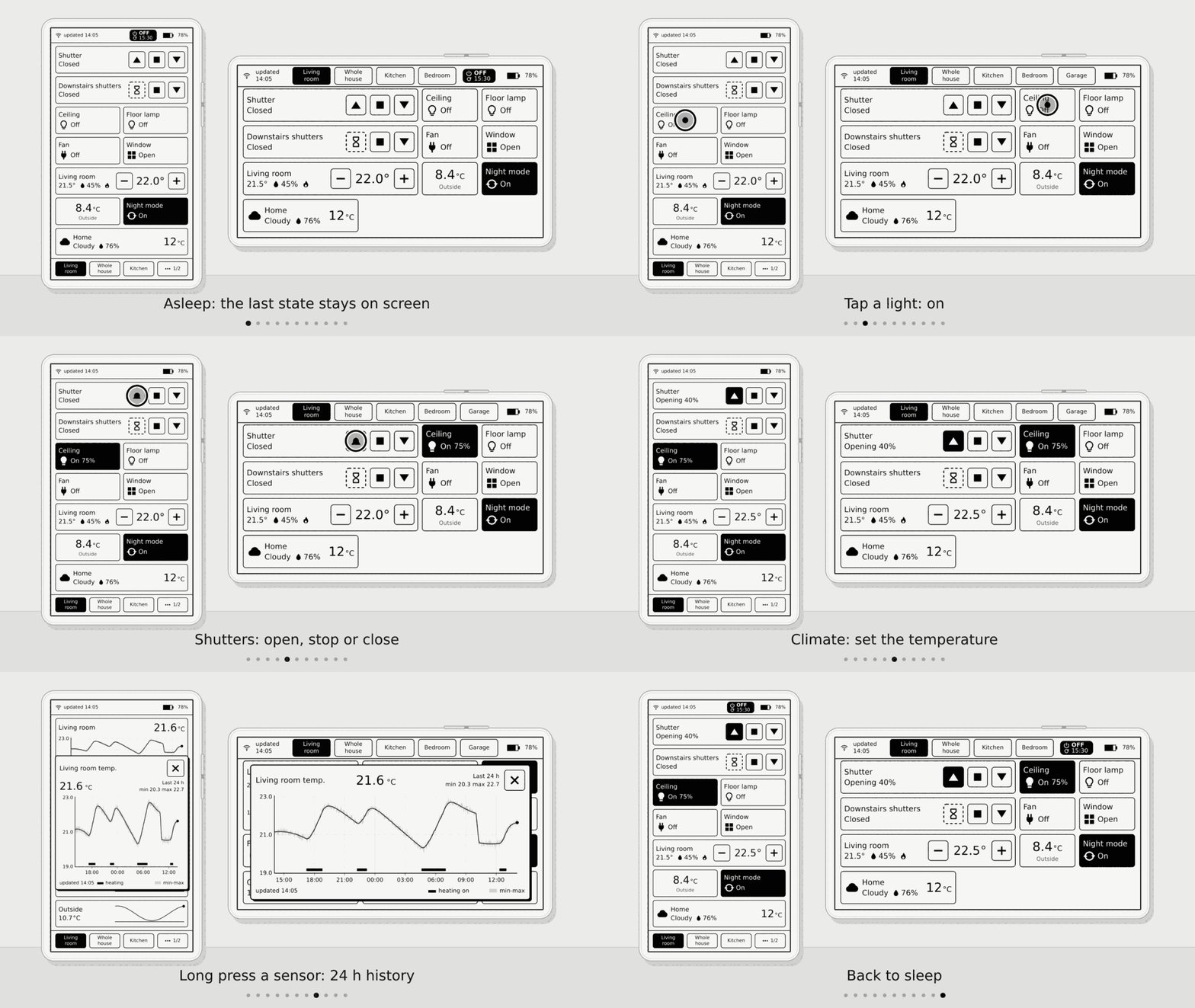
Hi all, I built a battery-powered Home Assistant remote on the M5Stack M5Paper (the original one, 960x540 e-ink touch screen) and would like to share it, in case someone has one of these lying in a drawer like I did. What it does Tabs with widgets for lights (on/off, brightness), switches, shutters/covers, thermostats, sensors and automations Sensor history: a popup on long press, or a graph widget right on the tab Taps go straight to Home Assistant over the WebSocket API; the screen keeps…
H
I put together a small Wyoming speech-to-text server around Cactus Whistle, a 16.9 MB STT model that runs on CPU with no GPU, supporting English, German, French, Spanish, Italian, Dutch and Polish. Repo: GitHub - arpena/whistle-wyoming: Wyoming speech-to-text server for Home Assistant using Cactus Whistle, with keyword biasing from Assist-exposed entities · GitHub What makes it different Whistle supports keyword biasing: you pass a list of words/phrases and decoding favours them. The server…
H
Hi, everyone. Since our company switched to electric vehicles, I kept running into the same headache: I charge my company car at home, but my personal EV is parked in the same garage and uses the same charger. How do I cleanly separate the electricity cost for each vehicle so I can submit an accurate reimbursement claim? Dynamic electricity tariffs made it even messier — I couldn’t just “guess” the split. I wanted itemized, per-vehicle charging records with exact kWh and cost. Here’s how I…
H
Hi all, I made a Home Assistant integration for the Tesla Powerwall. It talks to the Powerwall on your home network, so most things work without the Tesla cloud and without a paid service. I built it for my own Powerwall 3 and use it every day. I’m sharing it in case it helps others, especially Powerwall 3 owners who couldn’t get local access working. GitHub: GitHub - cnapagoda/ha-powerwall-tedapi: Home Assistant integration for local monitoring and control of a Tesla Powerwall through the…
H
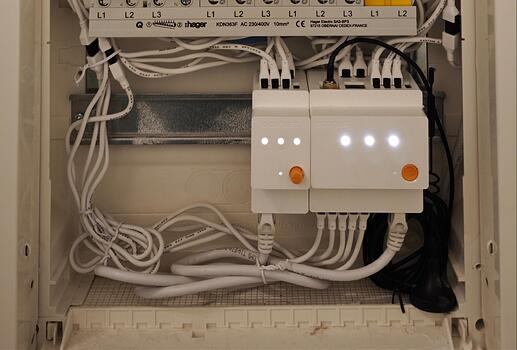
Hi all, I got tired of a perfectly good video door station depending on a vendor cloud and an app that gets less love every year, so I reverse-engineered mine and wired it into Home Assistant fully locally. The write-up of the method is public: github.com GitHub - cerealkiller57540/bticino-easykit-reclaim: Reclaiming a BTicino/Legrand EasyKit door station... Reclaiming a BTicino/Legrand EasyKit door station on the LAN, no cloud: recover the TLS client identity, beat the static-ECDH cipher wall…
H
As the title says. We 've almost arrived in 2027, so WTH can’t we refer to !secret keyword in automations and scipts? 7 posts - 6 participants Read full topic