H
Hello there, I’ve recently increased the number of Zigbee devices around my home and have started moving away from Wi-Fi devices in the hope of simplifying my setup. One downside I’ve discovered is that some of the Zigbee smart plugs I’ve purchased don’t appear to function as repeaters as I had hoped. In an effort to improve coverage and strengthen the Zigbee network, I decided to purchase a Sonoff MG24 dongle, as it was advertised as supporting repeater functionality. I flashed the MG24 with…
H
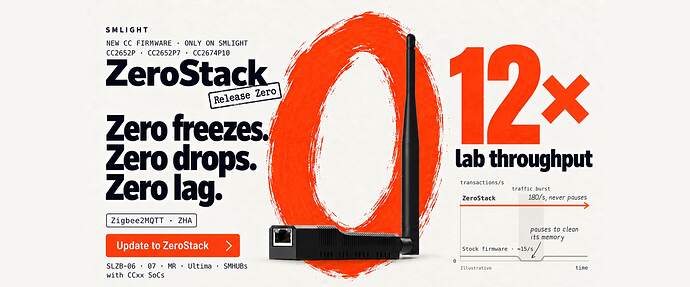
I was browsing SMLight’s website this morning to try to find something, when this blog post caught my eye: SMLIGHT – 10 Nov 26 ZeroStack: your coordinator, rebuilt from zero. ZeroStack, Release Zero: Zigbee coordinator firmware created from scratch by SMLIGHT for CC2652P, CC2652P7 and CC2674P10 adapters. 12× the lab throughput of stock TI firmware, zero freezes, zero drops, zero lag. Same Zigbee2MQTT and ZHA, one update,... I am blown away by their published initial results. I have been having…
H
Hi! I need to find a new solution to send notifications from HA to my phones and PC (alarmo status, notifications about zwave devices, battery switching, etc), and after some research I came down to two options.. Telegram or Matrix chat.. But since I’m not using either of them today I would like some opinions about them.. Matrix seems more secure, but dont know anything about it. Telegram I know a bit of its background at least, but only trust it to about 95%.. Are you using Matrix chat and…
H
Integrating iOS reminders into HA requires giving HA complete access to iCloud (outside of my comfort zone), and linking caldav to do lists (to HA or iOS) requires a server somewhere to host it… I have a server in my house… called Home Assistant This post from @homeBrother says it well. HA calendar as a CalDav server. That possible? Configuration Hi everyone. Still not willing to give up on my idea of using HA calendar to populate other calendars. Question: Is is possible to subscribe to the HA…
H
Hi everyone! I’d like to share SmartPlex for Home Assistant — an integration that extends the official Plex server integration with smart orchestration and AI features. Key features: TV wake pipeline: Seamless startup and playback handling for LG webOS, Samsung Tizen, and Apple TV. Assist LLM tools: Voice and AI assistant integration for controlling your media. Cross-room handoff: Easily transfer playback between different rooms/devices. Movie Roulette: Can’t decide what to watch? Let it pick a…
H
I am looking for a whole home water shutoff system that runs with no cloud requirement. As I am having a salt softener system installed in my home, a plumber will need to do some work with the pipes coming into the house. I’d like to take advantage of that to install a whole home water shutoff that integrates with Home Assistant. I’ve seen several discussions about some great systems (like Zoos). But I’d prefer an inline solution vs. an actuator that turns the handle. Why? I’m not really sure…I…
H
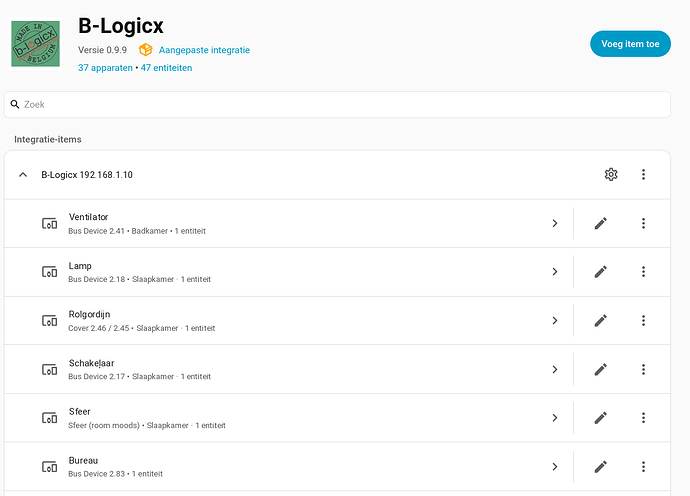
Hi all, I’ve built a custom integration that connects Home Assistant directly to a B-Logicx home-automation bus through the NWM / NWX network gateway. The B-Logicx Home Server (BHS) is optional, not required. B-Logicx is a Belgian wired home-automation system (EIB/KNX-style cabling, 24 V DC bus). It’s solid, but next to modern wireless gear it’s starting to feel dated, and the official Home Assistant route is limited and needs a Home Server. This integration talks to the bus in real time over…
H
ListenBrainz Scrobbler Custom Home Assistant integration that submits listens from selected media_player entities to a ListenBrainz-compatible endpoint. It was built for multi-scrobbler, which emulates the ListenBrainz API so it can forward scrobbles to Last.fm, ListenBrainz, Maloja and the rest of its clients. Installation HACS (recommended) Open HACS → Integrations. Search for ListenBrainz Scrobbler and select Download. Restart Home Assistant — integration code is only loaded at startup. If…
H
Hi, This is a compact, mobile friendly camera card specifically designed to work with the MotionEye integration, vibe coded using Claude. It uses the MJPEG camera feeds from MotionEye so it does not use any stream: components. It also uses the home assistant camera platform: proxy to create low definition versions of each camera and can then automatically (or manually) switch between these as bandwidth allows. eg. I’m my setup, streaming 6 live cameras uses around 350KB/S, switching from HD to…
H
The Shopping List integration has a handy “shopping_list_updated” event. I’ve used it in automations for years: change something on the list, and the automation can react. Lovely. Generic to-do lists now have triggers for items being added, completed and removed. But edit an existing item’s title, description, due date or due time… and there’s no equivalent update trigger. Apparently, moving a deadline is a private matter between me and the checkbox. My use case is a reminder list. Whenever…
H
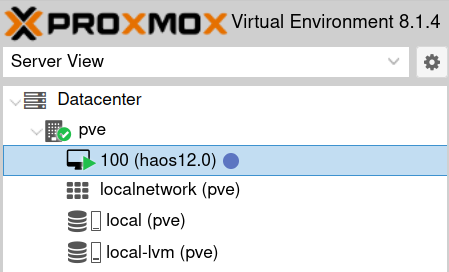
I have a server, a Dell Wyse 5070 with 16 GB RAM and a 128 GB SSD. It runs Proxmox8, and two years ago I installed HomeAssistant using the helper script: (now with Proxmox9) Installing Home Assistant OS using Proxmox 9. Last week I noticed that the app Syncthing exists in HAOS. I have now installed that app in HAOS and would like to save the folders that will be synchronized with my work PC and phone to an external drive connected via USB. In Proxmox, I added a USB device via: Datacenter > PVE…
H
We are regularly told that the forums aren’t where architectural or UI changes are debated, and to follow Discord or GitHub Discussions instead. I’ve tried doing exactly that to find the background on the recent 2026.11 entity naming changes, and I’m hitting a dead end: Discord: I actively monitor the Projects and Developer channels, and I haven’t seen any discussion covering this change. GitHub: In the GitHub mobile app, the main home-assistant/core repository doesn’t expose a Discussions…
H
Right now, if i want to tweak certain settings for automations i have to set this up completely myself with a custom dashboard, it would be nice if we can set a value in an automation as a user setting that then comes on a dashboard to switch things easily. For example: I have a guestmode that makes it so certain automation work in a different way, like lights dont turn off when all known users leave, or alarms that change to different settings, … 2 posts - 2 participants Read full topic
H
I’ve been using Home Assistant for 2 years now and my automations have gotten a lot more complicated than when I started. Nested choose blocks, repeats, a few scripts calling other scripts, templates everywhere. And every time something doesn’t behave, I end up doing the same thing: adding notification actions all over the place to see what a variable actually was, running it again, and then deleting them all afterwards. I know traces exist, and they’re really useful. But they only tell me what…
H
Hello everyone, I have an Argon ONE V5 OLED display that I would like to rotate. Unfortunately, it is not possible to do so physically. I am running Home Assistant on a Raspberry Pi 5. I have tested two apps, but neither allowed for rotation, even though it was claimed to be a feature. I have also tried using AI and various commands, but unfortunately without success. Has anyone here managed to rotate the display? If so, could you provide a guide on how you achieved it? Alternatively, does…
H
Good morning everyone Following a recent update to 2026.10.4, I lost access to my TPLINK smart plugs I could not work out what my phone charger hadnt powered on to charge my phone up before I wake up; I didnt think anything of it, until I checked the devices they came up with an error on the devices screen; I wished I had taken a screenshot now!! No matter, I tried to reload that didnt work; I then deleted the device to add it back; I was prompted for the useris and password for TPLINK userid…
H
Many GM EV buyers got a free GM Energy PowerUp 2 home charger. I couldn’t find anyone saying it works with Home Assistant, so here’s my report: it does, fully locally, using the OCPP integration. What it is: a Delta AC MAX inside. Over OCPP it reports vendor Delta, model EIAW-U11KSSU7E01, firmware 1.10.0, OCPP 1.6J. GM didn’t lock OCPP. Setup in short: Don’t register it in the GM Energy app (registering probably points it at GM’s server). Join the charger’s own Wi-Fi (Delta-<serial>), browse to…
H
I’ve been working on an open-source project that I’d love to share with the Home Assistant community. The idea started with something simple: I wanted a reusable way to connect BLE GATT devices to Home Assistant without writing device-specific communication code every time. That work has now become two projects: GATT Link BLE – A standalone asynchronous Python library built on Bleak. It handles GATT connections, characteristic reads, notifications, device profiles and reconnection. GATT Link HA…
H
I’m wondering if there is a way to switch to a different view or dashboard based on when i change the orientation of my tablet. I have a remote I configured for my ipad, i have made both portrait and landscape versions of it, I would jus like to switch between the 2 based on which orientation I’m currently in. I tried to give Claude the yaml with both orientations and have it make it into one dashboard that changes as I flip the tablet but it didn’t work. Is there anything I can do? like create…
H
If you use the BYD Vehicle integration (jkaberg/hass-byd-vehicle), you may have noticed the car losing a bit of charge while it sits parked. Every poll wakes the car’s telematics unit, and at the default 5 minutes that adds up: on my Sealion 7 it was about 2% a day. BYD Smart Poll is a small companion integration that changes BYD Vehicle’s poll intervals for you, depending on what the car is doing: Parked: telemetry hourly, GPS every 8 hours. My parked drain went from about 2% a day to between…
H
(topic deleted by author) 1 post - 1 participant Read full topic
H
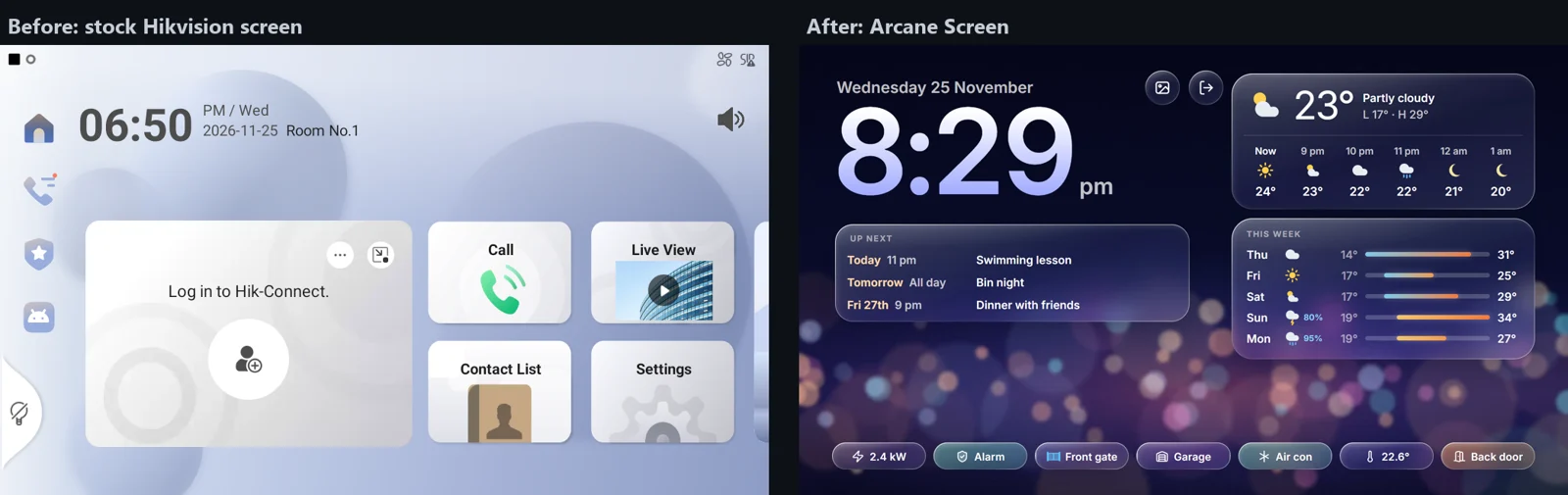
I’ve had a Hikvision DS-KH9510 indoor station on the wall for a while, and the stock home screen never did much for me. So I built a dashboard for it that Home Assistant runs, and I’ve now cleaned it up and released it free. What it shows A big clock, today’s weather, the next six hours and the week “Up next” from your calendars A row of chips for the things you glance at (alarm, gate, garage, power, a room’s temperature…). Tap one for its state and, where it’s safe, a button. Optional big…
H
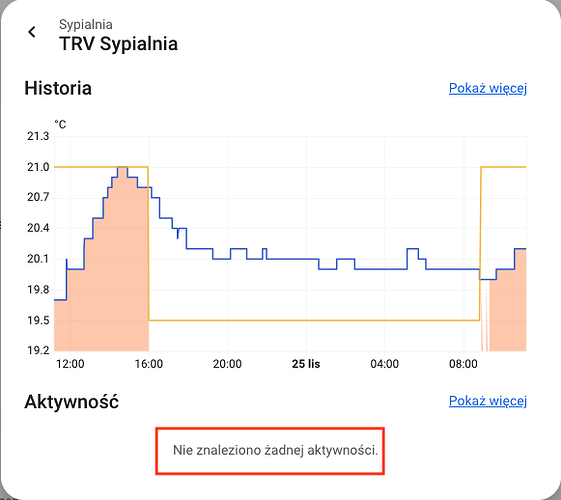
Why am I not able to see activities for a climate entity? I’d like to see e.g. which automations changed the target temperature. Just like I can see which automation turned on the light: 2 posts - 2 participants Read full topic
H
Why do I need to use templates like {{ is_state_attr("climate.living_room", "temperature", 21)}} or {{ is_state_attr("cover.living_room", "current_position", 60)}} instead of being able to use the visual editor with an equals condition? The visual editor for numeric state conditions only provides above and below options. The same applies to the device condition. I’d like to have an option to check the exact value directly from the UI, without needing to write templates. 24 posts - 7…
H
I got some new Matter Wi-Fi light switches, and wanted to set them up with my Home Assistant installation. While playing around with the Home Assistant Matter integration, I tried to add a device, and got to the screen prompting me to install the official Home Assistant companion app. However, this screen literally showed up inside the Home Assistant companion app. What’s this all about? Turns out I’m using the F-droid version, which is a “minimal” build. Apparently only the “full” Google Play…
H
I would love to configure one utility meter. For example “heatpump_heat_produced”. And in the same step say i want 1 day, 1 week, 1 month intervalls. I know via YAML its possible, via UI i never found a way. 2 posts - 2 participants Read full topic
H
BYD Seal odometer in Home Assistant via MeatPi WiCAN OBD (passive CAN filter) This guide reads the odometer from a broadcast CAN frame on a BYD Seal, using the MeatPi WiCAN OBD and its MQTT CAN filter, and shows it in Home Assistant. It doesn’t send any requests to the car, so it runs alongside AutoPID polling (SoC, charge times). Status: working and confirmed. The reading matched the dashboard when parked, and it incremented correctly on a drive. Tested on: BYD Seal, 2024 model, Australia…
H
Hi all I’ve been working on this in my spare time and it’s got to the point where I think it might be useful to other people, so I’m sharing it here. HA Workouts is a custom integration that pulls your workout and health data from the various fitness platforms into Home Assistant as normal sensors and long-term statistics. GitHub: GitHub - mrvautin/ha-workouts: Home Assistant integration for Garmin, Coros, Strava, and Apple Health workout & health data — sensors, long-term statistics, and…
H
Hello, I just wanted to share a thought that came to my mind when I was reading recently about all the audio input devices that are currently being integrated into a home assistant. Some of us might still have old record players and a nice record collection, but what always bothered me is the broken link between the analogue world and the digital one, when it comes to album art and further features. However, recently I thought about that every record usually has this crackly intro that is…
H
I have just startet using home assistant, and I wanted a smart screen for my home so I setup a iPad in the center of the home, but quickly found out it was using the battery in no time running kiosk mode with screensaver. So I was wondering if anyone else is doing the same as me and what have you done with your iPad/tablet 5 posts - 3 participants Read full topic