H
Hi, Just recently i have not been able to turn off the heat pump via AirTouch 5 or Home Assistant unless i disable the AirTouch Integration in HA. Has anyone else had this issue? All the other options work like increasing or decreasing temperature turning off Zones. Both AirTouch and Home Assistant have been fully updated. 1 post - 1 participant Read full topic
H
I need some help with the names “normal people” (like guests, or my mother-in-law) will intuitively understand. Some are pretty easy, but they quickly get blurry around the edges. Many of my automations are influenced by the current “day phase.” My automations provide specific behavior based on lookups or changes in these “day phases.” Once set, they rarely change. Anyone else trying to noodle this into something workable? What to call these daily cycles? Day Phase, Daily Phase, House Phases…
H
This would be useful in a button in the footer of a entities card. Example: type: entities entities: - entity: sensor.pumperly_cheapest_gasoline_e10 secondary_info: - station_name - address name: type: entity footer: type: buttons entities: - entity: sensor.pumperly_cheapest_gasoline_e10 name: Navigate tap_action: action: url url_path: '{{ sensor.navigate_url_to_cheapest_petrol_station }}' WTH does it only support a completely hard-coded value? This makes no sense to me. Yes, I know, there are…
H
6 posts - 3 participants Read full topic
H
I’ve been building Phone Assistant Link, an iOS app that brings Apple Screen Time and blocking into Home Assistant. You group your apps on the phone (Social, Games, Work…), and each group shows up in HA with: • Time used today, updated through the day • A daily limit and a “limit reached” sensor • A switch to block or unblock the group from HA • A readable status (Allowed, Limit Reached, Blocked by HA…) Some things I use it for: • Block social apps when I get into bed (bed sensor →…
H
Always looking to add a card and wish it was faster to find a manual blank yaml card to edit in. Have to do 4 clicks and a “manual” search for the card! 2 posts - 2 participants Read full topic
H
The team has done a great job these last few months adding a variety of LLM integrations. That choice diversity is what makes HA such a great project and tool for so many homes. But AI is moving very very fast. I’m sure the team is struggling to keep up, and integrate AI/LLMs in a meaningful, well-thought way. But WTH (why the heck) can’t we edit the system prompt. My system prompt is thousands of tokens long. Processing it locally to a cold slot takes ~10 seconds on a 7900 XT. I asked the…
H
It can be a matter server, so why can’t Home Assistant devices be exposed as matter devices to other systems? 1 post - 1 participant Read full topic
H
I probably just don’t know where to look, but… Will we ever get “computer” as a wake word? Officially. 1 post - 1 participant Read full topic
H
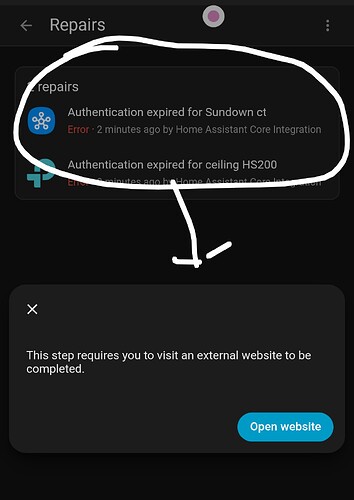
Today, 2 Tapo devices declared “invalid password” I tried reconfigure. Nope I reset my tapo/tplink password & tried again. Nope. The dozens of other tapo devices are working. These 2 items both work in Google & Alexa. So I deleted the two entries in homeassistant. Can’t re-add them. These have been working fine for over a year. IDEAS? This is the error I get. 100%,user/pass is correct. Unable to authenticate: Unable to complete handshake: 192.168.4.37: TRANSPORT_UNKNOWN_CREDENTIALS_ERROR(1003)…
H
I love the built-in dashboards. While I admire those that have time to tweak every pixel of their bespoke setup, I vastly prefer the simplicity of the built-ins. They mostly just. work. However - I have one gripe. WTH (why the heck) can’t I tag something as “security” or “light” or “climate” and have it automatically added to the built-in? I have a Shelly relay that “presses” the button to my garage door opener. I consider that a security-related entity, just like a lock or window sensor. I…
H
We have this robust system with all this integration of thing and apps. But we have no way to use the home assistant calendar that has access to our oth.er calendars, as our main calendar on our phone screen. There are alot of other possibilities and automation that this could open up if a simple widget was available to have the home assistant calendar and open it when we click on it 1 post - 1 participant Read full topic
H
WTH: Why is the ‘manage field’ located at the bottom of the labels drop-down list. Put in on top so I don’t have to scroll all the way down to add or edit a label. 2 posts - 2 participants Read full topic
H
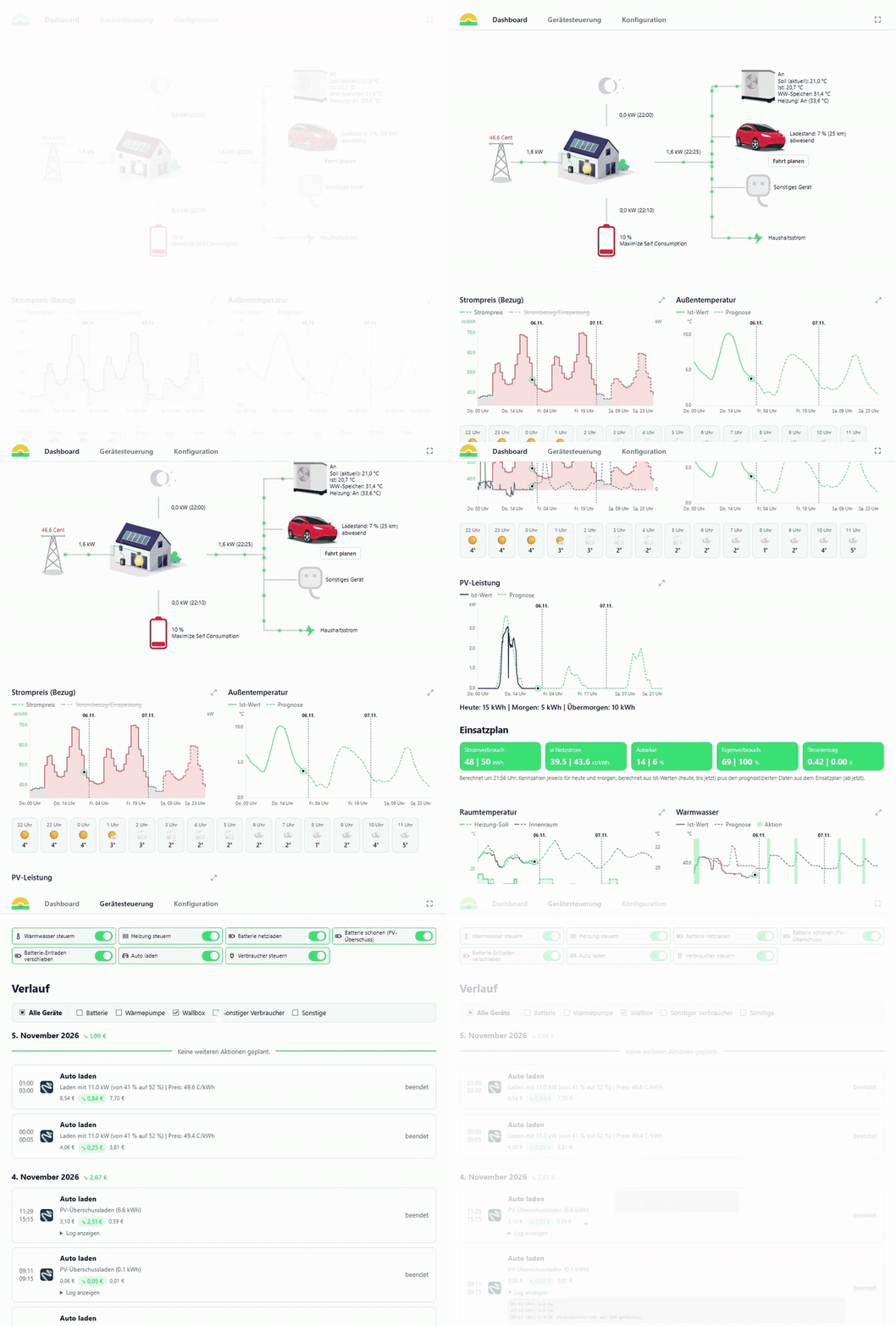
Hi everyone, we are excited to share our the new home assistant app version of our home energy management system. We’d like to introduce it and, above all, get honest feedback from people who run real setups. What it is Shyft is a home energy management system (HEMS) that runs as an app inside Home Assistant. You map the devices and entities you already have in Home Assistant, and Shyft computes an optimal schedule for the next two days and controls them: heat pump (including a thermal building…
H
I have a group of lights, Ground ALL Lights (light.ground_all_lights). I want to turn off all but the Kitchen light (light.kitchen_light). I thought this was exactly what the 2026.11 Excluding Targets feature would enable, but no – when I click Exclude target, the list comes up blank I tried it with multiple groups, and a group of groups, but always no targets to exclude. I’m new to Home Assistant and figure I must be missing something really obvious… 5 posts - 2 participants Read full topic
H
Hi guys, I have installed a new HA but on the old IP address. Now I wanted to change to the new IP address, but it’s not working. I manually adjusted it in the UI, then deleted the app cache, and even reset the device, but it still doesn’t work. Can someone please help me… Thank you very much 1 post - 1 participant Read full topic
H
Scenes can take a while to build since you have to add each individual device/entity. Would be much faster and flexible if you could target areas and labels just like in automations and scripts. If I move a device I wouldn’t have to painstakingly update multiple scenes, just change the device’s area/label. 1 post - 1 participant Read full topic
H
For years there has been a very frustrating problem with the integration(s) for Shelly BLU devices — door / window position sensors and motion sensors. The problem is that while the first status transmitted by the device is reliably seen by HA, the following status transmitted by the device is sometimes not seen. These devices operate flawlessly in the Shelly environment. Correct status is represented 100% accurately. Not in HA though. Several problem reports have been raised by multiple users…
H
I installed my first Enbrighten switch, no issue. I’ve tried adding 2 others but after adding it says it isn’t provisioned even after multiple tests. Where do I start looking? 2 posts - 2 participants Read full topic
H
I have a set of scripts and automations to control my Marantz receiver. They were working yesterday. I updated to 2026.11 this morning and now media_player.select_source no longer works. I’m at a loss. I can’t find anything with quick searching. Any help or tips on how to fix whatever got broken seemingly with this HA update? TIA! 2 posts - 1 participant Read full topic
H
I have several automations that need to take different actions based on the last time some entity was in some state. I can look at Activity or History views and see past states for an entity. But in an automation, I can only retrieve the current state. To work around this, I have to create separate helper sensors for “last time x happened” and then create additional dedicated automations just to update those helpers. It would be great if my automation could simply query the historical states…
H
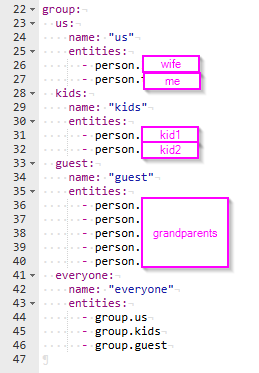
Helpers are great and especially groups. But it is still not possible to create a group consisting of people from the UI so you have to resort to configuration.yaml Additionally, would be great to create a group composed of other groups. Example: This was also brought up in 2024 > WTH Can not create a person group from UI? - Archive / Month of “What the heck?!” 2024 - Home Assistant Community 2 posts - 2 participants Read full topic
H
Seems odd to me that we get a notification that says you need to clear your front end cache, and it’s not an option provided in the notification the same way restart is. 1 post - 1 participant Read full topic
H
I don’t mean include an image in a notification. I mean make the app icon that shows on the resulting iOS notification something custom that isn’t the HA icon. I’ve seen other apps accomplish this - like a notification from a chat app for a message to a group - where the “app icon” of the notification is the group photo from the chat, and the icon of the actual app shows as a small “badge” over the corner of the custom icon. This would make notifications even more “glanceable” - it’s easier to…
H
Activity shows events in the last 24 hours. Not most recent events. IMO clicking Activity should show you the most recent events, regardless of when they happened. At least half the time I’m needing to dig deeper just to find out when something turned on/off to troubleshoot or improve/design an automation. 2 posts - 2 participants Read full topic
H
I have a bunch of helper entities (input booleans, etc.) that would be great if they had template-based icons. Currently, the only way I can do that is if I set the helper up in YAML instead of in the nice, shiny helper UI. WTH can’t I just put in a Jinja template via the UI? 1 post - 1 participant Read full topic
H
Circadian Lighting follows the natural daylight: warm light in the morning and evening, cooler light during the day. Philips Hue has this built in since years, yet in Home Assistant we still depend on a custom integration from HACS / Marketplace. Flux exists, but it is YAML-only, barely used (number of active installations) and missing basic functionality so it is no real alternative. A native, UI-configurable circadian lighting feature would be a huge improvement. 5 posts - 5 participants Read…
H
The Energy Dashboard knows used electricity in kWh and the price per unit (in a given time interval) and can show electricity usage per day in Euro. I can monitor individual devices, but their usage (in Euro) isn’t stored. Can the Energy Dashboard show the daily usage in Euro as well? 2 posts - 2 participants Read full topic
H
I couldn’t find an existing topic that covered this comment from @yashijoe specifically, so I made one to ensure it gets attention. If an automation fails for some reason (template error, device unavailable, network failure, etc.) I’d like to know directly so I can debug if needed. All I know of today is either “hmm, I expected an automation to change something, and it didn’t happen. Let me dig into why…” or by looking into system logs and finding errors from automations that weren’t expected.…
H
Hi everyone! I’ve been working on a custom integration for Home Assistant called Virtual Gas Meter and I’m finally at a point where I’d love to share it with the community and get some testers. If you want to track your gas consumption (or simulate a gas meter) without having a dedicated physical smart meter on your main gas line, this integration might be useful for you. What it does The Virtual Gas Meter integration allows you to create a virtual sensor that tracks gas usage based on custom…