H
How do I get back people and zones on the same map? The default configuration no longer overplots them and even when I try to build my map card, I see all entities on the map while I edit but then, as soon as I save it, I get the dreadful new grey mask that selects either of the two. What should I do to get Map back to what it has always been? 1 post - 1 participant Read full topic
H
As title, having installed the core integration recently in 2026.11 I find myself notified with multiple repairs a day to reconfigure Click the repair just fixes it, so why is this manu operation needed at all? 1 post - 1 participant Read full topic
H
anyone know how to connect a “Growatt SPH 6000TL BL-UP” up to a pi 1 post - 1 participant Read full topic
H
I have HA with Z2M, everything works fine. I added an SLZB-06MU running in “Thread+OTBR running on device (experimental)” mode. Everything seems okay. I wanted to add some Matter devices but it just doesn’t work. I (think) I tried everything. I checked IPv6 support (Crucial for Matter) = OK The SLZB-06MU is using my HomePod Mini’s preferred Thread network. I tried resetting the MYGGSPRAY, scan the QR code, enter the pairing code, took out the batteries, I tried everything, nothing seems to…
H
The problem The automation editor is not designed to use the available screen area on a 16:9 screen. Negative effects: There’s too little overview Too much scrolling is needed Hard to drag and drop far actions are hidden in menus Proposal rename trigger/condition/action and set/show trigger id directly in the header without having to use rename add the actions from the … menu directly in the header for trigger/condition/action render parallel actions side by side remove all the add buttons…
H
Navigating between views in Home Assistant, especially on mobile, is unnecessarily cumbersome when you have many views. I have 50+ views across multiple dashboards, and the current tab-based navigation is far from ideal on a small screen. Switching between views often requires multiple taps or returning to a navigation page. Why not support swiping left/right to navigate between views, as is common in mobile apps? A community solution, hass-swipe-navigation, has existed for many years,…
H
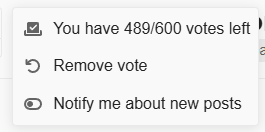
What is with this? I get why the number might be limited to newcomers in much the same way as posting is but I’ve been here nearly nine years . I don’t really care, I am just curious. 600 votes is quite a lot to be used as an abuse limit. Or is just there ‘because it had to be something’. Any way, just wondered… Interesting though, I had no idea I had voted 111 times! 3 posts - 3 participants Read full topic
H
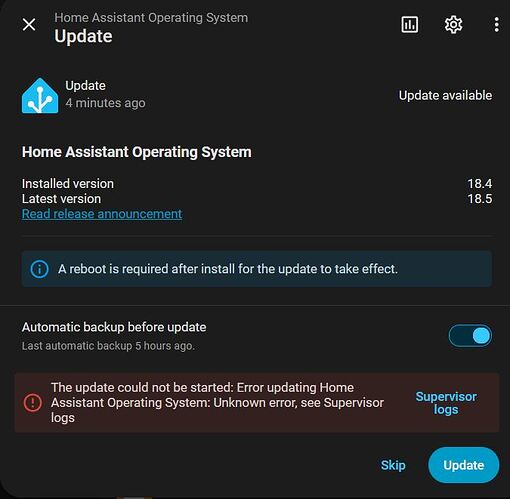
Hello! I tried to install the HAOS Update 18.5 but it fails! What to do to fix this? Thanks in advance. About my Home Assistant: Installation Method: Home Assistant OS Core: 2026.11.1 Supervisor: 2026.11.0 Operating System: 18.4 Frontend: 20261028.5 1 post - 1 participant Read full topic
H
I’m automating a light switch. I added a Shelly 2PM gen4 to home assistant over matter over wifi but the device has no controls. Home assistant also suggested adding it via the Shelly integration but that displays a shutter instead of a light switch. When I turn on the switch, the light turns on for a couple of seconds and then it turns off. I’m going to check the Shelly app, see if it’s the wrong firmware. I suspect it may also be in cover mode instead of light switch mode. I may flash this…
H
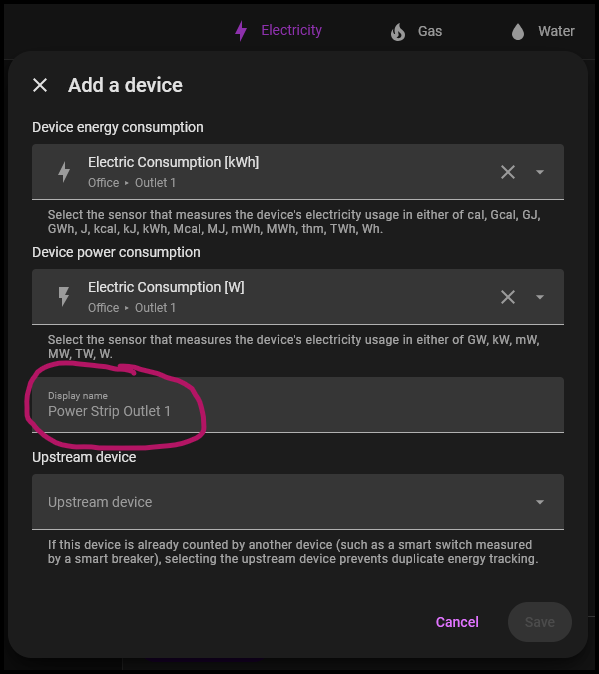
It would be great to improve the Display name of the energy dashboard with the composed naming scheme used elsewhere so I don’t have to manually type in the name and hope to remember to update it whenever I change the entity. 1 post - 1 participant Read full topic
H
as title, please consider adding a UI option to set an entity_picture / image to an entity we can set a single icon directly, but need either customize, uix or template to set an entity_picture using the card option is no alternative since not tied to the entity, but to a card. just like with person entity, please add to all entity btw, it would be even better if we could set on/off imagery both icon and image (so going beyond device_class icons, also on other entities not having a class) 1…
H
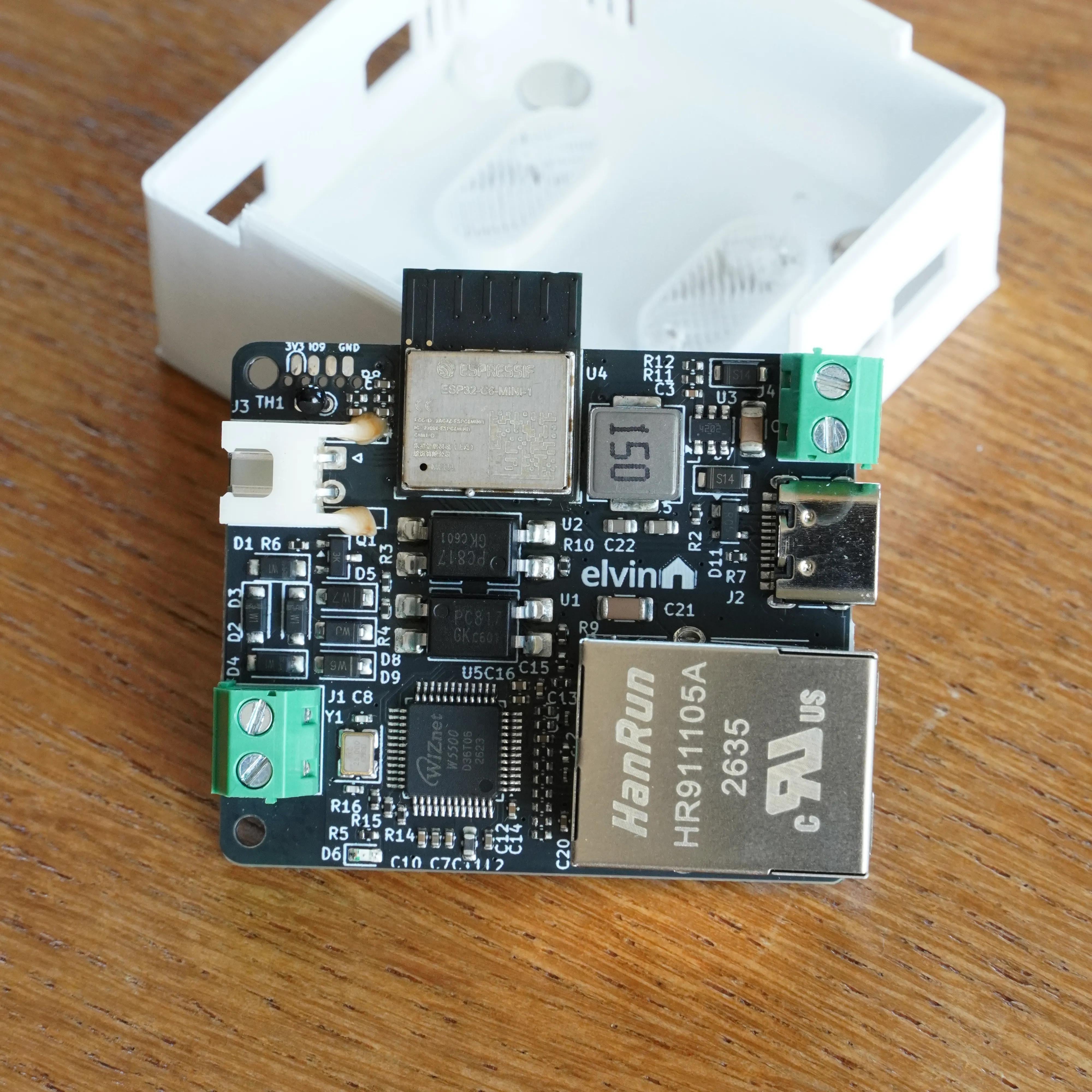
Hey all! I’m Elvin, and I run a little website I call elvinhome. I’m one guy based in the Netherlands and I make the ESPHome-based devices that I want to see in the world. About half a year ago, I released the CTRL ONE, a smart thermostat & air quality monitor with a touchscreen ePaper display. It was a great start, but it only supports a few types of heating systems. I’ve been working to expand that range, so I made the THRM ONE, an ESPHome device that connects to an OpenTherm-enabled boiler…
H
since material design icons is huge, and yet limited… we all run into the moment where we cant find a MDI icon, and are either searching for a less than ideal ‘second best’ or leave disappointed or, use custom additions that allow icons in a certain folder to be used in the icon picker. github.com GitHub - thomasloven/hass-custom_icons: 🔹 Use custom svg icons in Home Assistant 🔹 Use custom svg icons in Home Assistant github.com GitHub - Mariusthvdb/custom_local_icons: Custom local icons, drop…
H
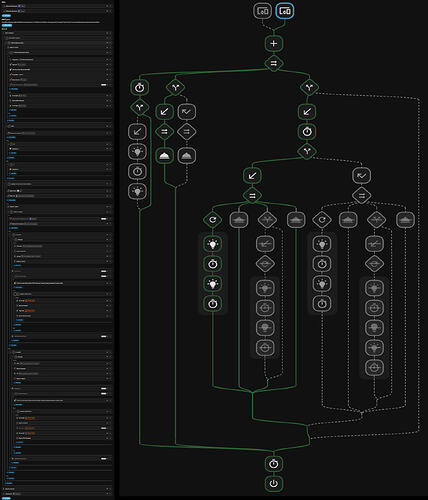
The problem The automation editor is not designed to use the available screen area on a 16:9 screen. There’s too little overview and too much scrolling needed. Illustration It is awfully hard to get an overview of an automation being edited with the current layout contra the graph visualisation in the traces views. A side by side example for the same automation Suggestion Create ability to use the graphical visualisation as base for the automation editor. Here are some obvious ideas, but you…
H
I run Home Assistant with KNX shutters in Germany. When a shutter is fully down, the actuator reports 100%. Home Assistant shows 0%. That’s not a broken motor. Home Assistant has a hard rule: 0% is closed, 100% is open. KNX and several other systems work the other way around. The KNX docs even say so, and the integration silently inverts the value to fit Home Assistant (KNX - Home Assistant). In daily life this is simply the wrong language. I want sun protection at 30% down. If I say “set the…
H
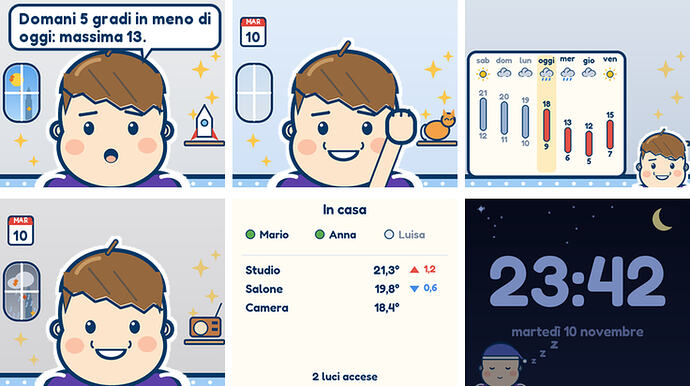
Home Assistant knows everything about my home… and tells me through notifications I never read. So I gave it a roommate. Coinquilino (Italian for roommate) is an AppDaemon app that turns a GeekMagic SmallTV Ultra into a little animated character, Alessio: a sharp, slightly ironic 10-year-old who lives in a room that changes with the season, the weather and the day. It sits on a shelf and tells you what matters: “Tomorrow 5 degrees colder than today, rain from 4 pm” someone is on the way home…
H
i have installed 3 new BluTRV (the one with Zigbee support). As far as i can see they are bound to HA via Plug S Plus Devices. I can see the Entities like temperature but they are not installed as “climate” devices that can be controled? So i can not create a dashboard where i can set the temperature. Is there any solution for this? I might have a BLU Gateway nearby but i thought that the advantage of the new devices is that they can connect to any Plug S Plus so i do not need the gateway any…
H
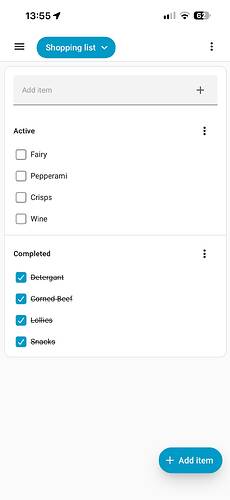
What The Heck - Why do we have strikethrough font for completed tasks! Hard to read on smaller devices such as phones when re adding the shopping items that are regularly reused. Maybe italic or underlined better or normal text as its in the completed section anyway. 4 posts - 4 participants Read full topic
H
When I create a notification action in an automation and want to send the same notification to another iPhone, I duplicate the existing action and change the target device. However, as soon as I change the action to select the other iPhone, all the data in the notification fields is cleared, including the title, message, and other settings. This makes what should be a simple task unnecessarily tedious, as I have to manually copy all the information from the original notification into the…
H
Almost every Home Assistant setup ends up needing a way to say what state the house is in: Home, Night/Sleep, Away, Vacation, Guest, Do Not Disturb. There’s still nothing built in for this. What we have to build today To get modes, you have to put together a pile of parts yourself: an input_select, or a handful of input_boolean’s, to hold the mode extra helpers and template switches to show and change it on dashboards automations to switch between modes (everyone left, everyone in bed, away for…
H
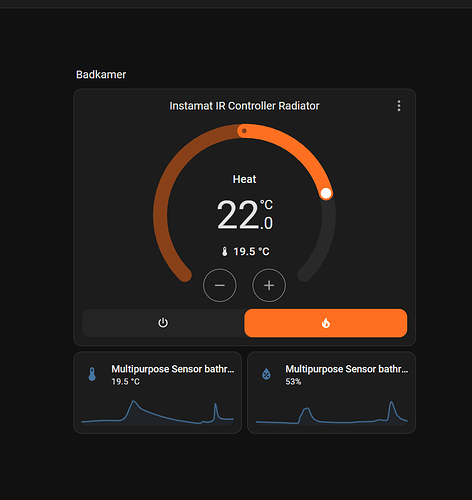
Hi all, I wanted to control my IR-remote electric radiator from Home Assistant after renovating, but a simple “learn and replay” IR setup didn’t work: the remote sends a long, stateful burst of frames (clock, program, temperature, weekly schedule), instead of a single command. So I reverse engineered the protocol and built an ESPHome project around it. I am an electrical engineer and developed this project with the assistance of AI. Combining my experience with AI-assisted development resulted…
H
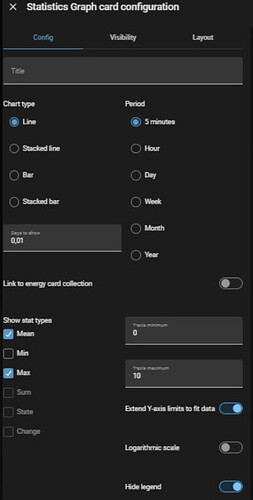
Computer screens are often in landscape format, 16:9 or wider, but Home Assistant’s UX components seldom use the screen area efficiently causing poor overview and excessive scrolling. current design compact alternative This example is from the visual editor for a statistics graph card. The spacing is “generous” to say the least. A quick Photoshop mockup of a more compact layout with less vertical spacing and less scrolling. PS. The markdown editor here fails to have pictures with specified size…
H
At 8:12, the tablet by the door showed Away. I was already on the sidewalk. At 8:40, a neighbor crossed the driveway. The Imou Life app recorded the clip. Home Assistant stayed quiet, and the alarm panel was still armed_away. At first, this looked like a problem. Shouldn’t the alarm panel have changed its state when the camera detected someone? Not necessarily. The key is understanding that an arming panel and a camera detection event represent two different things. The panel records the…
H
Hi everyone! I’ve made a free, open-source integration for anyone using Home Assistant in Budapest or the surrounding area: Budapest Departures. It brings live public transport departures from the BKK FUTÁR API into Home Assistant, together with a dotmatrix dashboard card inspired by the displays at local stops. It supports bus, tram, trolleybus, metro and HÉV services, plus suburban bus services covered by the API. You can add multiple stops, search for them by name in the card editor, and see…
H
Hello, since the latest update, virtual thermostats can no longer have a custom name; they retain the name of the associated module. 2 posts - 2 participants Read full topic
H
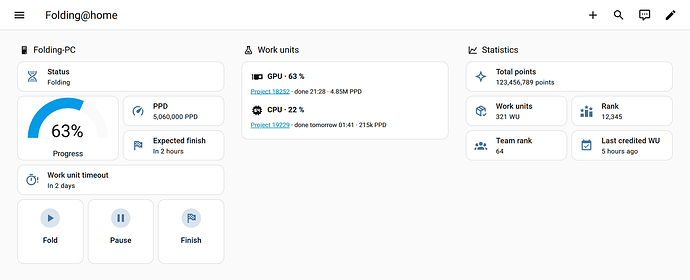
Hi everyone, If you donate compute to Folding@home, this custom integration brings the v8 client into Home Assistant. Highlights local_push: a websocket to the client’s web API on port 7396, no polling and no cloud account. Sensors: status (enum, with pause reason and work units as attributes), progress, points per day, expected finish, work unit timeout. Buttons: Fold, Pause, Finish. A separate statistics device with total points, work units, world rank, your team’s rank, your own rank within…
H
As per previous Feature Requests and WTH’s. Why can we not compare this day/week/month/year with previous year(s). Comparing with last month is of no use due changing weather seasons but comparing October 2022 with October 2026 makes so much more sense. Best solution would be to choose a multiple number of years, eg 2020-2026 but if we can just compare a year with another year would already be beneficial. 2 posts - 2 participants Read full topic
H
Every few weeks someone asks whether they need to migrate their automations to triggers: / conditions: / actions:, and the thread usually answers yes, better do it now. The 2024.10 release notes say something else: > As with the other syntax changes we've done recently, this is not a breaking change, and there will be no deprecation. The previous syntax will continue to work, and there are no plans to remove the old syntax. Two years on, that still holds. Singular keys are not legacy code. What…
H
On the Shortcut card if we leave the label blank why does it automatically fill it with the location. I just want a row of icons similar to the views tab. 2 posts - 2 participants Read full topic
H
Mopping in robotic vacuums is now almost a standard feautre, but Home Assistant handles mopping at a lower level, as a select, meanwhile vacuum suction speed is integrated in the vacuum entity. It would be nice to have the mopping options as the same level, so it could be visible in the stock Vacuum card as well. Otherwise the stock card is not useful if your vacuum can do more than just vacuum. 1 post - 1 participant Read full topic