H
Draws up to 4 sensors with custom Material Design Icons on an 800x480 Seeed Studio OpenDisplay monochrome screen using opendisplay.drawcustom. from the OpenDisplay integration from opendisplay.org -note install the one from opendisplay.org to replace the HA one in order to get the drawcustom action. gist.github.com https://gist.github.com/k9play/3712d6f5ae10f07c7dbe999fcee4f620 opendisplay_mono_kit_four_sensors_grid.yaml blueprint: name: OpenDisplay 4.26" (4.3") Mono Sensor Grid description: >…
H
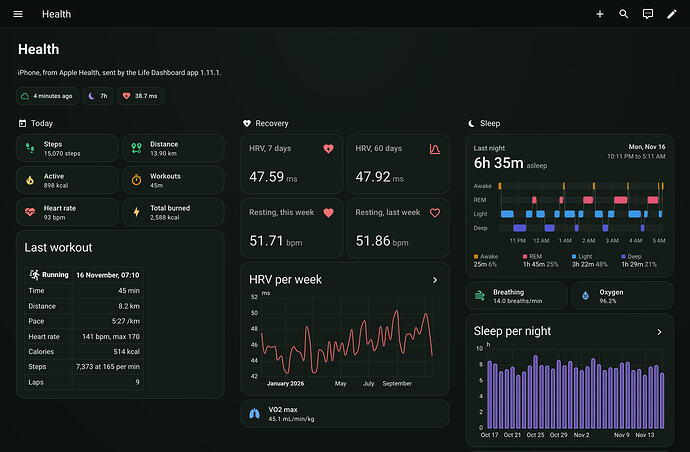
Disclosure first. I’m the developer of the app, the integration and the card behind this, and I build them with a lot of help from AI. I review and test everything myself, on my own phones and my own Home Assistant. Everything is under the MIT licence and the HA integrations are listed in the Marketplace (formerly known as HACS). I wanted my health data next to the rest of my house. Not just today’s steps, but how I slept last night compared to the weeks before, and whether my resting heart…
H
I have 3 Team Tracker sensors and have 1 automation that triggers when a game ends. I can’t seem to coax the template into producing the correct output in a notification: "Final score {{ state_attr( "{{ trigger.entity_id }}" , "team_score") }} {{ state_attr("{{ trigger.entity_id }}", "team_name") }} - {{ state_attr("{{ trigger.entity_id }}", "opponent_score") }} {{ state_attr("{{ trigger.entity_id }}", "opponent_name") }}. Just shows up as: Final score None None - None None. In the editor, I’ve…
H
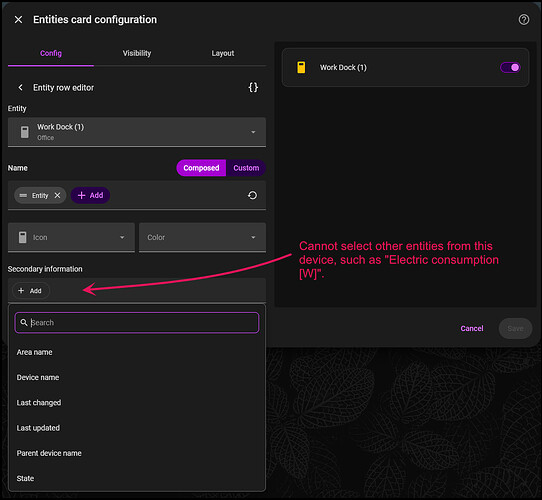
I like to show the power consumption of my switches along with the button to toggle them on and off. There is a “Secondary information” config for some dashboard cards but they do not cover other entities for the same device. So I cannot select the power consumption and instead have to include entirely separate cards to display this info. In the card setup, you cannot select other entities from the device, such as “Electric consumption [W]”. So you are forced to use multiple cards to show other…
H
When adding a " Temperature crossed threshold" trigger it defaults to Centigrade when the selected format is Fahrenheit (system/Home Information). That seems to be an oversight, no? 1 post - 1 participant Read full topic
H
On history Page I filter for one device and see the different entities in a graph. Download the data to csv is possible, It would be great I there is a toggle button to show the data in a table and be able to filter each column. 1 post - 1 participant Read full topic
H
When a Tile card shows a media player, long song or show titles get cut off with an ellipsis, so you can’t read what’s playing without opening the more-info dialog. Scrolling text already exists in Home Assistant: the Media control card scrolls long titles on hover, and the media player more-info dialog scrolls the title and artist using the built-in ha-marquee-text component. The Tile card is the odd one out. I’d rather have native support than rely on card-mod/uix for this. The scrolling…
H
Continuing the discussion from Integration for Ferolli Omnia 3.2 HeatPump (OMNIA Smart): I found a simple and effective solution for this integration with the help of Gemini You need to have a WIRED REMOTE CONTROLLER (like the one with code 3QE46370) with your Ferroli heat pump. I abandoned the idea of connecting to it by using modbus messages since it would require to connect a RS-485 to TCP gateway to the Ferroli electronic control board. So I preferred a much easier and safer approach:…
H
How do you disable community forum notifications for badges? I’ve looked all through the settings but can’t find any way to turn them off and they are pestering me. 2 posts - 2 participants Read full topic
H
Hi all I wanted a small display on my desk that shows what’s playing. Getting that from a Mac turned out to be harder than it should be. So I built Track Fly, a macOS menu bar app that reads the current track and serves it on your LAN as plain JSON. There’s no cloud and no account, and it doesn’t need to be set up per player. Sources: Apple Music, Spotify, Roon (it picks the zone for you) and Plex. What you get: http://your-mac.local:8765/now gives the title, artist, album, state (playing /…
H
I have 6-in-1 Tuya air box with PM2.5, temperature, humidity and so on. It has T1-3S with TuyaMCU. I successfully flashed ESPHome onto T1-3S and I can see datapoint updates via logs. However, sensors does not show up on neither GUI nor HA. Here is the yaml. uart: id: uart_bus rx_pin: RX1 tx_pin: TX1 baud_rate: 9600 rx_buffer_size: 512 debug: direction: BOTH sequence: - lambda: UARTDebug::log_hex(direction, bytes, ':'); tuya: id: tuya_mcu uart_id: uart_bus time_id: ntp_time status_pin: number:…
H
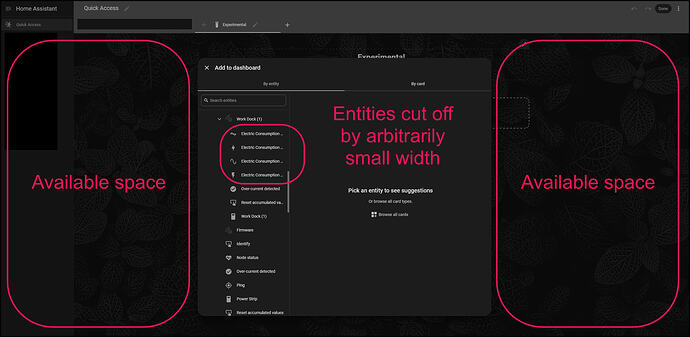
When adding cards to the dashboard using the entity filter, the entity labels are being truncated due to arbitrarily small widths of the container. In this example I have no idea which one is the one I want because they are all labeled the same due to arbitrary truncation. I appreciate all the electric energy ones have discrete, if similar, icons but why should I have to study which is which. Just show the whole label! This is unlike the very similar way the entities are presented in…
H
in different folders when using packages? 5 posts - 3 participants Read full topic
H
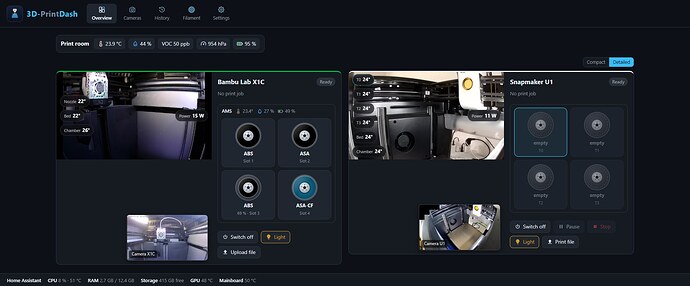
Update: 0.3.11 – UI redesign and more features since 0.3.0 What is 3D-PrintDash? A local dashboard for your 3D printers, made for Home Assistant. Bambu Lab, Klipper/Moonraker and Creality printers side by side in one place, with cameras, timelapses, filament management, print history and costs. It runs as a Home Assistant app (or with Docker), no cloud, everything stays in your network. A lot has happened with my project since my last post, so here is a short summary. UI redesign New look: own…
H
I have a lot of entities I want to be removed. Some are not in use anymore, others are automatically added while they are not mine. Provide a list of unused entities (or state did not change during a certian period of time) and remove them when they are selected. 6 posts - 2 participants Read full topic
H
On the upgrade page, how about listing the upgrades in the order that they should be done. For example HA OS should be upgraded before Core (AFAIU) but Core is listed first. 3 posts - 3 participants Read full topic
H
Issue Description I’m experiencing intermittent Home Assistant outages on a Raspberry Pi 5 running Home Assistant OS 18.4. During these outages, the Home Assistant web interface becomes inaccessible, and remote access through Nabu Casa also stops working. What’s interesting is that during one of these incidents, the Raspberry Pi continued responding to network pings with no packet loss, suggesting the device remained connected to the network even though Home Assistant services were unavailable.…
H
Hi there, am I missing something obvious, or does downloading sensor data to a CSV not respect locale settings? Downloaded CSV’s all use a comma as the field-separator and decimal point in numbers. Which is a nuisance when importing data into Excel. At least, for anyone outside the US. 2 posts - 2 participants Read full topic
H
Dear All, I have several Tuya/unbranded Zigbee roller blind controllers in my network (I am using ZHA with a Nabu Casa ZBT-1 dongle as a coordinator). Six of them are TS130F (_TZ3210_ol1uhvza) and they behave erratically. I am often (not always) unable to move the blinds from Home Assistant. When I press up or down, I get this error Failed to perform the action: cover/close_cover Failed to send request: device did not respond but when that happens, I operate the blinds with the wall switch and…
H
Hi. If there is any developer that could help this along, that would be great. I’m not sure if this is the right place to request a feature, but it is a third party app. Suzukiconnect is a service that shouws battery procentage etc. play.google.com SUZUKI CONNECT – Apps i Google Play SUZUKI CONNECT gør din biloplevelse mere bekvem og mere betryggende... Free A integration so this data could be used in HA, would be nice. And now that Suzuki has launched pure EVs, it’s time. Best regards. 1 post…
H
A Home Assistant custom integration for the Husdata H66 heat pump gateway. It talks to the H66 over Modbus TCP and gives every value a proper entity, instead of the climate “thermostats” the H66 creates for its settings with MQTT discovery: Temperatures, operating hours, power and energy as sensors Compressor, pumps, switch valve and alarm as binary sensors Settings as numbers and switches with real limits and units Alarm reset as a button It uses Home Assistant’s own Modbus connection handling…
H
If I have a offline ZHA device, why cant I just click on that to see what device is offline (or get a list of offline devices). It is OK-ish if you have a few devices, but if there is like 100 there is a lot of more job to figure out what device is offline/unavailable… 2 posts - 2 participants Read full topic
H
Hi everyone! I’m looking for advice on improving temperature regulation on my Fujitsu heat pump using Home Assistant. My setup: Living room: Fujitsu ASEH14KMCG-B Bedroom and office: 1 × ASEH09KMCG-B + 1 x ASEH14KMCG Outdoor unit: AOEH30KBTA4 Home Assistant with the Fujitsu Airstage integration. The problem: The indoor temperature sensor is located inside the AC unit. I suspect (I’m actually very sure about it) it reads warmer air than the actual room temperature. When the target temperature is…
H
I have some zigbee ceiling lights. I use the adaptive lighting integration for those. During the night they are set to sleep mode. However when a sensor detects motion the light goes on and then within a moment it changes to the sleep mode settings. Causing a sort of flash, since it’s powered on with the previous state. Is it possible to first set the state and then power it on? So sensor detects motion, state is set to either the correct adaptive lightning or sleep mode and then power on the…
H
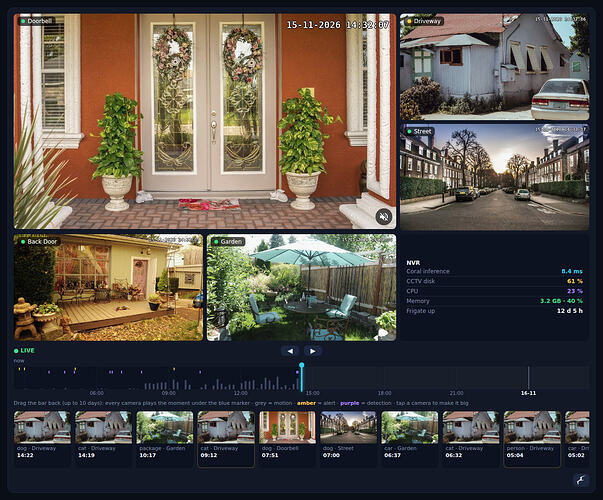
I wanted a CCTV tab in Home Assistant that felt more like a proper NVR, so I made a card for it. Sharing it in case it’s useful to anyone else. What it does Live grid: one big camera and the rest small. Tap a small one to make it the big one. One timeline for all cameras, 24 hours, with the marker fixed in the middle: grey = motion, amber = Frigate alerts, purple = detections. Drag the bar back (up to 10 days, or however long you keep recordings) and every camera replays that same moment. Tap…
H
I’m thinking of moving my HA from a Raspberry Pi 4 to an old Intel based SNUC Topaz 2. The Topaz 2 has internal Bluetooth based on an Intel AX200 which struggles to see some of my more distant RuuviTags. One possibility is to use a Bluetooth 6 long range USB dongle with a better antenna. Any recommendations for ones that are known to work well (with a supported Linux driver)? 4 posts - 4 participants Read full topic
H
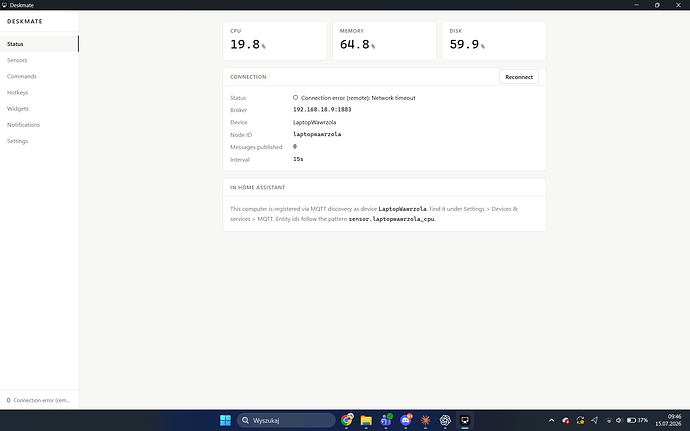
Hi everyone, I’d like to share Deskmate, an open-source (MIT) project that adds your computers to Home Assistant as devices. It has its own integration, in the default HACS catalog, and a client for the PC: a Windows app (x64 and ARM64), an optional Windows service, and a Linux daemon and desktop app as a preview. The PC talks to the integration over one encrypted connection, so you don’t need an MQTT broker. If you already run one, MQTT still works. Open your Home Assistant instance and open a…
H
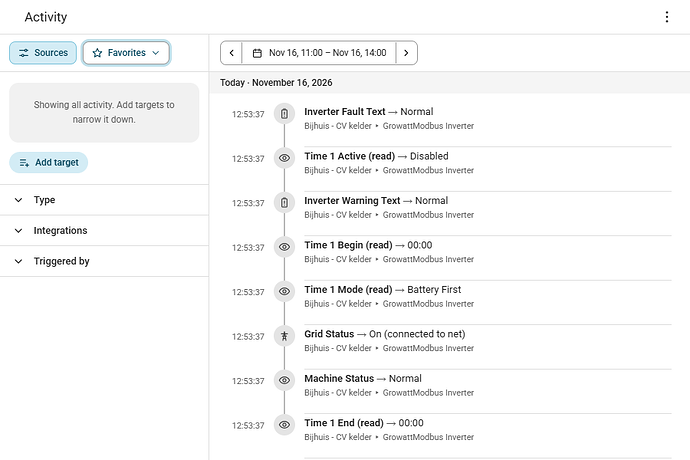
Hi everybody, I have some filters that I use quite often in my Activity and History view. Currently I have to specify my filters every time again from scratch in both views. It would be nice if it would be possible to save the current filters in both views as a favorite, and git it a name. So the next time you arrive on this screen, you can easily apply you favorite filter easily with one or two clicks. Perhaps that is already possible in some or another way? Thanks for reading! Bart P.S. I…
H
Hello, I’m using OpenWrt (ubus). My router redirects HTTP to HTTPS and has a Let’s Encrypt certificate. But the log is spammed with: WARNING (SyncWorker_3) [py.warnings] /usr/local/lib/python3.14/site-packages/urllib3/connectionpool.py:1129: InsecureRequestWarning: Unverified HTTPS request is being made to host 'router.example.com'. Adding certificate verification is strongly advised. See: https://urllib3.readthedocs.io/en/latest/advanced-usage.html#tls-warnings warnings.warn( 1 post - 1…
H
Hi everybody, Not sure if this has been asked before or whether it is a known issue, because not sure for which terminology to search for this one. I have a Tuya TRV on my radiator, which I have manually turned on this morning at 07:30. However at 08:00 it suddenly turned off, as you can see in the History view: So I had a look in my Activity view, but there I only saw that I had manually turned the TRV on: I had expected to see an entry here to explain what has caused the TRV to turn off at…