H
Hey all, Considering buying some RLC-1224A Reolink cameras. I’m enticed by the highly rated Home Assistant integration. The long term plan will be to add a dedicated NVR to my homelab, but with prices what they are at the moment, that isn’t going to happen soon. I’m curious if with just the cameras performing detection, if HomeAssistant can save event recordings or even screenshot to its own local storage. Basically using Home Assistant as an NVR for the time being, even if it’s just for events…
H
A device that quietly goes unavailable is easy to miss. A lock falls off Zigbee, a camera drops off Wi-Fi, and nothing tells you until you need it. That’s the gap this fills. You pick the devices you care about. When any of them has been unavailable longer than your limit (default 60 min), you get one message that lists everything down at once. A few things it does on purpose: If a hub or power strip takes several devices down together, they land in the same message, not five pings. Blips that…
H
I have some temperature sensors which are not completely reliable, so I am planning on combining several with the Combine Sensors helper. Median makes the most sense, but I thought it would be a good idea to test how each function (median, sum, average, etc.) works as sensors become unavailable. The setup is simple. I have one very reliable sensor which I will leave on during the whole test. Then I have two battery-powered ones which are temporarily sitting on my desk. Plan: check the result…
H
For the last 6 or 7 months I have a home assistant automation that sends a text to speech file with the level of the Powerwall 3 Charge. Using Google Translate en com. It’s worked flawlessly until about two or three weeks ago. We either get the Playing Default Media Rreceiver screen being displayed on the Home Hub slash tablet whatever the heck they call it. With a scrub bar just pulsating and it never plays anything. Sometimes you’ll hear the first sound of whatever it was going to say like…
H
Played recently with HA setup, fired number of testing instances. Long story. I ended up with my Android 17 messed up with a lot of leftovers from integrations and synchronizations. I cleaned Google Play services cache and storage (big mistake), but still see old testing names and data here and there. Can someone share information how to PROPERLY clean it out? 1 post - 1 participant Read full topic
H
At the moment I don’t think there’s a way to group devices to send notifications or Atleast an easy way. When I set up an automation I would like to select a single group to send a notification to. It’s kinda annoying if I need to include a device or replace a device I have to go through every automation that sends a notification. I would like a helper like how you can group lights. 2 posts - 2 participants Read full topic
H
If you go to Settings → Devices → Matter, you’ll see a list of your named devices (eg “Hallway Timmerflotte”). If you click on an item in the list, you see details of the devices firmware version etc, but not the node number. Conversely, if you go to Settings → Apps → Matter Sever ->Open Web UI and click on the Thread tab, and then click on one of the devices on your map, you’ll see information like Node 27 @1:1b but not the name you’ve given the device. When you have detailed logging turned on…
H
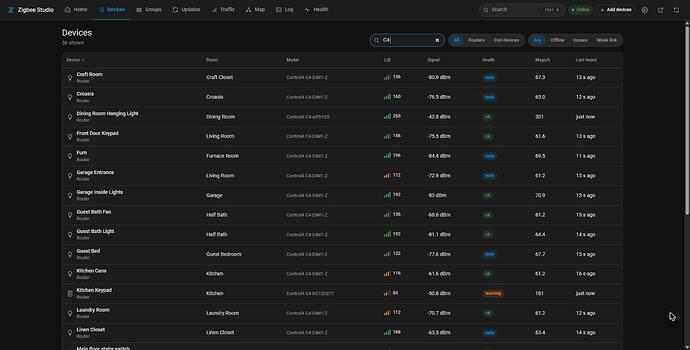
TL;DR: I moved a house full of Control4 Zigbee wall devices off the Control4 controller and onto stock Zigbee2MQTT inside Home Assistant. Dimmers, keypads, LCD remotes, LEDs, double-taps, power monitoring all work. The code isn’t public yet. If you’d use it, please reply below (there’s a short template at the bottom). That decides whether I clean it up and release it. Why Control4 hardware is well built, and a lot of it is in walls that came with the house. Without a dealer, a controller and a…
H
hi, i have this error in my logs Logger: homeassistant.components.recorder.db_schema Source: components/recorder/db_schema.py:591 Integration: Recorder (documentation, issues) First occurred: 00:30:00 (1 occurrence) Last logged: 00:30:00 State attributes for sensor.openmeteo_regen_stunden exceed maximum size of 16384 bytes. This can cause database performance issues; Attributes will not be stored i added entity (sensor.openmeteo_regen_stunden) it to my recorder.yaml in exclude section,…
H
Quite a few of my devices have Power measurements (eg 418W). But if I want to know what that device is costing to run, i have to make a helper to turn it into kWh, and a helper to calculate the cost of that power from an entity that holds the current import price. The Energy dashboard goes some of the way: you can add a device by Power or Energy. I’d love to have a way to connect those to an electricity_import_cost entity to give the cumulative cost through the day, or to have something like a…
H
Just purchased the ITM/art 1829553 3 outlet outdoor wifi smart outlet and was able to connect to Home Assistant very easily. The in box instructions says to download the “Prime Wire App”. I initially did but you DON’T need to if you want to connect to HA. Make sure your phone is on the wifi you will be connecting the plug too & bluetooth is on. Download the “Tuya” app, open it and fill out the “Create a free account” nonesense. Once the app opens. Click the “+” in the very upper right. 3.a)…
H
For some time now and more so under 2026.11.x the iOS Companion App is constantly crashing while editing. There’s nothing specific that makes it happen other than being in Edit Mode. Although it does restart itself, but any unsaved changes are lost. It has made doing any editing a competition to get the edit done and saved before the App Crashes. Running on: Apple iPad Gen 8 iOS: 26.7.3 2 posts - 2 participants Read full topic
H
Hello is Frient P1 electricy meter working with Home Assistant. It is not marked on their side Thanks, Dussan 1 post - 1 participant Read full topic
H
Hi, I have a MONOBLOC 2.0 heat pump with a hot water tank, set up in Tuya Local with the profile fisher_water_heatpump (Tuya Local 2026.10.0, protocol 3.3, Home Assistant 2026.11.1). The pump is in “Hot water only” mode (DP 2 = “DHW”). In the Tuya app I can change the DHW target temperature, but I can’t control it from Home Assistant: - climate.set_temperature on the climate entity does not change the DHW target in the Tuya app. - hvac_mode shows “off” even though DP 1 is true and the pump is…
H
I have the 'HDD tools" App installed, but I would like to be able to manually check the external data disk for errors. I can SSH into the HaOS system (on port 2222), but I don’t have the tools, nor the possibility to install tools into the system. 1 post - 1 participant Read full topic
H
Home Assistant talks to the Powerpal itself over Bluetooth, through a local adapter or any ESPHome Bluetooth proxy, and bonds with the pairing code from the card. A reading a minute: power, total and daily energy, ready for the Energy dashboard and its cost tracking. Nothing lost: after an outage or a restart it replays the missed minutes from the Powerpal’s own history, which goes back weeks. Moving from the ESP32 gateway? Setup takes it over for you: same entities, history and Energy…
H
I don’t mean a true deep RBAC system with assigned roles, and controlling access to anything except dashboard visibility. There is already an option to make dashboard ‘admin only’. Why can’t it be possible to have a drop down list of users that does the same? 1 post - 1 participant Read full topic
H
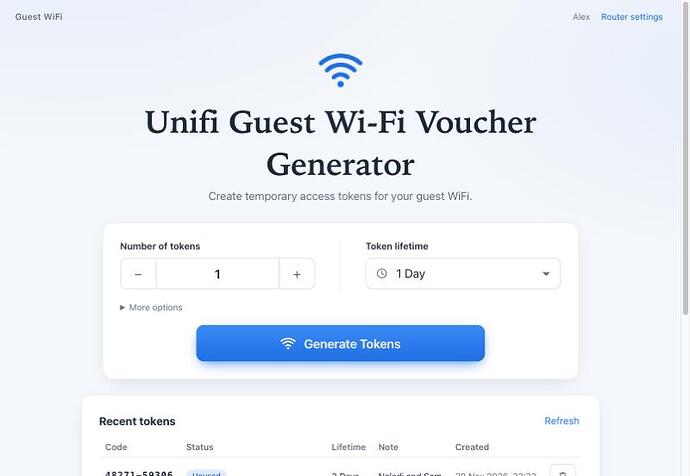
Guest Wi-Fi vouchers from Home Assistant, in one tap Every time someone visits, the same thing happens. They ask for the Wi-Fi, and I either read out a long password or open the UniFi console, dig through Hotspot settings, create a voucher, and copy the code across. It works, but it’s five minutes of clicking for something I do every week. So I built a Home Assistant add-on for it: Unifi Guest Wi-Fi Voucher Generator. It creates UniFi hotspot vouchers from the Home Assistant sidebar, from a…
H
i have resently setup my HA Installation methodHome Assistant OS Core2026.11.2 Supervisor2026.11.0 Operating System18.4 Frontend20261028.6 Companion app2026.10.1-full (24906) to use a indalo tech dongle to change he zones localy. (version 0.4.9). Peter at Indalo Tech was very helpful ensuring the dongle was set up corectly. unfortunately although everything reads well, nothing works when writing to the zones. I am using ramses_rf version 0.61.4 Looking at the logs it is sending a W comand, but…
H
When creating calendar entries, I usually use only one specific calendar per device (especially on mobile). But, when I create an event, I need to specify the calendar I want to create an event in every time. It would be nice to specify, per user, or let device, what calendar to use as the default when creating entries (this would also cut down on the number of events that I want to move to another calendar…) 1 post - 1 participant Read full topic
H
I use quite a free different calendars to organize stuff (and run automations based on which calendar have the event). Sometimes, I create an event in the wrong calendar, and currently it’s not easy to move an entry to another calendar. 3 posts - 2 participants Read full topic
H
The IOmeter integration for the (german) energy meter sensor seems to have stopped reporting energy values. At Github there seems to be work on a patch, but for me (on 20226.11.2) the integration still does only report once after restart. Changing the update interval on the device from 1min to realtime seems to fix it but is no option if battery powered probe. Anybody eles with the same problem or a working fix? Is there a way to downgrade the integration? 3 posts - 2 participants Read full…
H
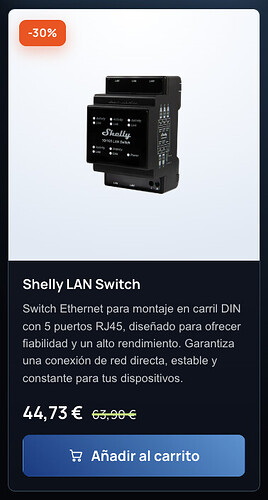
I’m just pasting here two devices I bought recently (1 or 2 weeks ago) They claim a 30% reduction, but I bought both for about the same price, maybe 1 or 2 euros more than it’s current price, but definitely not what they advertise. I can share an screenshot of the receipt total if anyone doesn’t trust me. Just wanted to mention because some of us just buy more things to “take advantage of the offers” and it is just… I don’t know how to name it, but something bad. Cheers 6 posts - 4 participants…
H
Just had an email from Google Nest to say that the Nest App will no longer be available after 25 January. Is it safe to assume that the Nest integration will not be affected? 3 posts - 3 participants Read full topic
H
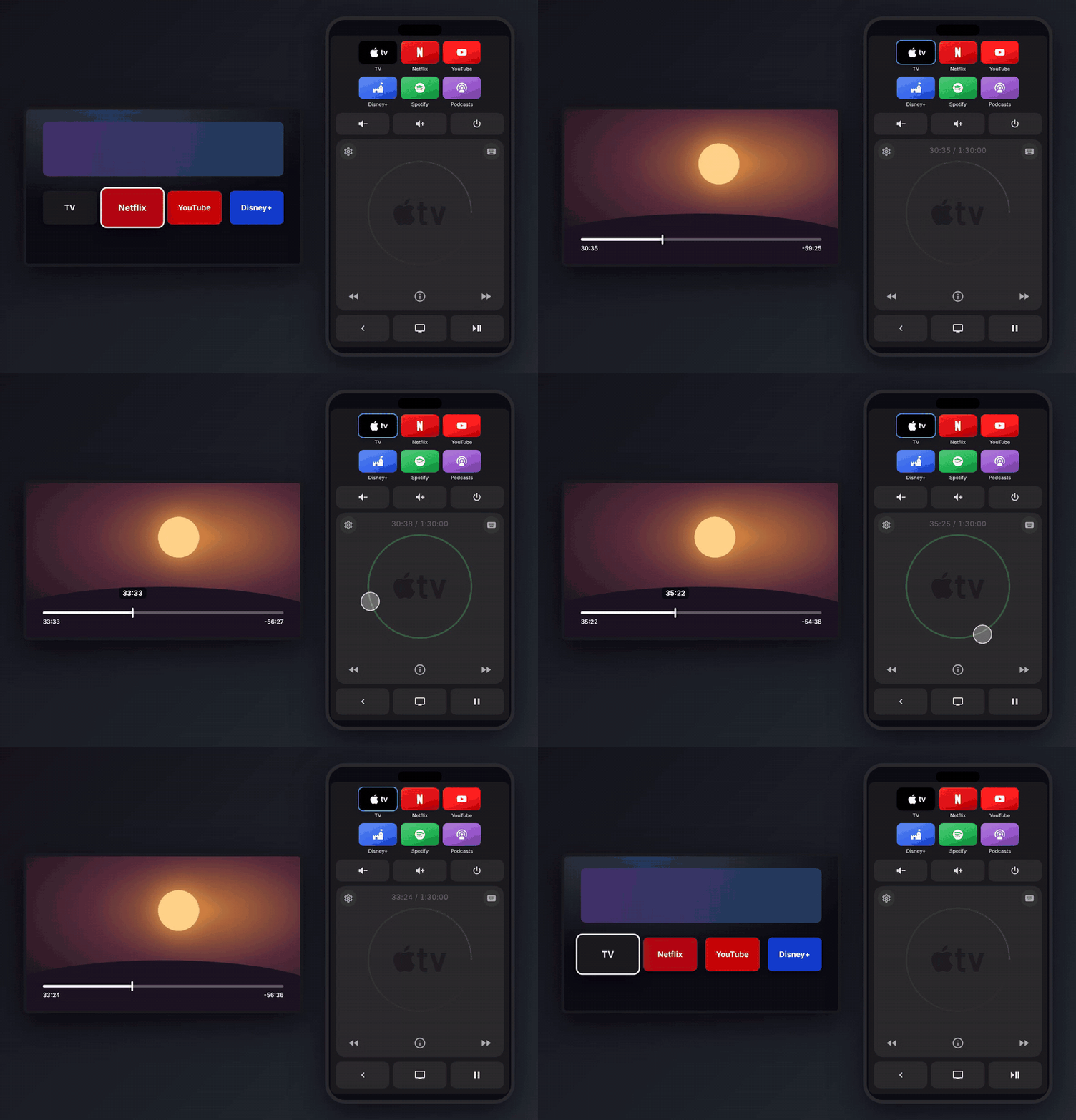
A Lovelace card plus a small integration that turns your phone into an Apple TV remote. Swipe = arrows, tap = select, and -go round the ring to scrub- through a video (Apple’s jog ring included). It also has the Remote app’s player buttons, app tiles with real App Store icons, keyboard, mute and a draggable progress bar. It builds on the core apple_tv integration and adds the touch / held-key commands core doesn’t expose. Demo: the real card driving a simulated TV screen. No YAML needed: pick…
H
Hello, I’d like to know how I should set up my window sensors: my Home Assistant RPi is located in the basement I’d like to use a window sensor (IKEA Myggbett, Thread) in the first floor I’d like to use a ZBT-2 My question is how do I connect my sensor to Home Assistant? I would like to use a ZBT-2 but is it possible to connect a ZBT-2 via different floors to a Home Assistant RPi in the basement? Regards 4 posts - 4 participants Read full topic
H
Samsung Health Bridge: Bringing Samsung Health and Galaxy Watch Data into Home Assistant I’ve published the initial developer/testing release of Samsung Health Bridge, an open-source project designed to bring Samsung Health data into Home Assistant that isn’t normally accessible through the Home Assistant Companion App and Google Health Connect. GitHub: GitHub - KruseLuds/samsung-health-ha-bridge: Developer and testing tools for bridging Samsung Watch & Phone App Health data to Home Assistant…
H
I have a Marvin Ultimate inswing front door with Marvin’s multipoint lock (lift the handle to throw the bolts). Looking for a smart lock that fits and ideally works with Home Assistant or Control4. The only thing I’ve found that fits is INOX’s Smart Multipoint Trim (Unison Hardware). It replaces the outside trim and works with their own app plus a Wi-Fi gateway, but there’s no Matter, Z-Wave or HA support. Has anyone gotten an INOX lock or gateway into HA some other way? Or found a better…
H
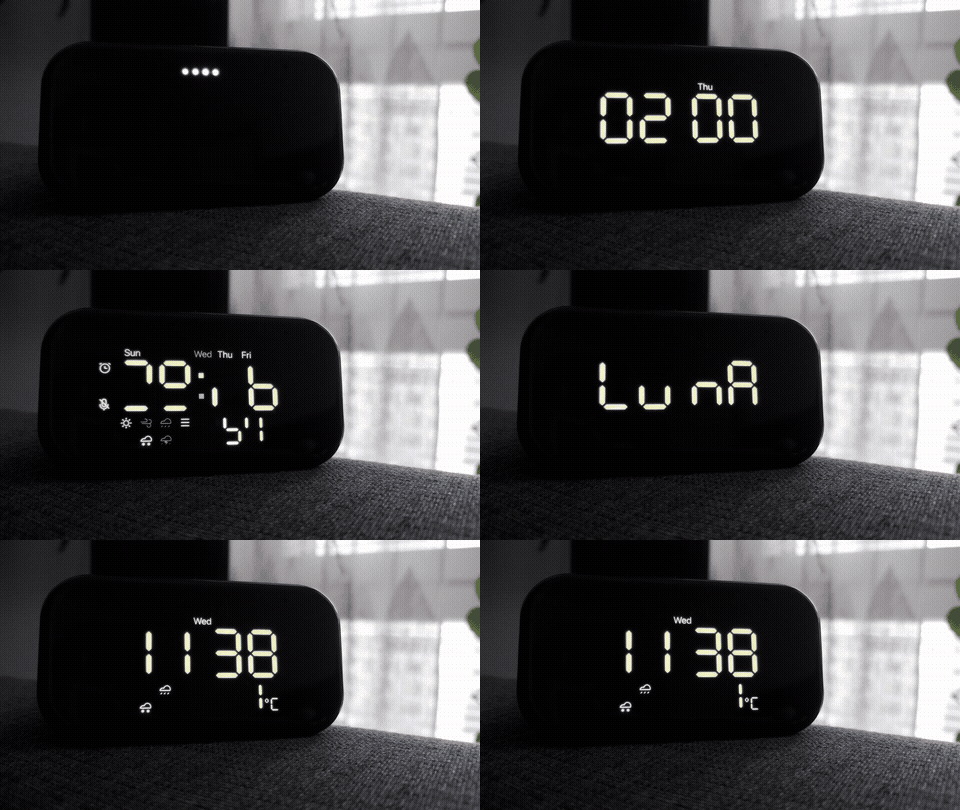
Greetings. Disclaimer: This project has been completed with the use of LLMs, so be warned. Testing done on three units, one with older retail firmware, two with beta / “engineering” firmware. Comes with no warranties. Testers welcome. Firstly, the device in question: Lenovo Smart Clock Essential (CD-4N341Y). No touchscreen, but all the makings of a great voice satellite. It’s the odd one out of the Smart Clock line. No full blown Android, no screen, just a segmented clockface with symbols. Has…
H
When using the input_select.set_options there is no way to set the selected value also, which means the command will force the selected value to something first, before you can issue the command to set the right value. At least the inout_selectvshould not react to changes in the possible options from the input_select.set_options command. 3 posts - 2 participants Read full topic