C
If you lose a device, you can now revoke all of your sessions from your account settings. This signs you out of PlanetScale in every other browser and revokes your pscale CLI logins and the OAuth applications you authorized, such as MCP clients. The organization service tokens are not affected.Organization Administrators can also revoke a member's tokens from the Members settings page. The member's pscale CLI logins and the OAuth applications they authorized lose access to that…
C
You can now authenticate to the PlanetScale API from Buildkite pipelines using OpenID Connect (OIDC). A pipeline step exchanges its Buildkite OIDC token for a short-lived service token, so you no longer need to store long-lived PlanetScale credentials in your Buildkite secrets.Create a Buildkite trust policy in the dashboard for your Buildkite organization and pipeline, then request a token with buildkite-agent oidc request-token and exchange it with the PlanetScale API.Read more
C
Neki now runs Postgres 18.7, the latest upstream minor release, which fixes 52 security vulnerabilities. We've already upgraded existing Neki databases, and new Neki databases start on 18.7.Neki maintenance windows or read the upstream 18.7 release notes.
C
New PlanetScale Postgres databases now use 17.12 and 18.7, the latest upstream minor releases, which include security fixes. Existing databases will be upgraded to these versions over the next few days.See supported versions or read the upstream release notes for 17.12 and 18.7.
C
We've added pscale oidc-trust to the CLI. You can now create, list, show, update, and delete OIDC trusts from your terminal.pscale oidc-trust providers list --org acme pscale oidc-trust create --org acme --name "Deploy from main" \ --provider github_actions --max-ttl 900 \ --condition repository_id=123456 --condition repository_owner_id=7890 \ --database-access mydb:read_branch Use providers list and providers show to see the supported providers and the claims in their tokens.Read the CLI…
C
We've added a command palette to the dashboard. Press Cmd-K on macOS (or Ctrl-K on Windows and Linux) to quickly jump to Insights sections, cluster configuration pages, and settings without clicking through menus.You can also switch between organizations, databases, and branches directly from the palette. This makes navigating large setups much faster, especially when you're working across multiple databases.
C
You can now add a passkey or a hardware security key from your account settings. The next time you sign in, you can use it instead of a code from your authenticator app.If your organization has SSO enabled, configuration remains with your SSO provider.Read more
C
If you sign in to PlanetScale with GitHub, you can now switch your account to email and password sign-in. In your account settings, select Disconnect GitHub, confirm on GitHub, then set a password.After you disconnect, signing in with GitHub stops working for your account and you are signed out of PlanetScale in your other browsers.Read more
C
You can now authenticate to the PlanetScale API from GitHub Actions and Depot CI using OpenID Connect (OIDC). Workflows will exchange their OIDC token for a short-lived service token, so you no longer need to store long-lived credentials in your CI secrets.Organization admins create a trust policy in the dashboard that defines the claims a workflow must present, such as a repository or branch, along with the access to grant and how long the service token lasts. The new planetscale/auth-action…
C
The PlanetScale MCP server now runs on a new platform, and its database queries leave from four dedicated IP addresses:104.28.1.231104.28.1.232104.28.1.233104.28.1.234If your Postgres database uses IP restrictions, add all four addresses so MCP queries can connect. Vitess databases need no changes, since the MCP server restricts its own short-lived passwords to these addresses.Existing sign-ins keep working. If you run into issues, re-authenticate the MCP server in your client.MCP server docs ·…
C
Manage Vitess parameters with v1.18.0 of the PlanetScale Terraform provider. Set VTGate parameters in planetscale_vitess_branch, and VTTablet and MySQL parameters in planetscale_vitess_keyspace.Terraform provider docs for planetscale_vitess_branch · Terraform provider docs for planetscale_vitess_keyspace
C
We've added two tools to the PlanetScale MCP server that let your AI agent tell us what got in its way.planetscale_submit_feedback: report a problem, such as a wrong result, a confusing error, a documentation gap, or a missing tool.planetscale_ask_question: record a question the docs and tools couldn't answer, so we know where to fill the gap.Your agent will send a short note, along with the tool, organization, and database it's about. Each submission goes straight to the PlanetScale team with…
C
We've added emergency backups to Vitess databases. An emergency backup will copy data directly from your running database instead of starting from the previous backup. This ensures you can get a fresh backup right away, even when regular backups are failing.On production branches, you can choose to copy from the primary or from a replica. Copying from a replica reduces the load on your primary. Emergency backups are retained, billed, and restored the same way as manual backups.You can create…
C
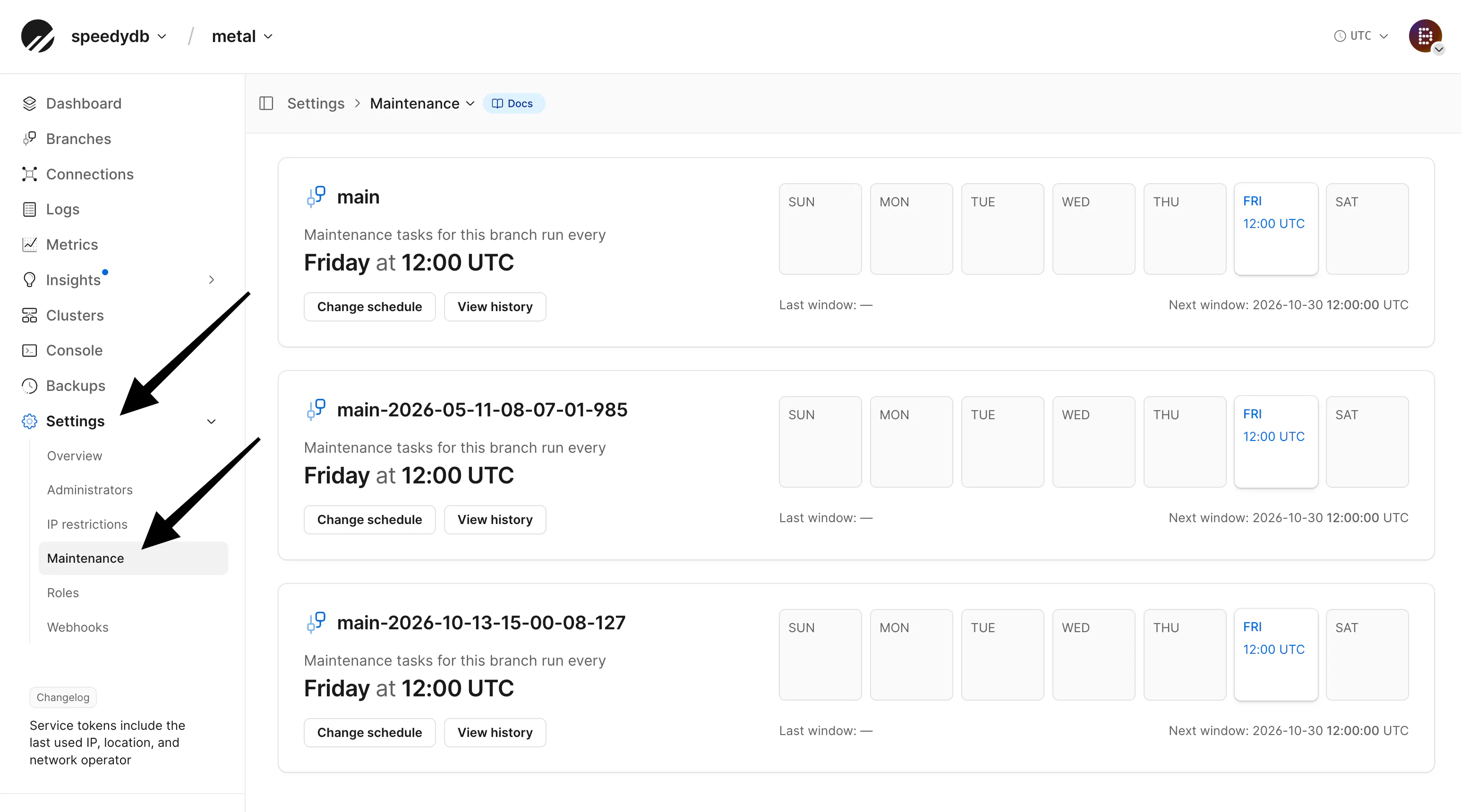
Every Postgres database now has a maintenance window. Your database only restarts in its window when maintenance needs a restart, such as an image update. Your database administrators get an email at least 7 days ahead and again 3 days before. If the time doesn't work, you can move it to any upcoming window before its deadline, up to 3 times.The rest of the time, your window will only run routine maintenance, which doesn't restart Postgres.You can change your window and reschedule maintenance…
C
Manage Postgres storage configuration with v1.16.0 of the PlanetScale Terraform provider. Configure minimum and maximum storage, autoscaling, IOPS, and throughput in the planetscale_postgres_branch resource.This keeps storage settings in version-controlled infrastructure code and lets Terraform detect configuration drift.Read more in the Terraform provider docs
C
We've enabled email notifications for Postgres and Neki databases to inform you when we detect higher than usual public network egress.Postgres network egressNeki network transfer
C
Service tokens will now show the IP address they were last used from, along with the location and the organization that runs that network, such as an ISP or cloud provider. You'll find this in the dashboard, the API, and the CLI. This gives more visibility into how your tokens are being used.In addition to the service token update, audit logs in the UI and API now also include the organization that runs the network behind the IP.Service tokens · CLI · Audit log
C
We've opened a wider set of Vitess operations on PlanetScale. Alongside MoveTables, you can now run Materialize, Lookup Vindex, VDiff, and PlannedReparentShard from pscale branch vtctl (alias vtctld), plus helpers like listing tablets and updating shard tablet controls.These map closely to the matching Vitess vtctldclient commands.vtctl overview · Workflows
C
The Workflows page for a Vitess branch now lists Materialize workflows alongside MoveTables workflows, with the type shown for each one.Open a Materialize workflow to see its stream states, replication lag, and the tables it materializes with the query that feeds each one. Creating, starting, stopping, and cancelling Materialize workflows stays in the CLI with pscale branch vtctld materialize.Read more
C
You can now see live connections to your Neki routers in the dashboard under Connections, or with pscale branch connections show and pscale branch connections top.From the dashboard or the CLI, you can cancel a router session's running query or terminate the session. Cancelling stops the statement and keeps the connection open. Terminating closes the client's connection to the router and rolls back any open transaction, the same as if the client had disconnected.Connections only shows router…
C
We've removed the patroni.slots cluster parameter for Postgres logical replication. PlanetScale will now detect logical slots automatically, so you no longer need to add each slot name to your cluster configuration. Keep failover support enabled on your slots to preserve them during switchovers and failovers.Read more
C
We've updated the Heroku Migrator so Heroku Postgres migrations are faster and cover more databases.The initial copy will now drop secondary indexes on PlanetScale and rebuild them after the data lands. This keeps a single bad index from restarting a multi-hour copy. The tool will also migrate every application schema, not just public, and you can click Verify Migration after switching traffic to compare the two databases.If you use pg_partman, pause maintenance before you start and resume it…
C
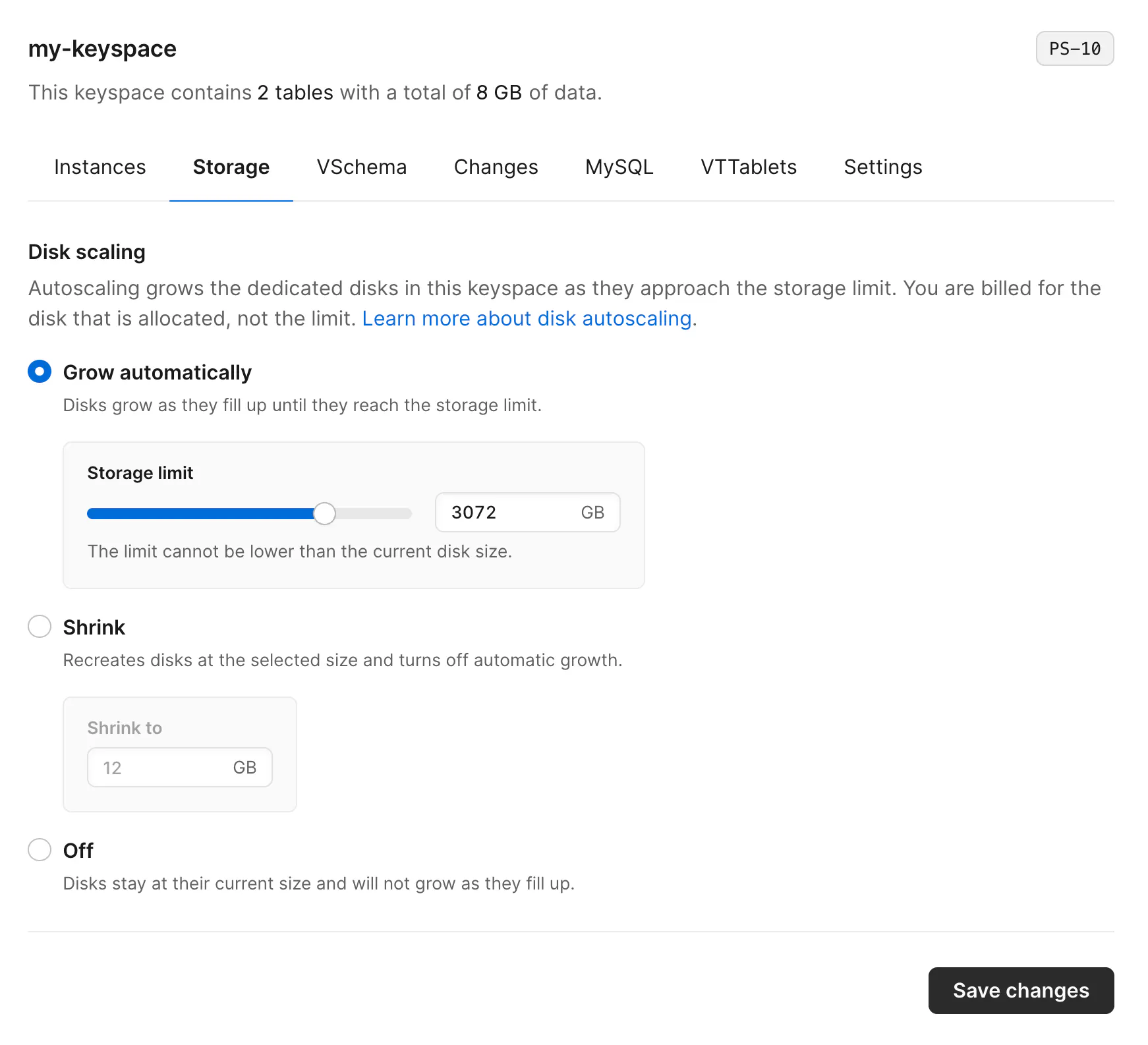
You can now control how disks in a Vitess keyspace are sized, from the dashboard, the API, or the pscale CLI. Let disks grow automatically up to a storage limit, turn growth off, or shrink disks with more capacity than you need.There are three disk scaling options:Grow automatically (the default): disks grow as they fill up, until they reach the storage limit you setOff: disks stay at their current size and will no longer growShrink: disks are recreated at the size you choose, and automatic…
C
We've added read-only replicas for Neki. You can now attach extra instances that copy from the primary and serve reads, without using the replicas that take over during failover.This keeps long-running work like analytics, reports, and exports off the instances that handle live traffic and failover. A read-only replica will never become the primary, and it doesn't count for write durability.Set the count (up to 8 per shard) from the Clusters page, then send reads with Query target on the…
C
We've added Metal sizes M-10 through M-160 for Neki on AWS. You can now run Neki on the same locally attached NVMe sizes already available for Postgres.On these sizes, you'll pick storage capacity separately from vCPU and memory. The capacity stays fixed after you select it.Read more
C
You can now enable huge pages for your Postgres and Neki databases on supported cluster sizes. Huge pages reduce the memory and CPU overhead of managing PostgreSQL's shared memory.Set huge_pages to on in the Parameters tab on the Clusters page for Postgres, or in a configuration profile's Parameters tab for Neki. Applying this change requires a restart. For Postgres, if you don't see the huge_pages=on option, your cluster might not support huge pages, or you might need to run maintenance…
C
The PlanetScale CLI v0.346.0 shows when a parameter requires an update before you can configure it. Parameter listings now include a Requires update column for Postgres branches, and for Neki configuration profiles, admins, and sidecars.# Postgres branch parameters pscale branch parameters list <database> <branch> # Neki configuration profile parameters pscale branch config-profile parameters <database> <branch> <profile> When an update is required, run maintenance on the branch or Neki…
C
The PlanetScale Terraform provider v1.13.0 adds parameter management to planetscale_neki_router. You can configure router settings in Terraform and read them through the router data source.resource "planetscale_neki_router" "app" { organization = "acme" database = "app-db" branch = "main" name = "app" parameters = { router = { "idle-session-timeout" = "10m" "replication-lag-tolerable-min" = "5s" } } } When you configure parameters, Terraform resets omitted customer-configurable parameters to…
C
We've added Microsoft Azure as a cloud provider. You can now create PlanetScale Postgres and Neki databases in Azure regions, alongside the AWS and Google Cloud regions we already support. Vitess databases are not currently available on Azure.To get started, choose Azure as the cloud provider when creating a new database, then pick a region. Databases on Azure get the same features you use on other clouds, including high availability, branching, Query Insights, automated backups, and Metal…
C
You can now opt a single deploy request into aggressive cutover from the CLI and API.pscale deploy-request create <DATABASE_NAME> <BRANCH_NAME> --aggressive-cutover pscale deploy-request update <DATABASE_NAME> <DR_NUMBER> --aggressive-cutover pscale deploy-request update <DATABASE_NAME> <DR_NUMBER> --aggressive-cutover=false You can change this any time before you deploy the schema change. pscale deploy-request show and queue now include an aggressive cutover column so you can see which…