M
My RHino 8 doesn’t have my Rhino7 Va View modes. Do I have to export all 30 of them as individual .in files (I can see how to do that) or can I somehow transfer them all at once. I’ve found that the Hidden Display Modes all seem to come with an Options export/Import as an .ini file. But only three of my many Conceptual View modes come through that way. 1 post - 1 participant Read full topic
M
Can anybody suggest a quick and easy method for cleaning up these steel beam connections? Elements are I am not super familiar with steel workflows but wondering if there is a way to use RiR to get everything slightly more refined. The structure shown is created from a reference mesh. thanks for any help! 3 posts - 2 participants Read full topic
M
Anyone notice this lately? You MatchSrf and then you want to tweak some control points… and you’re able to move them completely freely, in ways that break continuity… yet, when you do SelHistory, they still highlight as being matched. I’ve done factory resets on both V8 and V9 recently, and I see this behavior in both versions… I hope it’s not some weird default that allows this? I’ve also already reported this to McNeel support, but I’m seeing this so frequently now that I had to ask the forum…
M
I’m experiencing an issue in Rhino 8 where text background masks do not work when printing to PDF using Vector Output, but they work correctly when using Raster Output. This is particularly problematic for my architectural plans/elevations/etc drawings, where text annotations need to mask underlying linework to remain legible. Unfortunately, switching to Raster Output isn’t a practical solution, as my colleagues need vector PDFs… Is there a solution to this without going full raster? Thank you.…
M
Is it possible to use custom PNG images as clickable buttons for multiple Set Parameter Values Actions? I’m using the Set Parameter Values Action in ShapeDiver to update multiple parameters at once. Instead of displaying standard buttons with text labels or icons, I’d like to use my own PNG images, each representing a different shape. Ideally, I’d like to arrange multiple Action Controls in a visual selection menu (similar to an image grid or dropdown), where users can click on a specific image…
M
Hi everyone, I’m Alex, a furniture design engineer from Romania. I design cabinets in Rhino and send them to CNC shops, so most of my day used to go into the same steps: placing hinges, working out the drilling from the data sheets, building the parts list by hand. Over time I turned those steps into Python commands. They are now a Rhino 8 package with two toolbars, called Sphericon Furniture, and I’d like to hear what other people who build furniture in Rhino think of it. What it does, all…
M
Rhino 8 on mac. this started happening a few weeks ago, perhaps after the latest update. Sometimes, for no discernible reason, the layouts panel just goes empty. The layout still exist, I just can’t navigate to them. Closing and re-opening the file brings it back. Has happened on many different files so not file specific. Usually, the entire window sort of whites out and “refreshes” right before the pages disappear, like it’s about to crash but doesn’t. System info: Rhino 8 SR37 2026-11-3…
M
I’m testing stretching an object in V9-WIP using SolidPoints but it does not work. The object gumball moves but not the points. I get the result: Command: _SolidPtOn 159 polysurface edit points added to selection. Unable to transform 1 object. I saved the part back to V8, and it works in that version. SIDE_02_V9-WIP.3dm (1.1 MB) 1 post - 1 participant Read full topic
M
I have a text object (could be leader or just text). I change the print color. I update the text. When I click away, the prior text will be weird and overlapping, and when I double click the text, it reverts back to the original. The only way around this is. Change print color. Click away. Update text. Click away. original: I change print color to “by layer” and text to “Light Walnut”, it looks correct before I click away. See below: selecting the object shows the new text “light walnut” in…
M
Pirouette is a line of four sculptural bowls designed in Rhino by Dave Schultze of SchultzeWORKS designstudio. They are now available for purchase on the Nambe website. 1 post - 1 participant Read full topic
M
Designed entirely in Rhino, Pirouette is a sculptural bowl collection in four sizes. Unveiled at the New York Tabletop Show in October 2026, the collection grew from a single licensed design into four sizes: mini, small, medium, and large. Across the four sizes, the design ranges from a small accent to a tabletop centerpiece. The pieces can stand individually or be grouped together, allowing their shared form and differences in scale to become part of the composition. Explore the Pirouette…
M
If you export the “New in V8” Toolbar as a Container Definition File (RHC) and then import that file to Rhino 9.1 - You will end up getting an extra floating copy of the “New in Rhino 9” Toolbar. That was a surprise. What to Do? Also try importing the WalkAbout Toolbar to Rhino 9.1 (Mac). New_in_Rhino_8_Container.rhc (6.0 KB) WalkAbout+Look_Tim.rhc (192.6 KB) New_in_V8_Mac.rhc (19.9 KB) @CallumSykes: Are you working on the RHC import? 1 post - 1 participant Read full topic
M
Hi there, I started using Rhino 9 last week and organized my layout pages into Groups (I love the new feature), however, I’ve opened up that same file this morning and now it’s not displaying my Layout Pages. The groups are still there but cannot be expanded. It is acknowledging down the bottom that I have many Layout Pages, but again I cannot see them. Unfortunately I cannot share my file sorry. I’ve tried reopening the file - no luck. I’ve tried closing the Layout Panel and reopening - no…
M
If youin Rhino 9 create a new container and drag 4 toolbars to the container then I would expect that a RMB “Size to Content” would make the Container as small or large to fit the largest of the Toolbars. What happens is that the Container is resized to the Toolbar which is “on top”, so if it only has 4 tools, the Container will be that width, Size_to_Content.rui (4.4 MB) Rhino 9 SR1 2026-11-10 (Rhino 9, 9.1.26314.09001, Git hash:master @ e7a246f3aefa1afad39e4dc6c2abb31fa5ca4d6f) License type:…
M
Flow subd edges, faces, edit pts - flows but no history Flow subd control points - has history, but explodes part on subsequent edits (file attached), and only works if Copy=Yes Pull subd edges - pulls a copy of the edge curve. History works. Pull subd faces - doesn’t work at all Pull subd control points - works and history works CageEdit subd edges, faces, edit pts - selection not allowed CageEdit subd control pts - works and history works FlowAlongSrf subd edges, faces, edit pts - flows but…
M
when i tick: -- > click ok it does not save nor the snapping works Rhino 9 SR1 2026-11-10 (Rhino 9, 9.1.26314.09001) 1 post - 1 participant Read full topic
M
There seems to be an issue with adding a fraction manually to dimensions: Clicking the “Toggle stacking brackets” button doesn’t work Adding leading brackets and clicking away does work Adding trailing brackets breaks it If you add only leading brackets and click away, the fraction is created, but then add any character and it breaks It is working correctly with Text Objects and Leaders. Screen Recording (click for more details) System Info (click for more details) 2 posts - 1 participant Read…
M
I see that if I make a GLB with many instances the file size goes up with the amount of instances, and if I read it back in the blocks are exploded. GLB support this, so could you please update Rhino 9 to use this for blocks and nested blocks? 3 posts - 2 participants Read full topic
M
Hi! I’ve been using Live Scripts in Raven to create assembly elements in Rhino. It has changed how I work, and I’d really like to keep using it, but I’ve run into a problem. The project is small. So far I’ve only added two slabs and two wall types, placed in six locations. Even so, Raven has become much slower and uses a lot more tokens than it did at the start. A task that used to take about 600 tokens and under a minute now takes around 19,000 tokens and more than 30 minutes. At this point…
M
WalkAbout Toolbar misses three icons on Mac: StepSize + Walk forward + Walk left Also the python-scripts in this toolbar are not running on macOS Golden Gate (27). In Rhino 8 you could just export a Container-file from Windows and import it to mac OS Rhino 8. Rhino 9 SR1 2026-11-10 (Rhino 9, 9.1.26314.09002, Git hash:master @ e7a246f3aefa1afad39e4dc6c2abb31fa5ca4d6f) License type: Commercial, build 2026-11-10 License details: Cloud Zoo Apple macOS Version 27.0 (Build 26A428) (Physical RAM:…
M
Hi, I’m trying to cut down on post-editing of my architectural drawings, and I’d like to understand where the limits of Rhino’s native tools are. My goal is to avoid running Make2D for every drawing. I’d rather have layout details that cut through the 3D model, so every drawing updates when the model changes. I’ve tried the live section tools but find them lacking for this, so I’d prefer a different approach if one exists. What I’m after is a PDF where the linework is exported as vectors in the…
M
I have the sr3 release candidate , for printing reason , but unisolate does not work anymore , isolate does , i have to ""show objects to see the isolated objects again 1 post - 1 participant Read full topic
M
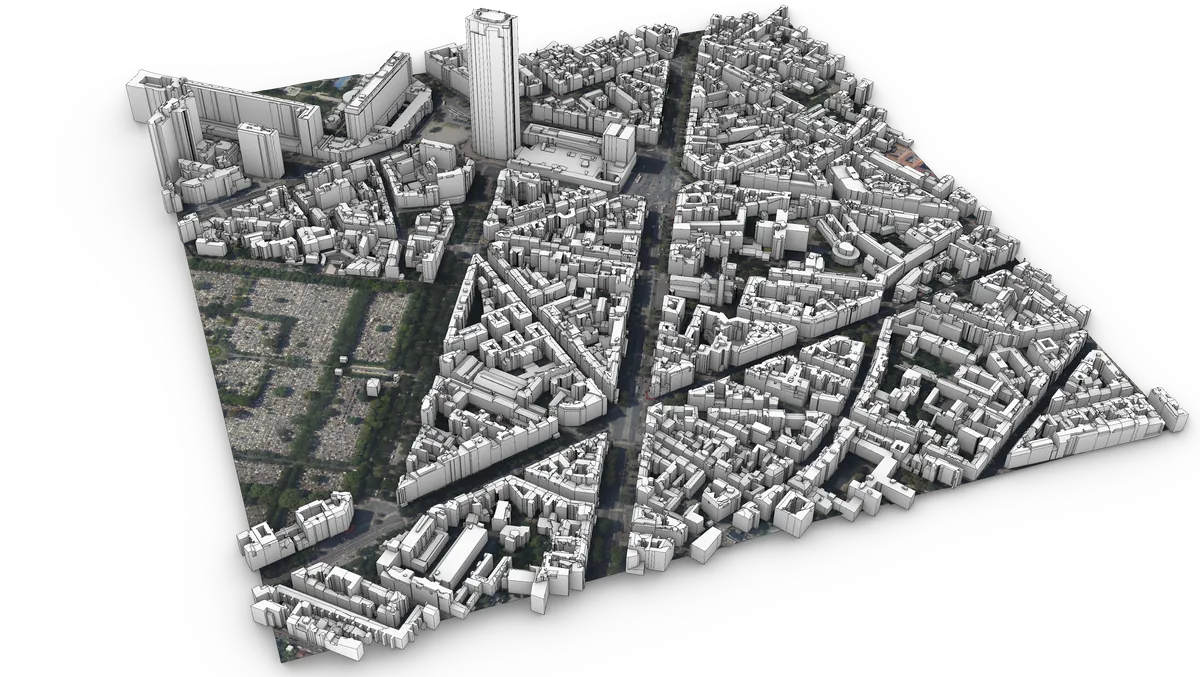
Hi all, I’ve been turning the French national LiDAR survey (IGN LiDAR HD, open data) into ready-to-use city context for Rhino: buildings in LOD2.2 with their real roof shapes, terrain, and the aerial photo mapped on the terrain. Everything is cut into 1 km × 1 km tiles, georeferenced in Lambert-93. The reconstruction runs on PDAL and Geoflow, then goes from CityJSON to OBJ and native .3dm. There is a free sample (500 × 500 m around Fourvière, in Lyon) with the .3dm if you want to try it in your…
M
Have tried installing two separate plugins, neither of which want to install. Could be the plugins but with two I thought it might be a Rhino / setting issue I’m missing. Any ideas? The details dialogue provides no useful information. 1.) 2.) sysinfo.txt (2.3 KB) 4 posts - 3 participants Read full topic
M
Hello, I’ve now looked through se veral tutorials on 2D drawings, but so far I haven’t found any information regarding my problem. Similar questions I’ve read here in the forum should have been resolved by an update. I’m using the latest version, SR 8.37.26307.15001. My question: When I print a PDF from the top-right or front view, the result is practically exact (420 mm > 419.947 mm in AI). But when I print a page, the result is incorrect. What am I doing wrong? 2 posts - 1 participant Read…
M
Hi all, I’m Yasin from OstlerTech. I write C# tools for Grasshopper and AutoCAD. My Grasshopper plugin MakerKit covers kerf offset, finger joints, box generation, nesting, living hinges, bend allowance, sheet-metal flat patterns and layered DXF export (CUT / ENGRAVE / BEND). The image below is real DXF output from the plugin. I also built and sell AreaPilot, an AutoCAD add-in for area, perimeter and quantity takeoff with Excel export. I can help with custom Grasshopper components (or turning a…
M
Hi can someone shed light onto this logic inconsistency? edit: I already solved by adding a rounding component, as if there is some invisible decimal difference, but why? debug_dotp.gh (7.6 KB) 5 posts - 4 participants Read full topic
M
Hi, In version 9 is great to linked referenced pointcloud … but limits on included selected objects dosen’t work! Of course it works fine on normal inserted clouds… is it a bug or a missing features? 1 post - 1 participant Read full topic
M
Hello, I am trying to install the Dlubal-Plugin for Rhino 8. I have the RFEM 6.14 and 6.16 versions on my computer, as well as Rhino 7 and 8. I want to run Rhino 8 with RFEM 6.16. Does anyone know where the problem might lie? 1 post - 1 participant Read full topic
M
Hello Fellow Rhino Nuts, I have been haunted by the prospect of unsnapping lines & nodes as far I can remember from at least 18 years ago when I picked up Rhino to practice architecture. Usually, I am keen to keep things in order because when I go to model, I will not continue with open polys; going as far as to redraw everything. Even after all the rigor I always find myself catching this moment inside overlapping lines that are not correctly overlapping, missed corners, microns off etc.…