A
"Format Değişikliği (.xls’den .ods’ye): Sorunu ağırlıklı olarak .xls ve .xlsx uzantılı dosyalarda yaşadığımız için bunları .ods formatına çevirmeyi denedik. Bazen geçici olarak kaydetmemize izin verse de her zaman işe yaramadı. Hatta dönüştürdüğümüz bazı .ods dosyalarını açmaya çalıştığımızda sadece beyaz, boş bir ekranla karşılaştık." Buna tamamen katılıyorum.Aynısını yaşıyoruz. Dün yine temiz bir kurulumda son versiyonu kurdum. Neredeyse boş sayılabilecek bir belgeyi açmayı denedim ve açıldı.…
A
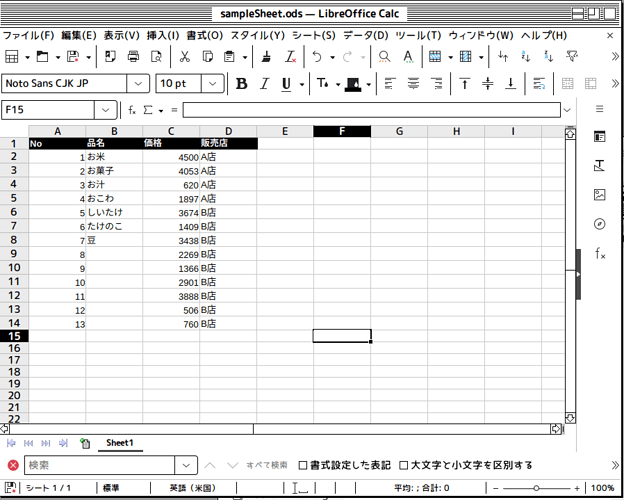
LibreOffice Ver 26.8.1.1 (X86)_64 Ubuntu 26.04 お世話になります。 Calcのオートフィルについてです。 先頭行が表示されていない状態でオートフィルを試みると、上に移動してしまいます。 [再現手順] 先頭行に適当にカラムを作ります。 2行目以降にデータを入れます。 1行目がウィンドウに表示されていない状態まで下にスクロールします。 データの入っているセルの右下の■からマウスをドラッグしてオートフィルします。 [結果] オートフィルが上に移動する [期待する動作] オートフィルが下に移動する [参考画像] 1行目をカラムにして2行目以降データを入れる 先頭行が見えない状態にして、データが入ったセルの右下の■から下にドラッグしてオートフィル 上にフィルされる また再現性はないですが、横にフィルすることもあります。 他の環境で試せていないので、どのように挙動するかは現状分からないです。
A
Hello, everyone. I want to access an Access product order database from LibreOffice Base and extract data for completed orders within a specific time period. The “Completed During This Period” query accepts the start and end dates of the target period as parameters, but when I use the YY/MM/DD format, the results are blank and I can’t extract the data. I can extract the data if the format is MM/DD, but then entries from 2025 and 2026 get mixed together. What should I do? Thank you in advance.
A
I have click Include formats , but still have the problems. Row height adjusted to suit, but this does not move with data when sorted. Version: 26.2.6.3 (X86_64) Build ID: 8221e31b3ac356a1623c672912a3d2b492f7e3d1 CPU threads: 16; OS: Windows 11 X86_64 (build 26200); UI render: Skia/Raster; VCL: win Locale: en-US (en_US); UI: en-US Calc: threaded Thank you
A
Thanks. This is getting the TOC entries nicely lined up but the periods are still not aligned and the numerals flush right. But I’m not even convinced this program is behaving consistently. I’m not convinced this can do what I want tho I do appreciate the improvement.
A
Your bug has been marked as a duplicate of another bug. From https://bugs.documentfoundation.org/show_bug.cgi?id=173297#c17 It seems that the workaround appears to be “Reading my bug 157135 comment 65 and trying it out, renaming share\extensions\dict-en\Lightproof.components to Lightproof.components.old, the hang goes away.”
A
These links don’t appear to address the issue I’m having. But I do have a theory that the issue may have something to do with the audio dropdown menu, because there’s so many files listed there from both this presentation and previous ones that it might potentially be causing problems. I have yet to test this, though. Not that I know how to clear that queue.
A
JeanneMarie: is it possible In the paragraph style (Content 1) I added two tab stops (at 10 mm right aligned, and 12 mm left aligned) Then added tab stops before and after the entry number.
A
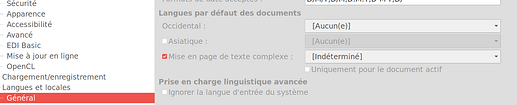
Bonjour et bienvenue @Benjibasson83, sans le document .xlsx pour tester, c’est un peu pifométrique. Une hypothèse à tester : supprimer la langue par défaut des documents. Voir la copie d’écran Benjibasson83: les dates acceptées sont déja D/M;D.M.Y;D-M-Y;D/M/Y. J’ai toujours considéré ce réglage applicable à la saisie des dates, pas au format par défaut des cellules.
A
I wonder if anti virus heuristics are causing the issue? Can you add soffice.bin to the anti virus Allowed list? It is possible that the previous version was in the Allowed list. . For testing purposes of it isn’t the above, you could install parallel versions of LibreOffice, see Installing in parallel - The Document Foundation Wiki
A
Thanks. I changed the extension, so it works equally well in Writer and Calc. Addons.xcu: <prop oor:name="Context" oor:type="xs:string"> <value> com.sun.star.drawing.DrawingDocument,com.sun.star.presentation.PresentationDocument,com.sun.star.sheet.SpreadsheetDocument,com.sun.star.text.TextDocument </value> </prop>
A
Thank you. This is one possible solution. After copying pics from Calc to Draw, you have to ungroup them, then edit and after pasting back you need to restore anchor to cell (pics are meant to be like cell values).
A
Gracias. La propuesto es algo complejo para un usuario inexperto; no lo realizaré. Supongo que debo esperar que lo solucione el equipo de desarrollo.
A
Sans ton code, il est difficile de t’aider. Assure-toi d’ajouter un argument à la macro. Sub Mi_Macro(args) End Sub
A
Thanks for all the replies. Here’s what I’ve learned so far: A chart can be accessed in two different ways: Via the Charts collection. Via the DrawPage. Renaming a chart is only possible through an object accessed via the DrawPage, not through an object accessed via the Charts collection, even though the Object Inspector shows the setName() method. So far, so good. Now, Stephen Hawking once said, “It is very important for young people to keep their sense of wonder and keep asking why.”…
A
Para extrair o CEP de uma coluna com o endereço completo, acho que vale considerar também os casos em que o código aparece com ou sem hífen, já que isso pode afetar o resultado. Se houver vários formatos de endereço na planilha, uma fórmula ou macro que identifique os oito dígitos do CEP pode facilitar bastante a separação sem alterar o restante do texto.
A
FrankyBoy: myChart = ThisComponent.Sheets(0).Charts(0) In an excellent example provided by my colleague @Lupp, this construct (as shown by MRI) returns an object that supports the TableChart service. This service, in turn, has the XNamed interface, which includes the methods getName and setName. The getName method returns the programmatic name of the object: “Object1” and this name (in this case) cannot be changed by setName.
A
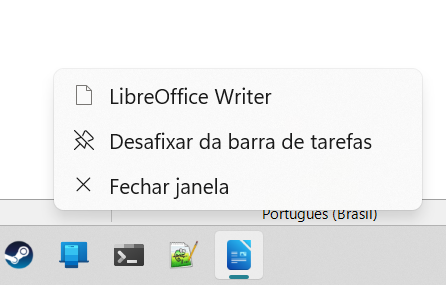
Olá, eu estava no Libreoffice 25 e os atalhos e documentos fixados na barra de tarefas do Windows 11 estavam aparecendo normalmente. Decidi atualizar par ao Libreoffice 26 mais recente e essa funcionalidade não está mais presente. Já reiniciei o sistema, mas não mais é possível anexar documentos frequentes na aba acessível pelo botão direito sobre o atalho na barra de tarefas.
A
Re, J’ai un peu avancé. Si j’affecte la macro au bouton sur Touche enfoncée ou Touche relâchée, la macro ne s’exécute pas. Mais si je l’affecte à Réception du focus, la macro s’exécute.
A
So it is right: The forms are external forms, not forms inside the Base file. Seems there won’t be established any connection to the database when form will be opened this way in Win 11. . Don’t know why you create a switchboard inside the Base file and external forms… . Might be it helps to execute a little macro when opening the document: SUB DatabaseConnect oDatabaseContext = createUnoService("com.sun.star.sdb.DatabaseContext") oDatasource = oDatabaseContext.getByName("Name of registered…
A
Na entrada eu tenho a tolerância dos 10 minutos! Não serei descontada! Porem, se eu entro às 07:15, serei descontada os 15 minutos e se me atrasar 5 minutos no almoço, sim serei descontada os 20 minutos!
A
Bonjour, Dans mon classeur sur une feuille j’ai créé un Bouton auquel j’ai assigné une macro, cependant l’action sur le bouton avec la souris ne lance pas la macro. Pour tester j’ai inséré une forme à laquelle j’ai assigné la même macro et qui fonctionne correctement. Je suis en version libreoffice 26.8.1.1 sous Windows11. Quelle peut être le problème avec le bouton? Merci par avance à ceux qui se pencheront sur mon problème
A
Esclarecendo: Entro as 7:10 e atraso 5 minutos no almoço, quanto vai descontar? 15 ou 5 ??? E se entro 7:15 e atraso 5 no almoço o desconto e 20 min. Vou dar uma saída, continuo mais tarde…
A
Sim! No caso de almoço, não tem tolerância! Somente na entrada para o trabalho que a pessoa tem tolerância de 10 minutos. Porem se chegar 11 minutos, será descontado os 11 minutos! Ex. Meu horário de entrada é 07:00, mas cheguei 07:10, tudo bem, pq estou na tolerância! Mas se eu chegar às 07:11, serei descontada. Se puder me ajudar em relação às horas noturnas. A formula não esta considerando. Ex 23:00 para 24:00. Ex o funcionário foi jantar e bateu o cartão às 23:12. Ao voltar para o trabalho,…
A
Ola @mlmacatto, a tolerância é de 10 minutos considerando o atraso da entrada inicial + entrada do almoço? Se SIM, preciso revisar a formula… A formula Y17 esta pegando a dados da linha 23, corrigindo fica 6 min.
A
FrankyBoy: It seems to me that I’m missing something fundamental here. Just a GUESS Sun collapsed before they could finish the (very complex ) UNO software. So they implemented just an so to speak “Interface” in the Java tradition, without the code. Sometime ago I tried some method in a routine for Base and it didn’t work, raising also an error message. Don’t remember what it was… And yes: I also checked via MRI and the variable points to the Chart, Name displays but Method setName raises the…
A
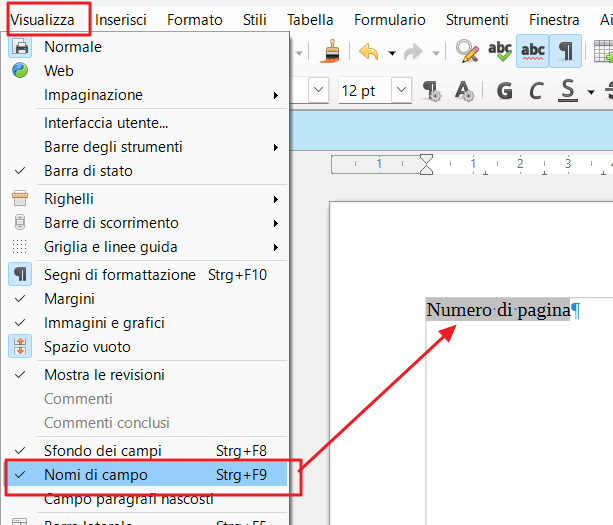
Ciao, avrei gentilmente bisogno di un aiuto per risolvere un problema che sto riscontrando con LibreOffice Writer durante la creazione di un documento. Quando provo a inserire il numero di pagina, questo non viene inserito automaticamente nel modo corretto in ciascuna delle pagine del file di progetto: infatti compare solo una scritta sul fondo con uno sfondo grigio con la dicitura «Numero di pagina». Se, ad esempio, inserisco manualmente il numero 1 nello spazio corrispondente, tutte le pagine…
A
The properties of the pushbutton I use to open the form are: Action…Open document/web page URL … file:///C:/Users/[name]/Documents/Garden%20Database/Plant%20View.odt
A
I have tried “–headless” but it takes about 30-40seconds to run (if I remember correkt)