A
@RobertG, what I find curious is this context menu and its purpose. I created a blank form—truly devoid of any objects, just a white page. I saved it and then reopened it. When I right-click, this context menu still appears. What is its function? There is nothing there—no images to enable or disable, no text to select, and nothing to “reload”… I also noticed that in a form containing objects, the options in this menu do absolutely nothing. This could even be misleading or confusing for a user.…
A
crb999: saving my work to microsoft’s DOC format. Doc format is an obsolete binary format not in current usage by Microsoft. It is more readily corrupted and much harder to recover than the current Microsoft format of DOCX. If you’re going to send doc always work in .odt and click File - Save a copy as doc and send that but continue working in odt format. crb999: use either Linux, or Libreoffice ODF Open Document Format is not a Linux format, it is an ISO standard, the first ISO document…
A
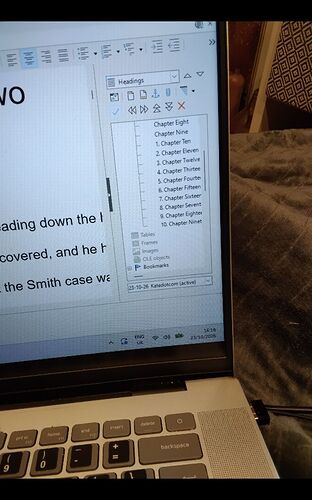
A screenshot has never allowed to solve an issue. I see that headings up to"Chapter Nine" are unnumbered and subsequent headings are numbered. Since this is inconsistent with regular numbering controlled by Tools → Heading Numbering, I suspect you added, perhaps inadvertently, list numbering with toolbar button or direct formatting. If your document is saved .doc or .docx, it is extremely sensitive to direct formatting and resulting instability. The “correct” workflow is to save .odt which…
A
Problem solved! Based on the HSQLDB 2.7.4 malfunction with embedded bases post, I installed HSQLDB 2.7.4 as explained by @Primus. I had an issue though, as I had JRE 1.8.0.503 installed (up-to-date at that time). But it can’t run the HSQLDB 2.7.4 Java files which were compiled with a later version. So I had to install the latest JDK (27.0.1.0.2) and everything went fine. Thanks to all for guiding me through the fog!
A
well, with “machines” I don’t mean hardware but software à la “Google AI”. Being an old user of 80 years I just want my paid search program Copernic to be able to find content in a calc table. Therefore I have written them to have a look at this thread. And since I am not using Adobe, but only the wonderful PDF24, I have written them also, because with this reader I can easily find out if a PDF or only parts of it is indexed. Hitherto this Libreoffice forum did not give me an answer - sad.
A
Sorry. I haven’t had a problem for years and just forgot the protocol Libreoffice 26.2.0.3 Win 11 version 25H2 os build 26200.9711 The conversion inserts numbers and letters sometimes, quite randomly. In the attached picture I’ve shown headings, which echos the chapter headings Regards Chris Christopher Bruce 8th Dan 八段 Kyoshi 教士 OSS Taisho
A
From Base to Calc: Ctrl+Shift+F4 (data source window) Browse your database and drag the icon of your table or query onto a spreadsheet cell. If your database is not in the data source window: right-click>Registered databases… or Tools>Options>Base>Registered databases. The resulting range is a link. Data>Refresh refreshe the link. Glitch with wrong defaults on nonsense options: Data>Define… Select your linked database range. Under “More Options” select “Insert/Remove cells” and “Keep…
A
Já tentou Reiniciar em modo reparo, esta no Menu Ajuda, e abrir os arquivos.
A
i.guigo: ao abrir dois arquivos simultaneamente Isso é selecionando os dois arquivos numa pasta e pulsando Enter? Ou arrastrando os arquivos até a janela do LibreOffice? Já estando o LibreOffice aberto? Qué ocorre se você modifica o fator de zoom? E se escrever ou eliminar parte do texto? i.guigo: já desinstalei Teste com Reparar o LibreOffice (Modo de segurança). A versão 26.8.0 está dando mais de um problema. Se puder voltar a 26.2.6 ou 25.8… Compartilhe a informação da versão (está na última…
A
Hi @fimeck I have reconsidered, I don’t think it is Windows Security anti-ransomware because then LibreOffice would not start. fimeck: the system locks dows as soon as I try to open a document Maybe you have installed AVG or Avast anti-virus, they block access to files in certain locations except to approved apps. You can add LibreOffice to the Allowed list Open AVG. Click Menu > Settings > Blocked and Allowed Apps then click on the button +Allow App, a new dialog will appear Click the button…
A
How can export a table from a Base database to excel or calc format. And after adjusting the data import it again the base database? I cannot find this option in Base yet, in Access you have this possibility.
A
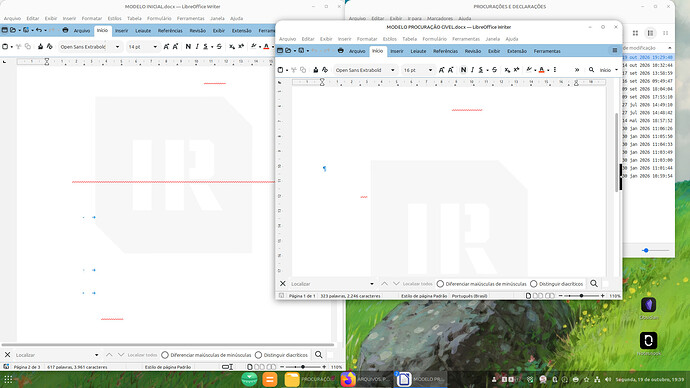
Olá, gente! Espero que estejam bem. Estou usando a versão 26.8.0.3 (X86_64) Flatpak do Libre instalado num computador com Linux Mint 22.3 - Cinnamon 64-bit (Kernel 7.0.0-38-generic). Há algumas semanas venho passando por uma situação estranha no Write que não consigo resolver: ao abrir dois arquivos simultaneamente, o segundo aberto ou ambos ficam com a escrita totalmente invisível. A imagem abaixo ilustra a situação: Fiz alguns testes para verificar se era algum problema com o formato dos…
A
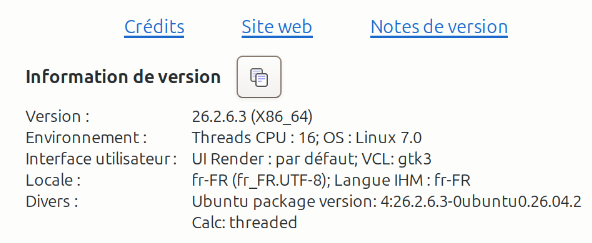
J’utilise Ubuntu 26.04 et Libre Office : Version: 26.2.6.3 (X86_64) Build ID: 620(Build:3) CPU threads: 16; OS: Linux 7.0; UI render: default; VCL: gtk3 Locale: fr-FR (fr_FR.UTF-8); UI: fr-FR Ubuntu package version: 4:26.2.6.3-0ubuntu0.26.04.2 Calc: threaded4 Merci d’avoir répondu à mon message.
A
Hab’s mir jetzt erst angesehen. Ist ein Schritt in meine Richtung, aber definitiv ein Hack. Wenn man das exzessiv anwendet, kapiert das am Ende keiner mehr. Danke dennoch für den Tipp.
A
Je suis sous Ubuntu 26.04et pour Libre Office :
A
Bonjour, pourriez-vous nous donner la version d’Ubuntu et la version de LibreOffice ?
A
I’m experiencing this in october 2026, the problem can be reproduced working with files from a SMB share
A
Bonjour, Après mise à jour d’ubuntu, les plages sélectionnées dans Calc ne sont pas mises en évidence (ni encadrées, ni en surbrillance…). Ce n’est pas pratique : qui aurait une solution ? Merci
A
I am not an expert in tables of content. JeanneMarie: the periods are still not aligned Which periods? For A, B, etc., you must edit the tabs for Contents 2 style. JeanneMarie: the numerals flush right You can reduce the position of the tab stops. Paragraph styles Contents n must be reapplied once the TOC is updated and every time you “refresh” it. Formatting TOC with roman numerals_LeroyG.odt (13.5 KB)
A
Hmmm… I was hoping for something that a purely conditional formatting solution, but this does look like it may solve my particular problem anyway, even with having to make additional data-tracking cells, which is the next best thing. Thanks!
A
Row height isn’t a cell format property but a property of the row. When sorting data there are no rows moved, but cell contents, and -if the respective option is enabled- cell format properties.
A
@LilithRose Suggestion 1: NEW__Example02.ods (135,0 KB)
A
Tekrardan selamlar. Çözümü buldum. Libre dil ayarını İngilizce (UK) çevirdiğinizde yüksek ihtimalle sorun düzelecektir. Ekstra olarak buradaki bug report bölümünden, önerilen çözümü de deneyebilirsiniz: https://bugs.documentfoundation.org/show_bug.cgi?id=174005 https://bugs.documentfoundation.org/show_bug.cgi?id=173297 Ekstra olarak bu sorun 2023 yılında karşılaşılmış bir sorunmuş. Norveççe ve Türkçe’de oluyormuş. Yine benzer bir durum yaşanıyor.
A
Tekrardan selamlar. Çözümü buldum. Libre dil ayarını İngilizce (UK) çevirdiğinizde yüksek ihtimalle sorun düzelecektir. Ekstra olarak buradaki bug report bölümünden, önerilen çözümü de deneyebilirsiniz: https://bugs.documentfoundation.org/show_bug.cgi?id=174005 https://bugs.documentfoundation.org/show_bug.cgi?id=173297 Ekstra olarak bu sorun 2023 yılında karşılaşılmış bir sorunmuş. Norveççe ve Türkçe’de oluyormuş. Yine benzer bir durum yaşanıyor.
A
Saitoib: What should I do? At first: Show the sql of both queries and the definition of the date-columns. Saitoib: if the format is MM/DD What do you get, if you set no format? What about YYYY/MM/DD?
A
Hi again, Today the system locks dows as soon as I try to open a document. I therefore want to try your suggestsion, but I am not a technical guy, so I hope you can give me some more explanation: What is “ransom ware protection”? Where can I add soffice.bin to an allowed list?
A
betelijah: I installed Microsoft’s Fluent Calibri fonts from the official Microsoft Fluent Fonts.msi installer. This page: https://www.microsoft.com/en-us/download/details.aspx?id=50721 (?) Do you have read on this page?: For non-Windows platforms, there must be support for installing system-wide fonts and extracting files from a ZIP file. For non-Windows platforms that support installing fonts, select the file “Microsoft Fluent Fonts for non-Windows OS.zip”. Extract the files, read the file…
A
Just for your information: https://wiki.documentfoundation.org/Fonts The replacement font for Calibri in LibreOffice is Carlito.
A
LO has dropped support for “Type 1” fonts. So the question is: which is the type of this font? You can tell with FontForge utility (at least). It is one of Fedora packages.