A
The intersecting worked. The exporting a text box as .jpg did not. It did export but as a full page doc as opposed to a .jpg? “If” I uninstall LibreOffice and re-install, would that help if there were any corrupted files. I will look at the corrupted user profile link you provided as well. If I must re-install, I will not lose any of my saved documents, correct? Thank you!
A
I did need to change my email and, after looking all around profile, etc., found no way to do it. found this link and when you scroll down, you will see “Document Foundation” and that is where I actually changed my primary email and it took on LibreOffice after logging out and back in. Here’s the link so you can see as I’m wondering if there is any link. Change email address
A
DJsOak: I just changed my email via Document Foundation…wonder if that caused an issue? Not for LibreOffice.
A
@RobertG, reporting this bug would require me to create an account—something I have no desire to do—and the entire Bugzilla submission process seems far from straightforward; I simply have no interest in going through it. The process feels unnecessarily complicated; I prefer things to be simple. I have pointed out a situation here that I consider dysfunctional, and that is where my contribution ends. . Thank you for taking the time to provide feedback, which helped me realize that this menu…
A
Thanks, Al, I will try that. You know, I just changed my email via Document Foundation…wonder if that caused an issue? Perhaps I will give it some time plus try what you suggest.
A
From LibreOffice, Click the menu Help > Restart in Troubleshoot mode > Restart > Continue in Troubleshoot mode Open Draw and try exporting a text box as JPG. Does it work? Try Intersecting an image with a shape, does it work? If both work then you have a corrupted user profile, see LibreOffice user profile - The Document Foundation Wiki
A
I only say that because it worked previous to my installing the latest version. I did get it to work but no where near as easily as it did prior to the last update but I’m not real tech savvy. I will not report a bug yet until it does it again and again–don’t see how to set the transparency when I put a shape over a picture? Please advise as I’d like to try that as well. Again, thank you!
A
DJsOak: Again, this had been working fine up until (I think) the last updat 2 “glitches” since last update… Possible, but I recommend to test in safe/troubleshoot mode before reporting bugs to rule out problems with a corrupted profile.
A
Renel: It’s a rather dysfunctional situation. So write a bug for this: https://bugs.documentfoundation.org/ Post the number of the new bug here so I could set it to “new”
A
DJsOak: the last update? ??? Workaround Set the shape positioned over the image to 10% transparency; that should do the trick. You should report the problem as a bug. https://wiki.documentfoundation.org/QA/BugReport
A
I would take a picture, cover it with a shape, highlight both (shape is now on top of picture), click on intersect and the picture would be converted to that shape. Now, all of a sudden, it just has a white section with part of the outline on it? Again, this had been working fine up until (I think) the last update? Thanks for any help.
A
Using LO 26.8.1.1 (AARCH64) on MacBook. Up until perhaps last update, was able to add text to a picture, highlight entire pic w/text in Draw, export to .jpg. It is no longer working that way and, in fact, if I highlight just a textbox, it does not export as .jpg? Not sure what changed but how can I now get it to export as .jpg or other format? Perhaps I inadvertently changed a setting? Fontwork to .jpg works and pic to .jpg works–not text? Thanks for any help, DJ
A
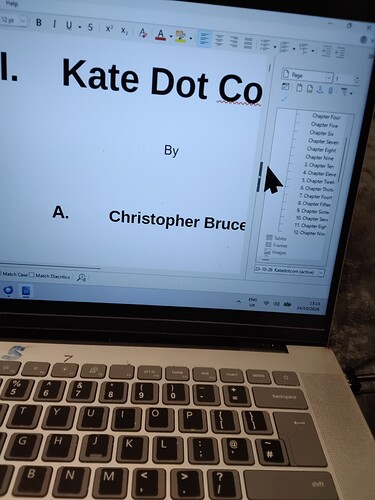
As already mentioned, a screenshot is nearly worhtless because we can’t look at the underlying encoding. And worse, View → Formatting Marks is not enabled. Your screen does not show the hidden “directives”. The “1” and “A” come from automatic numbering. They could have been created at least 3 different ways. Without a sample file, we can’t tell. crb999: I have just run a test saving my document to ODT, and then to DOCX, and there were no problems as far as I can see Saving an .odt from a .doc…
A
Saitoib: SELECT `受注データ`.`受注番号`, `受注データ`.`得C`, `得意先マスタ`.`得意先名`, `受注データ`.`数量`, `受注データ`.`横`, `受注データ`.`縦`, `受注データ`.`深さ`, `受注データ`.`完成日` FROM `得意先マスタ`, `受注データ` WHERE `得意先マスタ`.`得C` = `受注データ`.`得C` AND `受注データ`.`深さ` >= :開始日 AND `受注データ`.`完成日` <= :終了日 受注データ.深さ is a decimal field >= parameter :開始日. This is the second last column of your selection. 受注データ.完成日 is a date field <= parameter :終了日. This is the last column of your selection. HOWEVER: The “Completed During This Period” query accepts the start and…
A
OK! I’ve verified in the document you sent that the “Select text” context menu item serves no purpose. “Disable image” hides the image you’ve inserted, but the image frame remains visible. Unchecking this option makes the image reappear, as does the “Change image” option. The “Reload” option does absolutely nothing. . In my view, this context menu is completely useless. What’s most confusing is that it appears in any database form whenever you right-click on an empty space—anywhere not occupied…
A
I have just run a test saving my document to ODT, and then to DOCX, and there were no problems as far as I can see, I have not yet examined every page. I’ll stick with this procedure, and hope never to bother you again. Regards Chris Christopher Bruce 8th Dan 八段 Kyoshi 教士 OSS Taisho
A
Qual suplemento? É extensão?
A
Thanks Alistair. Now i find that my original text, saved as *.ODT has These oddities added. Pic attached Neither the 1 nor the A period was entered by me. Christopher Bruce 8th Dan 八段 Kyoshi 教士 OSS Taisho
A
Como introduzir no LibreOffice CALC o suplemento para o ChatGPT?
A
Here a “raw” version of @Ratslinger’s code. Taking notice that his is much more robust and allowing for tuning of dimensions and positions of the called form. Option Explicit Sub GetID(Evt As Object) 'GlobalScope.BasicLibraries.loadLibrary("MRILib") Dim Grid As Object, RowId As Object Dim id As Long On Error GoTo Erro Grid = Evt.Source.Model Rem Get the column with the ID info needed RowId = Grid.getByName("CUSTID") Rem Get the clicked row id id = RowId.getCurrentValue() OpenDF(id) Exit Sub…
A
I shall experiment with docx and report back Thanks Chris Christopher Bruce 8th Dan 八段 Kyoshi 教士 OSS Taisho
A
I did not such thing. I used that example for ease of demonstrating the problem. at random, i found that where I had written, ‘Chapter xxx’, a number had been added to the left of the word. This was randomly added, and generally followed no pattern. Christopher Bruce 8th Dan 八段 Kyoshi 教士 OSS Taisho
A
CRDF: Base Macro - Click on Table Row to Open Record Direct link: Base Macro - Click on Table Row to Open Record English Hello @PhLo, Have attached a Q&D sample. Using the form CustomersGrid (again Q&D - no filter used) when you click on any row, that record will open form CustomerEdit at the record chosen. Code can be improved upon for your needs and includes code to resize the newly opened form. The new form is opened at the required record by setting the filter to the ID value requested.…
A
If the form is blank nothing could be shown by “Load Image”. Have a look at the form of attached database. With “Load Image” you could see the image and the content of the frame. I don’t know any reason to use this «function». Internal_Firebird_TestDB.odb (24.8 KB)
A
redline: open a different for Macto to open a form is in the guide for base: https://books.libreoffice.org/en/BG72/BG7209-Macros.html#toc99
A
macawfeather: save sent in DM for reference : ./document.xml:2: parser error : Opening and ending tag mismatch: sdtContent line 2 and p <w:rPr><w:lang w:val="en-GB"/></w:rPr><w:commentReference w:id="2"/></w:r></w:p>
A
Hello @mikekaganski, it seems that I have the same problem as everyone, writing a file on Libre Secrets in the Time of Exchange.docx (96.5 KB) Office and then after saving it to a .docx file, it does not open again. Is there a way to save the file? Many thanks!
A
Check the solution by @Ratslinger in Base Macro - Click on Table Row to Open Record
A
I’m new to base and trying to create my database in base to replace ms access. backend is in mariadb i created some forms and i would like to be able to click a field in a subform list that will open a different for, this form is a list of knowledge articles and when i click a cetain field i want it to open a form to display all of that information better than ina list form
A
Wanderer: think I guess the OP answered your rant