Getting values from another sheet
Then thing is that the error goes away if i click hard recalculate.
Posts from every feed QUEST has found across the web — blogs, news, podcasts, channels and more.
Then thing is that the error goes away if i click hard recalculate.
PaulHam: I had no idea it even had a trouble shooting feature It was renamed recently. In older versions you will find “safe-mode” as this does not load anything from user-profile.

michaelblucher: Google Docs I remember the topic and your way seems at moment to be the solution or work-around. The following thread has also a bug-report listed: tdf#114164 TOC of a document exported to EPUB English Wich can be summarized without external link as: load the .odt in Google-Docs, then “select File, Download, Epub publication.”

Worked like a charm I had no idea it even had a trouble shooting feature. The extension saves me a bunch of time each time I update my spreadsheet, happy to have it back working again. Many, many thanks

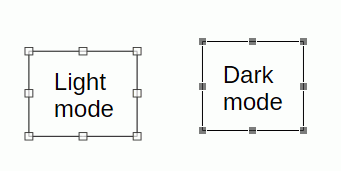
EarnestAl: guessing you are using Dark mode. As the handles shown in the sceenshot are a grey variant of the light mode it may be light mode. But when somebody asks Benn1: preferably by someone who is not a programmer, I’m out anyway… (Otherwise a screenshot of his settings may have been interesting.)

That is something that I can try, and I don’t want to be rude, but the last Libre Office extensions I tried made Libre Office so unstable, that I had to remove it. That was, of course, the spelling and grammer checker. I’ll give it a try in the next couple of days. Note: The extension needs to produce EPUBs that are compatible with Google Books, Barnes & Noble, Rakuten Kobo and Apple Books. Cheers PS. The novels I write tend to be up around 500 pages in length. That is hard on Libre Office and…
You could try this extension, Writer2xhtml » Libreoffice Extensions
It sounds like an extension problem. Click Help > Restart in Troubleshoot Mode In the dialogue, click Extensions then Uninstall all user extensions Apply Changes and Restart Hopefully, that will clear registry Re-install the extension
Something that I’ve noticed is that when I export Libre Office documents (manuscripts) to EPUB format, other sites won’t import them succesfully. Specifically Publishing sites. What I find myself doing this instead is this: Converting the manuscript to Microsoft Office .docx format. Opening that .docx copy with Google Docs. Exporting from Google Docs to EPUB. That works and it does create a very clean EPUB export. However, wouldn’t it be better if we could just use the Libre Office EPUB format?…
I was running the latest version of LO on my Windows 10 PC, and had successfully installed an extension called JSON API Importer [JSON API Importer » Libreoffice Extensions](JSON API Importer) I had used a CALC extension for more than 10 days and it could import the json files I needed into various files without issue. My CALC crashed and would not restore, so I reinstalled LibreOffice 28.6.1.1, and now when I try to re-install the extension I get the following error message:…
LibreOfficeをヘッドレスモードで使用して、DXFファイルをPDFに変換しています。 LibreOfficeのバージョンは4以上です。また、dockerfileにlibreoffice-writerパッケージをインストールしました。 LibreOffice version is 6.4.6.2 同じDXFファイルでも、変換が成功する場合と、以下のエラーで失敗する場合があります。 エラー:ソースファイルを読み込めませんでした Error: source file could not be loaded DXFファイルは存在し、読み取り可能で、サイズは約415KBです。 以下が私のコードです。 This is my code. pdf_file_path = "#{out_dir}/#{dxf_file_path.split('/').last.gsub(/\.dxf/, '.pdf')}" convert_command = "libreoffice --headless --convert-to pdf --outdir #{out_dir}…
Il serait simple de réaliser la mise en page et les liens dans Writer ; pourquoi utilisez-vous Draw ? Vous pouvez effectuer n’importe quel dessin dans Draw, puis le copier-coller dans Writer, ou bien l’exporter au format SVG, JPG ou PNG et l’insérer ensuite. It would be simple to do the layout and links in Writer, why are you using Draw? You can do any drawing in Draw and paste into Writer, or export as svg, jpg or png and insert those.
Vous pouvez sélectionner Affichage > Mise en évidence des colonnes et des lignes. Ou Pour modifier la couleur de la bordure entourant une cellule sélectionnée, accédez à Outils > Options > LibreOffice > Apparence. Sous la section Personnalisation, sélectionnez Focus cellule Calc (Calc Cell focus) et choisissez la couleur souhaitée. Cliquez sur OK et laissez LibreOffice redémarrer. Notez que cela modifiera également la couleur de la mise en évidence des colonnes et des lignes, en y ajoutant une…

claro. no sé cuál sería la opción para el color de fondo del botón activo. No parece haber algo que se llame así De todos modos, muchas de esas opciones no veo que hagan realmente nada.
The default colours in 26.8.1.1 for light and dark mode on Windows 11 with default colours are shown below I am guessing you are using Dark mode. Is your screen set too bright? Have you set a colour scheme for your OS? Have you set a theme in LibreOffice?
Plage sélectionnée non visible Français Bonjour, Après mise à jour d’ubuntu, les plages sélectionnées dans Calc ne sont pas mises en évidence (ni encadrées, ni en surbrillance…). Ce n’est pas pratique : qui aurait une solution ? Merci

Hi @Benn1, could you please provide your LibreOffice version and operating system?
Je ne sais pas pourquoi le texte que j’écris est transformé en charabia !?
Quand je sélectionne une cellule ou une plage de cellules les entêtes de ligne et de colonne passent en surbrillance mais la ou les cellules sélectionnée(s) ne sont absolument pas visibles. Je suis sur Linux Ubuntu 26.04 avec Libre Office 26.2.3
Here, try to spot the selectors on border the image. There should be 4 on each corner and 4 more in the middle of each border line. The issue is they are almost exactly the same color as the page. I don’t remember having this issue in previous versions of libre office. it might be on my end, or something to do with light vs dark mode, but its incredibly annoying. Please test any additions or changes you make to software (preferably by someone who is not a programmer, so its actually accessible,…
Use the OS file manager provided Drive integration instead ?
EricN: Appears you have ?? Where did you get this impression? IMHO it was working only for some time… After google changed something it was broken again…

That’s a much easier answer. Thank you very much!
Note @eteb3 that after disabling Keep with next paragraph in Legislation level 2+ you will need to re-enable it in Legislation Level + emphasis as it inherits from its parent.
TonyW: I have run Check for Updates and this informs me that LibreOffice 26.8 is up-to-date 26.8.0.3 is not up-to-date, current is 26.8.1.1 although 26.8.2 is imminent, see Release Plan 26.8 - The Document Foundation Wiki . I turn off automatic updates; I will update when I am confident. In the main menu, click Tools > Options > Online Update and untick the box Enable automatic update. . You can update manually by downloading directly from www.libreoffice.org and installing. The new version…

Thanks - that has worked for me too.
I converted it to epub using Writer2xhtml and the table of contents is completely gone.
AbleSlave: But pasting a long line will result in an expanded and definitely wrapped cell. Paste as unformatted text or it will bring its own formatting with it.

Try to add some text in the other language. It worked for me. Anyway, there are some languages shown that I am not using; so, don’t know why they are there.
DJsOak: If I uninstall LibreOffice and re-install, would that help if there were any corrupted files No; it would do nothing. The user profile is not affected by uninstalling, re-installing or updating. Please first try in Safe Mode as described. It is a non destructive test
