EXPORTING for print: How to add printer marks (and bleed area) to document and the PDF
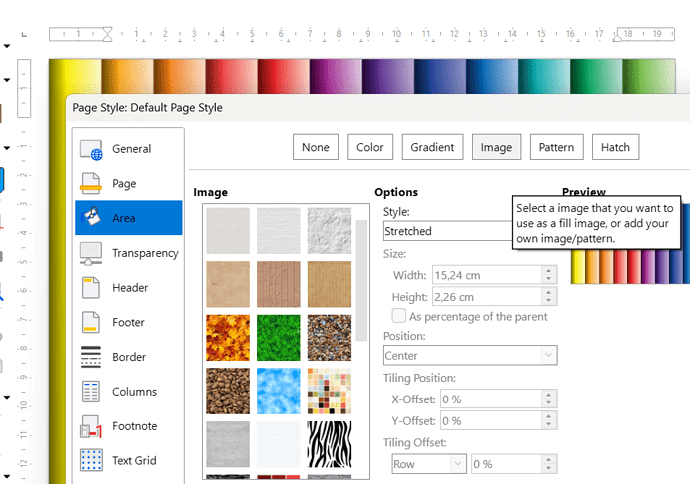
Can be, creating a graphic with the marks, and adding it as image to the page style area, selecting ‘Stretched’
Posts from every feed QUEST has found across the web — blogs, news, podcasts, channels and more.
Can be, creating a graphic with the marks, and adding it as image to the page style area, selecting ‘Stretched’
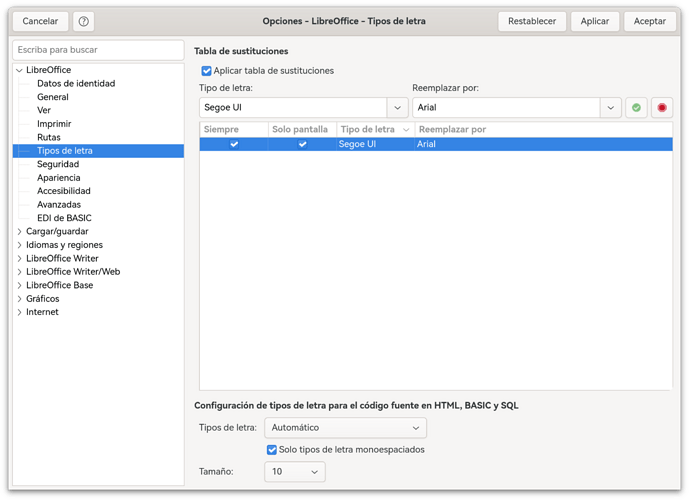
Acabo de abrir un fichero y sigue saliendo lo mismo tras haber hecho lo de las sustituciones. . . . . Me falta algo por hacer???

Gracias por la información. En el Mac es Ajustes > Tipos de letra Lo he puesto a ver si funciona.
Ubuntu snap versions of software, e.g. LibreOffice run in a jail. By default, files are stored in that jail in a specially organised subfolder system. Normally, you can’t write your files outside that jail, and if you try, the write to file fails, absent switching on specific snap options for the program, which lowers security, but does allow files to escape the jail. The original file should still be in your Ubuntu-created jail subdirectory system, somewhere, providing at least an older…
Just a quick side note! In the past, neither CAD programs nor plotters could generate anything other than one-dimensional elements — that are lines. Consequently, “pseudo-text” had to be drawn by a pen. To create two-dimensional (area-based) content, one had to use a workaround: placing lines side-by-side so that the plotter’s pen width caused them to overlap, or at least created the visual impression of a surface. I enlarged the image you provided to recall how things were done back then. The…
Bonjour. La liste comporte 7 colonnes trop large pour entrer dans une feuille A4 et les 97 noms étaient illisible sur 1 seule page A4. J’ai donc masqué 1 colonne. Ensuite - Définir une zone d’impression - Aperçu - Format - style de page - feuille - largeur en pages 2 - hauteur en pages 2 - Ok - et après j’ai imprimé ces 2 pages. Et je voudrais enregistrer ces 2 pages en taille réduite. Cordialement Claude
lferrero2001: \n Corresponde a salto de línea. Lista de expresiones regulares

Lo que buscas se encuentra en Herramientas ▸ Opciones ▸ LibreOffice ▸ Tipos de letra. Escribes los nombres de las tipografías y le das al icono verde de Añadir.
Merci, la “panne” est assez curieuse. la case “Formats” n’était pas cochée dans la fenêtre de confirmation. La hauteur n’est pas modifiée si je supprime du contenu dans une cellule dont j’ai déjà réglé le format dans Calc ; par contre, la hauteur de ligne est modifiée quand je traite une cellule sur laquelle je n’ai pas encore travaillé dans Calc (le fichier avait déjà été créé au départ sous Excel, je suis en “migration”) ; …
didou01: j’utilise un modèle fourni par Impress Lequel ? didou01: celui-ci sort du cadre et bien évidemment ne peut pas être déplacé. Une copie d’écran, ou mieux, un fichier Impress incluant l’anomalie serait utile. Une diapo suffit.

Hola, estoy importando a Calc ficheros de Excel en los que la fuente es Segoe UI. Ese tipo de letra no está cargado en LibreOffice. Los convierto al formato de Calc y cuando los abro, en el cuadro del tipo de letra aparece Segoe UI en cursiva y con fondo amarillo, aunque las fuentes que veo creo que son Arial, aunque no estoy seguro. He buscado por la configuración algo sobre reemplazar fuentes no existentes y no lo encuentro. Alguien puede indicarme por dónde buscar? Por que supongo que eso…
rp-chem: This is usually done in Microsoft Word, and the object maintains its appearance as an embedded object in a Word file (.docx). @rp-chem , I’m afraid I may have given you the wrong advice. It appears that you are initially creating the file in MS Word (in .docx format) and then opening it in LO Writer (on a different computer). Naturally, to analyze the issue, we need the original .docx file. In MS Windows, the OLE format allows an embedded portion of a document to be viewed and edited…

I have figured out some additional details that may be helpful. It seems Writer treats the text labels in the object the same as standard text - turning off text antialiasing gets rid of the brown borders. It unfortunately also makes everything look terrible. But now that I know it is the text antialiasing specifically, I can refine my searching efforts a bit.
Bonjour, qu’appelez-vous réduire ? à l’affichage ? à l’impression ? Pouvez-vous décrire en détails comment vous avez fait ? Merci.
Hi ajlittoz, thank you for taking a look. It’s interesting that you are experiencing a similar but slightly different issue. It does make me wonder if the OS plays a role in it. I agree with your idea that the issue is something related to pixel optimisation or antialiasing, I had actually also attempted to tweak the antialiasing like you did, forcing Skia rendering, looking into whether any other rendering options are available (it seems not, Skia is the default and the options to change that…
Wow, thank you I was hoping that there was some way to do this I should be in the PDF export functionality… or wherever… __ I will also study the PDFTK plus Python way… Thanks very much! Peter 16/Nov/2026/20:35 PS: Inkscape is great in this, too. and Scribus, too. Create a blank page with the marks, and place the document PDF over it. You have, say, 200 pages, it’s a piece of cake

Hi Sokol, thank you for taking a look. I will try to play around with the file extension of the drawing when next I have access to ChemDraw (as it is licenced software limited to certain computers). While I hope that works, I’m still a bit confused as to what makes Word display the same embedded object correctly while Writer struggles to render it. If possible, I will keep looking for a fix to the rendering issue, although I’ll also try bypassing it like you suggested.
Bonjour, une tentative : supprimer avec confirmation décocher la case Formats Si la hauteur est maintenue, vérifier si la suppression sans confirmation maintient aussi la hauteur de ligne.
I’m having the exact same problem, also on the Linux Flatpak. It happens all the time, in all sorts of dfiferent sheets, not on every sort operation - sometimes on the very first, sometimes it works fine for a couple - but it always crashes eventually. After recovery, sometimes the reopened file has the columns sorted, sometimes it doesn’t. Version: 26.8.3.1 (X86_64) Build ID: 861effc5289d539f15c4c18d1ba8579ffd78728b CPU threads: 8; OS: Linux 7.0; UI render: default; VCL: gtk3 Locale: en-GB…
Bonjour. J’ai réduit en 2 pages une liste de noms de 97 personnes. La réductions s’est bien faite et j’ai voulu l’enregistrer pour la transmettre réduite à des correspondants. Je n’ai pas trouvé la solution ? Claude
Thank you all! Meanwhile I tested with Win-x86_64@tb100-1-TDF 2026-11-16 04:03:49 and got the expected results in simple cases. However, all my recursive examples (including the one from help for LAMBDA) failed with Err:514. BTW: In wxMaxima define(my_factorial(N), if N>1 then N*my_factorial(N-1) else 1) works as expected. In fact I would prefer to have a metafunction assigning the name to the meaning in one go. I do it this way for ordinary expression results (matrices/arrays to avoid locked…
The only way I know of is to define a user sheet format. If your document is correctly formatted with styles without direct formatting (and specifically spacing between paragraphs with empty lines), all you have to do is modify your pages styles to resize sheets to some larger page et adjust correspondingly your margins. With correct styling, this should have absolutely no impact on your layout. A probable issue will emerge if you have illustrations or images and you moved or resized them with…
I always use the “master” branch when searching through the documentation: https://help.libreoffice.org/master/en-US/text/scalc/01/func_lambda.html?&DbPAR=SHARED
Here with 26.8.2.2 under Fedora 45 (Linux 7.3.3) with KDE Plasma desktop, at maximum magnification (600%) your label characters are solid black without borders. At moderate zoom factor, they seem to be blue with tint depending on magnification. This suggests sub-pixel optimisation or antialiasing. I tried to disable antialiasing in LO Tools → Option>LO → View and tweak display settings in the OS to no avail. It is likely to be an artefact of image encoding. I don’t know how to display it…
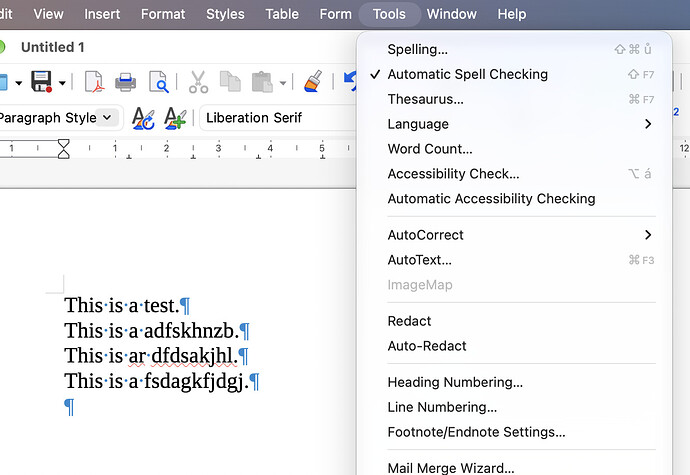
I have went above and beyond and created a separate startup volume with macOS 27.3 (beta) and downloaded LibreOffice and without any modifications tried to reproduce the issue, it’s still happening. Perhaps this is a truly macOS only bug, weird is that it specifically affects English spellchecking.
Gracias, con eso ha funcionado. Entonces, el Writer no reconoce \n como marca de parrafo?
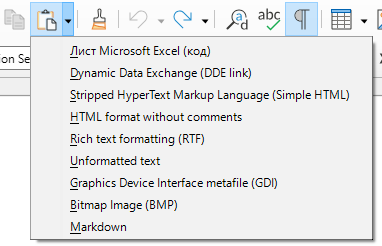
The embedded object in your file is a graphic file in .emf format. Such graphic files can be inserted into a text document perfectly well — see the image in the attachment. brown-text-exerpt2.odt (41.7 KB) Update. Thus, there are two “correct” ways: Save the drawing in the original application in .emf format, then insert the file into your Writer document. Copy the drawing to the clipboard in the original application, then, in Writer, click the arrow to the right of the “Paste” button on the…
ご迷惑をおかけして申し訳ありません。修正を行いました。https://bugs.documentfoundation.org/show_bug.cgi?id=174329#c20
Merci, oui, je connais cette fonction. Mais justement, je ne veux pas être obligé de reformater la ligne chaque fois que je supprime un contenu de cellule !
Question similaire dans la catégorie anglaise : Issue: Auto-fill drag in Calc scrolls upward and fills in wrong direction