WTH can't we see who changed a thermostat's target temperature?
I agree. If it helps, I created an automation that does this, but that shouldn’t be necessary. I think there’s room for improvement, but I haven’t looked at it for a while: alias: Heating Setting Changed description: Logs heating setting changes and can notify when preset changes. triggers: - trigger: climate.target_temperature_changed target: floor_id: first_floor options: threshold: type: any conditions: - condition: spook.triggered_by_user options: {} actions: - action: logbook.log metadata:…
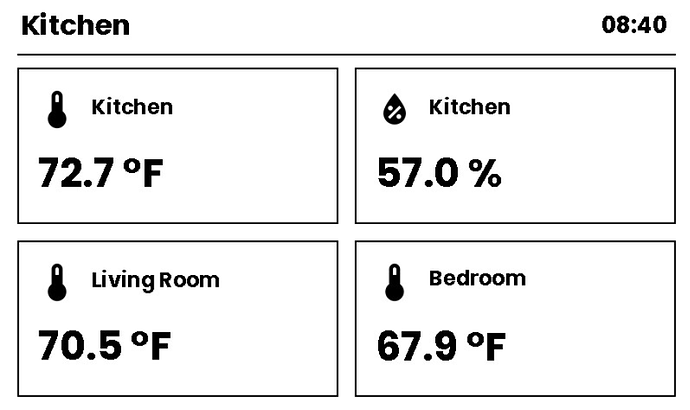
OpenDisplay 4.26" Mono Kit Four Sensors Grid Blueprint
Draws up to 4 sensors with custom Material Design Icons on an 800x480 Seeed Studio OpenDisplay monochrome screen using opendisplay.drawcustom. from the OpenDisplay integration from opendisplay.org -note install the one from opendisplay.org to replace the HA one in order to get the drawcustom action. gist.github.com https://gist.github.com/k9play/3712d6f5ae10f07c7dbe999fcee4f620 opendisplay_mono_kit_four_sensors_grid.yaml blueprint: name: OpenDisplay 4.26" (4.3") Mono Sensor Grid description: >…
Cloudflare 2026.11
GitHub - homeassistant-apps/app-cloudflared: Connect remotely to your Home Assistant instance without opening any ports using Cloudflared. · GitHub is not a valid app repository ?
Geo Home Smart Meter integration
Geo Solo III / Emlite EMC1.w — Working local 868 MHz SDR decoder I’ve successfully recovered live electricity readings from my legacy Geo Solo III installation, without using the discontinued EnergyNote cloud, Geo hub or in-home display. Using a Nooelec NESDR Mini 2 RTL-SDR and a Python decoder, I can now receive the meter’s 868 MHz FSK transmissions and extract: Live household consumption (W) Live solar generation (W) Calculated grid import/export (W) Four apparent cumulative energy counters…
Lovelace Windrose Card
Released version 2.8.0 and 2.8.1 Version 2.8.1 Fixes: Period from and to date not working. Fixes #226 Version 2.8.0 Features: New current winddirection arrow options, to render the arrow different. Fixes #230 Fixes: Fix with statistics data, when the first values are 0. Fixes #228
Home Keeper Library - Track your physical book library
Please file an issue and tell me more about how you think it could work! It’s not clear how I could help the missing data problem. I could build better tools for submitting new data efficiently using your camera and all that? No idea if people would use that..
Automation trigger Entity ID not showing up in action template
{{ state_attr("{{ trigger.entity_id }}", "team_score") }} First, in the above template, you are asking for the value of the team_score attribute of the entity “{{ trigger.entity_id }}”… not the rendered value of the template {{ trigger.entity_id }}… by using quote marks you are saying the entity ID string is “{{ trigger.entity_id }}”. Since that’s not a valid entity ID, the outer template returns None. Second, nested delimiters are not allowed, just use the variable. Also, there’s no reason to…
Screen time and Health Connect from your Android phone in Home Assistant, paired with a QR code, no broker (open source)
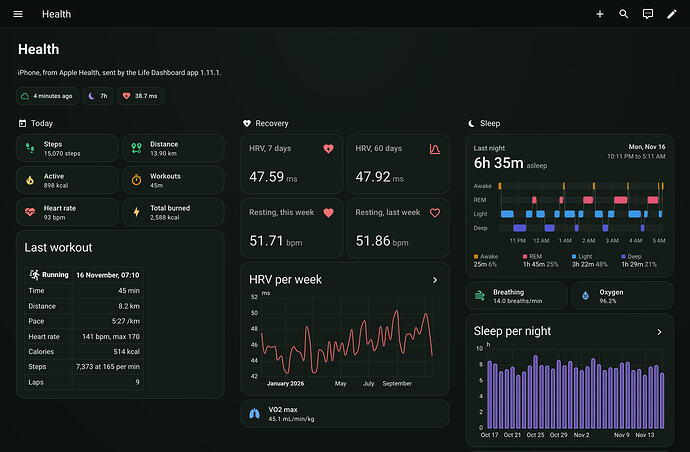
Small update, since some of the info above is outdated. The integration is in the default HACS list now, so you can just search for Life Dashboard in the Marketplace and you don’t need to add it as a custom repository anymore. The iPhone app works with the integration too, you pair it with the same QR code, so you don’t need MQTT for that. I also shared the dashboard I built on top of it, with screenshots and the full YAML, over here I wanted my sleep and health history next to the rest of my…

I wanted my sleep and health history next to the rest of my house, so I built this dashboard
Disclosure first. I’m the developer of the app, the integration and the card behind this, and I build them with a lot of help from AI. I review and test everything myself, on my own phones and my own Home Assistant. Everything is under the MIT licence and the HA integrations are listed in the Marketplace (formerly known as HACS). I wanted my health data next to the rest of my house. Not just today’s steps, but how I slept last night compared to the weeks before, and whether my resting heart…
Automation trigger Entity ID not showing up in action template
I have 3 Team Tracker sensors and have 1 automation that triggers when a game ends. I can’t seem to coax the template into producing the correct output in a notification: "Final score {{ state_attr( "{{ trigger.entity_id }}" , "team_score") }} {{ state_attr("{{ trigger.entity_id }}", "team_name") }} - {{ state_attr("{{ trigger.entity_id }}", "opponent_score") }} {{ state_attr("{{ trigger.entity_id }}", "opponent_name") }}. Just shows up as: Final score None None - None None. In the editor, I’ve…
How do you disable community forum notifications for badges?
The Home Assistant Cookbook - Index Community Guides A collection of posts on how to perform common tasks and deal with common problems. This Guide is intended for those new to Home Assistant, those that are struggling for answers on some subjects, and those in troubleshooting mode. All of the Home Assistant Posts are made by Community Members and most are posted in Community Guides for your convenience. Getting Started With The Forum Discourse New User Guide (this forum uses the Discourse…

I released a new Growatt integration that works completely offline and it does not need Docker or Grott to run
Thanks for this integration. Grott worked fine for me, for data collection, but wanted a way to configure my Growatt. Was trying to solve this with Grottserver, but found your solution in time.

WTH: Notifying people is hard
Well, yeah, haha! Anyways, just tell me what you need and I’ll fix it for you. But before that, please give the use cases a read. If you’re familiar with SBE, you can jump straight to the “Nine use cases” section. Then again, the introduction is only two pages long, so I reckon you can manage that too. EDIT: Btw, getting an LLM to produce well-structured documents can be one hell of a challenge! Brilliant at gathering information and complex analysis, but sometimes downright stupid at making it…

Alexa Devices Media Player Feedback
Has media player functionality been implemented? I’m using the integration and the Echos show up in Music Assistant, but attempts to play to them fail. Works amazingly well otherwise.
IKEA Myggbett Door/Window Sensor Modifying
benny2244: I haven’t noticed any increased battery consumption after 20 hours Quite short timeframe.. Anyway, if that works over days/weeks, it confirms the hall sensor is push-pull type and MCU just doesn’t behave correctly with open-collector setup.

Album Slideshow (Google Photos + Local)
Thanks for the quick reply. Yes, the phot does come back right after itself next to a different photo a few slides later. The orientation is set to pair. I do have warnings for Album Slideshow. They seem to be warnings about not being able to fetch some images… This log entry is from a custom integration. Logger: custom_components.album_slideshow.camera Source: custom_components/album_slideshow/camera.py:2360 Integration: Album Slideshow Camera (documentation, issues) First occurred: 6:39:37 AM…
EQ3 BT Smart Thermostat working with v ≥ 2022.7
In my fw there’s an option in the screen menu that replaces the top pixel bar to show the valve percentage instead of the schedule, i use that to see how open it is directly from the lcd
Water Level in My Tank (ME201WZ Zigbee Sensor)
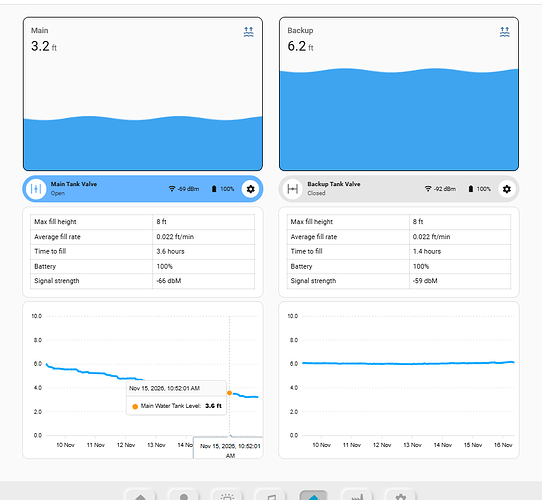
I have two tanks, each with a LoRa YoLink Water Depth Sensor, 16 ft Measuring Range, YS7905-5Ms along with two LoRa YoLink valves. My water tanks are 1500ft away, the YoLink LoRa is perfect for this. LoRa is only broadcasting water info once every 5 mins or so. So it can run over a year on a battery, no power requirements. Mine are drop in pressure (not radar sensing depth). Works perfect. . The charts show the water depth over a week, you can see no errors/drops. In the action bar you can see…
Bluetooth 6 long range USB dongle recommendations?
i use the Sena UD100-G03 from the known working list. its a beast! and i have 0 issues with anything connecting to it.
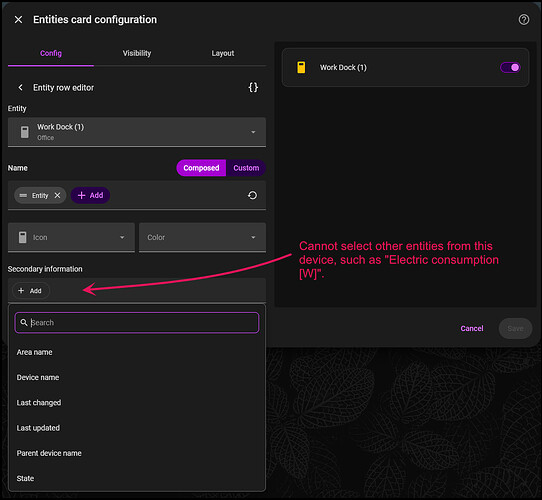
WTH: Dashboards and secondary information
I like to show the power consumption of my switches along with the button to toggle them on and off. There is a “Secondary information” config for some dashboard cards but they do not cover other entities for the same device. So I cannot select the power consumption and instead have to include entirely separate cards to display this info. In the card setup, you cannot select other entities from the device, such as “Electric consumption [W]”. So you are forced to use multiple cards to show other…
WTH doesn't Temperature crossed threshold respect temperature zone?
When adding a " Temperature crossed threshold" trigger it defaults to Centigrade when the selected format is Fahrenheit (system/Home Information). That seems to be an oversight, no?
Changing 'Picture Mode' on LG G6 OLED TV
Ohh wow. I thought you had to root to do a lot of this stuff.
WTH: history in table
On history Page I filter for one device and see the different entities in a graph. Download the data to csv is possible, It would be great I there is a toggle button to show the data in a table and be able to filter each column.
Drop-in replacement for Echo Dot 3rd with Voice Assistant
Ooh fancy that is genuinely kinda neat.
Notification History: keep and browse every notification Home Assistant sends, with image, link and buttons
Thanks! it makes it complete.
WTH cant I just click on the offline ZHA device to see it?
I believe there are already plans to develop a ‘Network health’ page, that will show what devices are exactly offline, with detailed lqi, battery, status etc. Not going to link it here, to prevent unnecessary spam, but you can find it in the frontend repo.
Timed on then off
You can also use a input_datetime to specify your “Off” time. The idea being that when the “on” trigger occurs you: Check to make sure the light isn’t already on. Set the “Off” time to be current time + 30 minutes (or whatever amount of time you want). Turn the light on. That way you can implement any “nudge” (say by 15 minutes) or any other variant that you need to change the amount of time You can use one automation with two triggers (On/Off) or two separate automations, from a functional…

Changing 'Picture Mode' on LG G6 OLED TV
The core LG webOS integration has no picture-mode action, but you can do it with webostv.command and a TV-side popup trick. I use it on a 2021 G1 and a 2022 C2 (both stock and unrooted) on HA Core 2026.11.1. The approach I used comes from this thread. The direct settings/setSystemSettings call returns 401 insufficient permissions on both my TVs, though it reportedly works on some models. If you get the 401, this yaml works. It sends a confirmation popup whose OK button runs the settings change,…