Can't figure out saving/loading
Try casting the data back into an enum when you load it from the file. Enums are just numbers with names (see GDScript basics | Enums). Whatever the name for your enum is (glo?), try to cast the number into that.
Posts from every feed QUEST has found across the web — blogs, news, podcasts, channels and more.
Try casting the data back into an enum when you load it from the file. Enums are just numbers with names (see GDScript basics | Enums). Whatever the name for your enum is (glo?), try to cast the number into that.
It successfully saves and reads the difficulty. The issue appears to be in reversing the data. “difficulty” is 3, but glo.difficulty isn’t “difficulty,” even if literally and directly set as such
Here’s the documentation page about game embedding: Godot Engine documentation Game embedding Godot supports optionally running the game in the editor itself. This is enabled by default. Configuring game embedding: Game embedding can be in one of 3 states: Floating window(default): The game... The top bar design changed a bit for 4.8 but the functionality is the same.
Would you mind providing this context in a readable manner? It makes it a lot easier to help you.
Could it be a type-casting error when you convert the variant from save.get_var() into a Dictionary? Have you checked that data is a valid Dictionary; can you print it to the console? I’m not great at GDscript, so…
I have, yeah. It all checks out. I’ve looked at the example there but it’s way too complicated and doesn’t seem to be for my use case
Have you tried verifying the data you are saving and loading? Try and check what is inside save, both in savefile() and loadfile(). I haven’t personally used store_var() before – only store_line(). In the documentation you can find a json serialization example that saves and loads files. That is what I’ve used in the past. The code example is a little long but it should do the trick. You can find it here: Godot Engine documentation Saving games Introduction: Save games can be complicated. For…
Godot Version 4.5 Question I found a tutorial on saving/loading that seemed to fit my needs. Unfortunately, it just doesn’t work. ‘glo.difficulty’ doesn’t get set once the file is loaded. var savelocation = "user://SaveFile.json" var saves : Dictionary = { "difficulty": glo.difficulty } func _ready() -> void: #Only saves when returning to title. I have accounted for this. if glo.firstopen == 0: #to prevent the save file from being overwritten instantly. glo.firstopen = 1 else: savefile()…
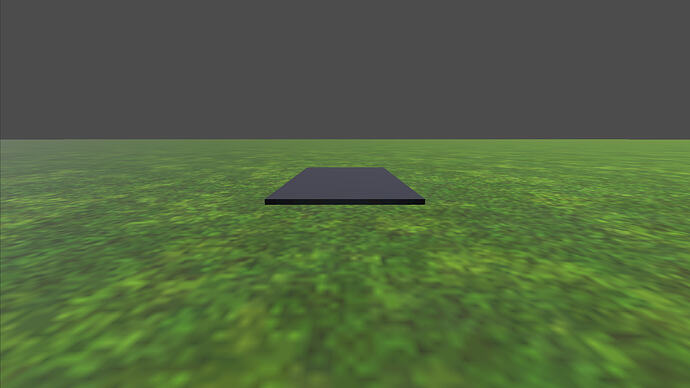
Description Regarding the image: In a first-person shooter (FPS) game on Steam with crafting elements—specifically in the building mode where you place floors, walls, and other objects on the stage—I’m having trouble figuring out the following aspect of the code for placing a floor. What I Don’t Understand As shown in the image, when I move the camera to the left, the floor object in the center of the screen rotates in place while also moving along with the camera since it’s a child of the…
My player is a characterbody2D, and the hitbox(a child of the player) is an Area2D. I want the attack state to detect through the area entered signal of hit box, when a hurtbox(an area2D) enters.
Update 010 - Year One It have been a year since the first post in this thread Progress is slow, but I’m glad that it’s not being abandoned by yours truly. Animation Added two temp animation (ascend & descend) for slope/stairs. I checked the player position of y-value, compared it to previous frame, then changed the animation (with blend value) according to the return value. Joypad Messing around with joypad in Godot at some point and decide to test it now before it become to much pains to be…

Hi All, The weather now gets worse when turning right and improves when turning left! … genius game design? or, the weather debug slider is bound to the same controller input as the steering A quick race at a freshly updated “Belgium GP” track.: WIP Racing Game - Belgium GP Weather [ ‘Belgium GP’ weather test - short race ] Happy accidents FTW! [ Vector Pulse GTS in the rain - photo mode screenshot ] Cheers James

The exported one will run in a separate window. To make the editor run in a separate window, go to Game (top center panel), then the three dots in the top right of the viewport, then “Make Game Workspace Floating On Next Play”.
Godot Version 4.8 dev Question I compiled a development version of Godot 4.8 and created a new project. When I run it, the game runs in a window embedded within the Godot editor rather than a stand alone window like I’m used to from previous versions of Godot. How do I configure my project so that my app runs in a separate window?
Because I’m developing this game all by myself, and I’m not naturally gifted at drawing, hahaha. If you have tools, you should use them, otherwise humanity wouldn’t have evolved to where it is today.

z as relative adds the parent ‘effective’ z index to its own index. By effective, it means the final z index considering the z as relative option and parent nodes… If your parent z index is 0 and node z index is -12, then the effective z index of the node is -12. And I assume your ‘background’ z index is also 0. Since 0 is bigger than -12, background is drawn on top of the node. You need to set your characters main node z index high like 50 (this is just a suggested number based on very limited…
This did indeed fix the issue with the warning! Check your other tracks too; a single zombie package from an earlier release will trigger this warning. Closing as solved!
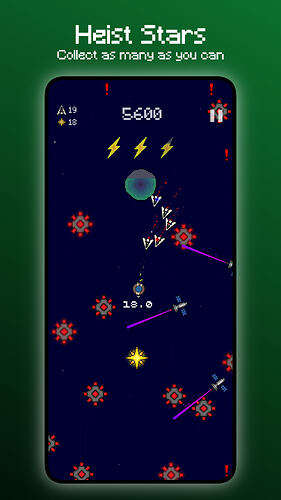
Hey everyone, I just released my first Godot game, Star Bandit. It’s a mobile arcade game where you swipe to thrust your ship through the galaxy, dodging obstacles, heisting as many stars as you can, and trying not to get caught by the space police. Collect enough stars and a wormhole pulls you into a short mini-game. I’ve been building it solo for about a year, with 40 devlogs along the way. It’s FREE with NO ADS, although there is an optional $1 unlock, Bandit Stash, which adds the full…
Thankyou, this helps clarify the complexity of this task and the search term that can help me create more optimized TileMapLayer colliders! With this in mind, I’m considering learning to make a full game idea that mainly relies on TileMapLayer first, and then when this is done I have much more experience in coding, the step to making my marching squares terrain using custom rendering would be less daunting. Then that would be my 2.0 version of the game.
Thank you, I’ll give it a try
Generally these require specialized techniques at a close to engine level, Terraria and Noita are not using Godot or anything close to it, they are built from the ground up to support this kind of simulation. You will not get such functionality out of Godot’s TileMapLayers, or at least not without performance problems. “Greedy Meshing” is another term that may help, and Godot does (recently) use for reducing TileMapLayer collision complexity. It is usually the first step to optimizing voxel…
I’ve not heard of that. I’ll look into it, thanks for the advice!
its 15 bodyparts in a character… those bodyParts update position/bones/etc… when nextFrame == true I dont know why the moveChild() is too slow, sometimes i can see a leftArm in Front of the Torso, then in the next frame the leftArm is already in its right position ( behind the torso ). with changing z_index this problem doesnt happen ( i dont know why its faster ). you can change whatever z index you want in the nodes inside viewPort. They wont show behind or in front ofa background of z index 0
Couldn’t be more AI generated if they tried
I made a few tweeks, but this essentially worked perfectly, thanks!
Hey Godot Community! I’m a solo student indie dev. I know how crucial good 2D art is when prototyping in Godot, especially if you are participating in any October Game Jams. To help out the community (and to help fund my college tuition this month), I’ve put my entire premium 2D asset catalog on a massive 50% OFF sale for just $2.50. All the 2D sprites are engine-agnostic and ready to be dropped into your Godot projects! What’s in the $2.50 Bundle: Complete 2D Soccer Kit: 12 Stadiums, 13…

jonPS: I cant move them in the tree without making the performance fall from 200fps to 8 fps, with 10 characters on screen… What do you mean? How are you updating their position in the tree? How is using a viewport a solution? Are you sure you can’t re-work the scene nodes re-parenting them as needed and using show_behind_parent instead?

func _unhandled_input shouldn’t recieve inputs if your line edit is currently consuming them. But I assume you are using Input.get_vector as part of your _physics_process. You may need to check if any gui has focus at that point in your code. func _physics_process(delta: float) -> void: var input_dir := Input.get_vector(...) var focused_node: Control = get_viewport().gui_get_focus_owner() if focused_node != null and focused_node is LineEdit: input_dir = Vector2.ZERO If this doesn’t help then…